
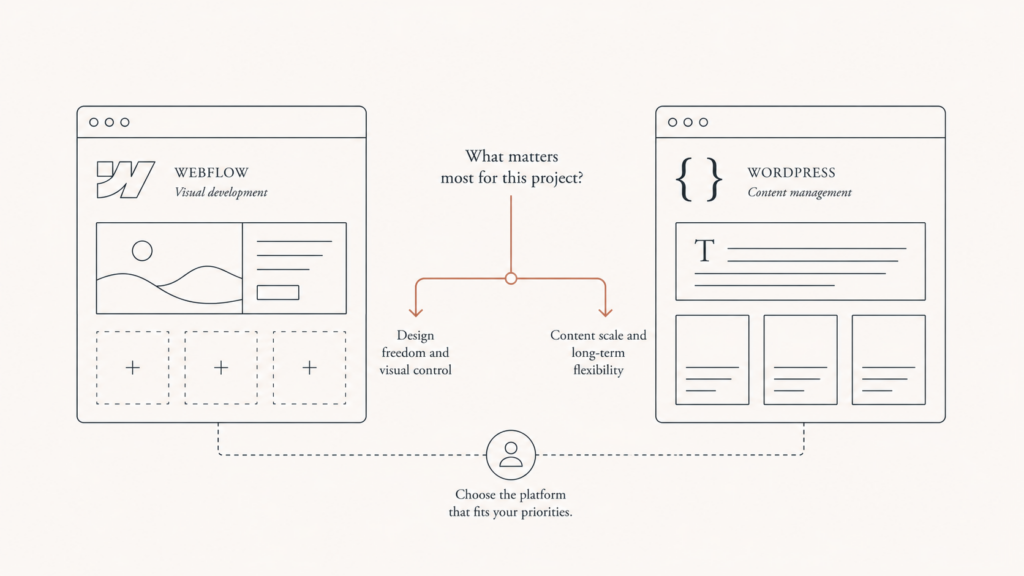
Picture this: you have a real business, a launch date, and a budget that already feels tight. Someone in a Slack channel swears by Webflow. Your last developer built everything on WordPress. A friend says both are fine. So you stall. Then you build on the wrong one. Then, eighteen months later, you pay to rebuild the thing you already paid for.
That is the actual cost of getting the Webflow vs WordPress decision wrong. Not the monthly fee. The rebuild.
One of the most common conversations at Javaid Ahmad starts exactly here, with a founder who picked a platform based on a recommendation, not on how their business actually runs. The right answer is not the popular one. It is the one that fits your content, your team, and your growth curve. This article covers the full picture: cost, speed, SEO, ecommerce, the new AI features on both sides, and a plain rule for choosing without gambling.
Webflow vs WordPress in one honest sentence
WordPress wins on flexibility and ownership. Webflow wins on predictability and polish.
That is the whole debate compressed. WordPress is open-source software you install and control, still powering a huge slice of the web. As of mid-2026 it runs roughly 43% of all websites and around 59% of the identifiable CMS market, according to W3Techs data summarized by GravityKit. Webflow is a hosted visual platform where design, CMS, and hosting live in one paid subscription. Smaller footprint, tighter experience.
Here is the thing: those two sentences pull in opposite directions, and the tension is the whole point. Control comes with responsibility. Convenience comes with limits. Most bad platform choices happen because someone wanted one without accepting the other.
What each platform is actually good at
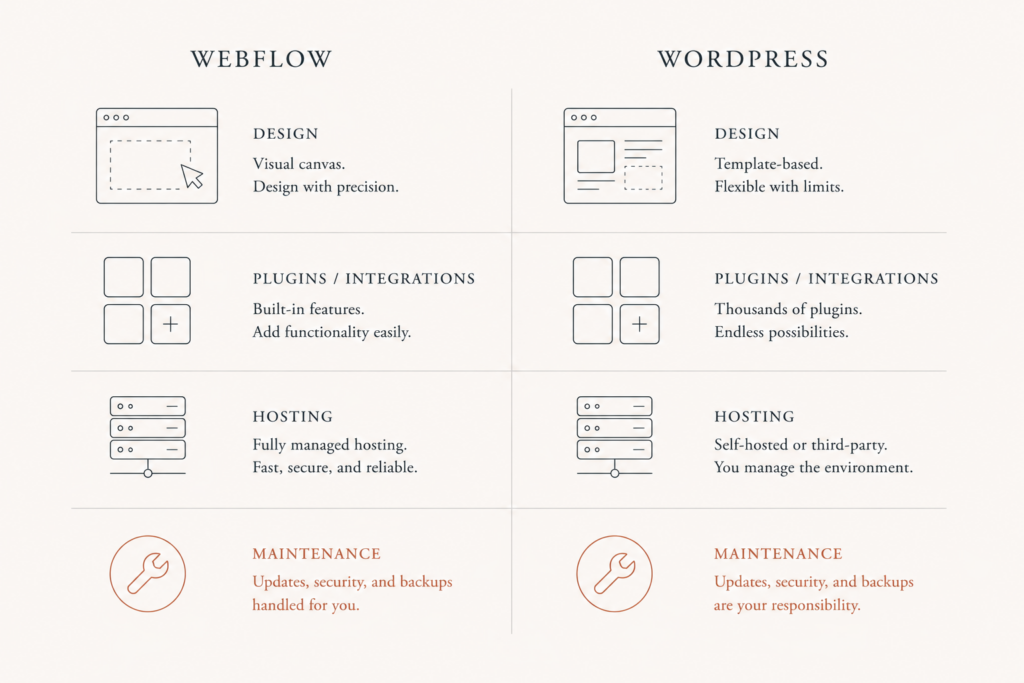
Webflow is a designer-first canvas. You build visually, it writes clean HTML and CSS underneath, and it publishes to a fast managed host with a CDN attached. No plugins to update, no security patches to babysit, no hosting to configure. For a marketing site, a portfolio, a small catalog, or a design-led brand that wants a specific look without a developer on retainer, it is a strong fit.
WordPress is an engine, not an appliance. It runs on any host, bends to almost any requirement through plugins and custom code, and carries content archives into the tens of thousands of pages without blinking. That flexibility, the same trait that makes it powerful, is also what makes it fragile in careless hands. Fifty plugins from forty vendors is not a website. It is a maintenance liability wearing a website costume.
The cost comparison nobody explains properly
Most cost debates compare the sticker, not the total. That is backwards.
Webflow bundles almost everything into the plan. Site plans for a small business run about $14 a month for Basic, $23 for CMS, and $39 for Business, all billed annually with hosting included, per Appsrow’s 2026 pricing breakdown. Ecommerce plans layer on top. The number looks higher than WordPress at first glance. It usually is not, once you count the whole picture.
WordPress is free software with a long tail of real costs behind it. Hosting runs $5 to $30 a month on shared plans, or $30 to $100 on managed hosts like Kinsta or WP Engine. Then premium themes, plugin licenses, and, for most serious sites, a maintenance retainer. Add it up and, across three years, a small-business Webflow site tends to land in the $4,500 to $15,000 range while a comparable WordPress build often runs $8,000 to $40,000 once the ongoing upkeep is honest and included.
The takeaway is not “Webflow is cheaper.” It is this:
- Webflow costs are predictable. One subscription, few surprises, minimal upkeep. You trade ceiling for calm.
- WordPress costs are variable. Cheap to start, and the real bill arrives later as plugins, security, and developer time. You trade calm for ceiling.
- The rebuild is the biggest cost of all. Picking wrong once dwarfs any monthly difference between the two.
If you want to see how this plays out on the WordPress side specifically, the custom plugin versus off-the-shelf total-cost-of-ownership breakdown shows where the money quietly goes over time.
Speed and Core Web Vitals: the default versus the ceiling
Speed is not a vanity metric anymore. It is ranking, conversion, and the INP score that now sits at the center of Core Web Vitals.
On defaults, Webflow leads. Roughly 58% of Webflow sites pass Core Web Vitals against about 42% for WordPress, based on field data compiled by ClearBrand. The gap is even wider on server response: around 55% of Webflow origins hit a good mobile time-to-first-byte versus about 25% of WordPress origins. That is not because WordPress is slow software. It is because WordPress runs on every hosting tier from a $3 shared plan up, and the average deployment is never tuned.
And here is the nuance most comparisons skip: the ceiling favors WordPress. On managed hosting with a lightweight theme and proper caching, a well-built WordPress site matches or beats a standard Webflow site. The honest framing, then, is simple. Webflow gives you good speed with zero effort. WordPress gives you great speed with deliberate work. One is a floor. The other is a ceiling you have to climb to.
SEO: both can rank, only one forgives neglect
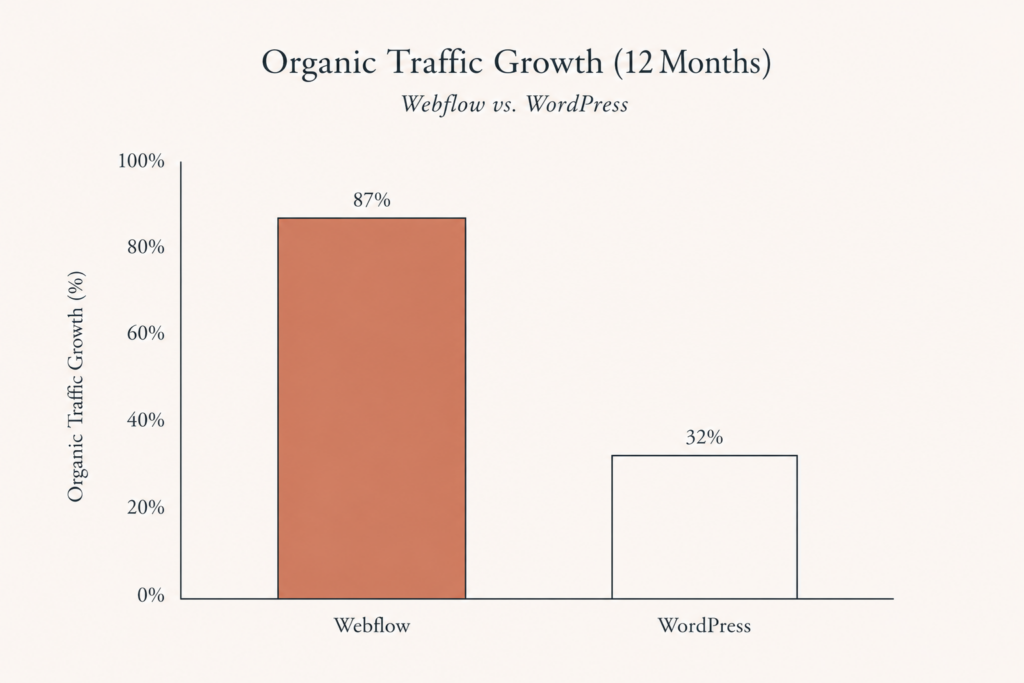
Search engines do not care which platform you used. They care about clean markup, fast pages, sensible structure, and content worth ranking. Both platforms can deliver all four.
The difference is what happens when you stop paying attention. Webflow ships clean code, automatic image handling, and a CDN by default, so a neglected Webflow site still holds a reasonable technical baseline. WordPress hands you deeper SEO control through plugins and custom fields, which is a genuine advantage in expert hands and a genuine risk in careless ones. Bloated themes, conflicting plugins, and slow hosting are all self-inflicted, and all common.
So the SEO verdict is not about capability. It is about discipline. If you have a developer maintaining the site, WordPress gives you more room to win. If you do not, Webflow protects you from your own neglect.
Ecommerce: where the two genuinely diverge
This is the line that decides many builds. Webflow ecommerce is elegant and limited. WordPress ecommerce, through WooCommerce, is powerful and demanding.
Webflow handles small, design-led catalogs well, think a few hundred products, a DTC brand where the storefront look matters more than deep merchandising. Beyond that it starts to strain. Complex variants, subscriptions, wholesale pricing, and heavy catalog logic are where it runs out of road. WooCommerce, by contrast, will do almost anything you ask, and it will ask for maintenance and a competent build in return.
For most jewelry, B2B, and mid-catalog stores I work with, that flexibility is the deciding factor. If your product logic is even slightly unusual, Webflow will fight you and WordPress will not. If your catalog is small and your priority is a clean, fast, low-maintenance shopfront, Webflow is the calmer choice. For a related decision one layer down, the Webflow vs Wix for ecommerce comparison covers the hosted-platform trade-offs in more detail.
The AI features on both sides, briefly
Both platforms added real AI in the last year, and both changed the “who can build this” question.
Webflow’s AI site builder now turns a single prompt into a multi-page, production-ready site on an editable design system, as Webflow describes on its own product page. It generates pages, CMS items, and copy inside the real editor, not a throwaway mockup. WordPress went the other direction and built an AI assistant into the editor itself, part of a broader shared-AI-infrastructure bet covered in the WordPress 7.0 “Armstrong” review. Webflow’s AI leans toward launch speed and structure. WordPress’s leans toward an open, extensible platform that agents and plugins can plug into.
Neither AI layer changes the core trade-off. They just lower the effort on each side of it.
The bottom line on Webflow vs WordPress
The Webflow vs WordPress choice is not about which platform is better. It is about which problem you would rather own.
Pick Webflow when the job is a marketing site, a portfolio, or a small, design-led store, and when you want predictable cost, strong default performance, and no maintenance treadmill. Pick WordPress when you need real flexibility, a large content archive, custom functionality, or serious ecommerce, and when you have the developer support to keep it fast and safe. Simple and design-led, lean Webflow. Complex and custom, lean WordPress. The trouble only starts when you pick the convenient platform for a complex job, or the powerful platform with nobody to maintain it.
If you are staring at that fork right now, reach out to Javaid Ahmad for a straightforward conversation about which platform fits your business. No lengthy discovery calls, no vague proposals, just a clear answer on next steps and an honest read at javaid.dev/contact.
FAQ
Q: Is Webflow better than WordPress? A: Neither is better in the abstract. Webflow is better for design-led sites, small catalogs, and owners who want low maintenance and predictable cost. WordPress is better for flexibility, large content libraries, custom features, and serious ecommerce when you have developer support. The right pick depends on your project, not on popularity.
Q: Is Webflow cheaper than WordPress? A: Often, once you count everything. Webflow bundles hosting, security, and updates into one subscription, so a three-year small-business build tends to land lower than a comparable WordPress site with hosting, plugins, and a maintenance retainer added on. WordPress can be cheaper to start and more expensive to keep running.
Q: Which is better for SEO, Webflow or WordPress? A: Both can rank well. Webflow gives you a clean technical baseline by default, which protects a neglected site. WordPress gives you deeper SEO control through plugins and custom code, which is a real advantage if the site is actively maintained. SEO outcome comes down to discipline more than platform.
Q: Can I build a full online store on Webflow? A: Yes, for small and mid-sized catalogs, especially design-led brands under a few hundred products. For complex variants, subscriptions, wholesale, or large catalogs, WooCommerce on WordPress offers far more flexibility. Match the platform to how unusual your product logic is.
Q: Should a small business use Webflow or WordPress? A: If you want a fast, low-maintenance marketing site or small store and do not have a developer, Webflow is usually the calmer choice. If you expect custom functionality, heavy content, or growth into complex ecommerce, WordPress gives you more room, provided you budget for upkeep.
Q: Is it hard to move from Webflow to WordPress later? A: It is a rebuild, not a simple export, because the two structure content very differently. That is exactly why the initial choice matters. Getting it right the first time is far cheaper than migrating a live site after eighteen months of growth.

Comments are reviewed before they appear, so yours will not show up straight away. Your email is never published.