
Key Takeaways
- Shopify’s July ’26 Liquid developer preview adds two tags,
{% block %}and{% partial %}, letting a template compose a full page and refresh named regions of it without a client-side framework. - A partial is server-rendered HTML that JavaScript fetches and swaps into the page. The
apply()helper carries over focus, scroll position, form values, and text selection on its own. - The workaround this replaces, pairing the Section Rendering API with a hand-built fetch-and-replace or a JS framework, is a real contributor to the extra 50 to 150KB of JavaScript a typical app install adds to a page.
- Median Shopify store LCP sits at 4.2 seconds against a 2.5 second “good” threshold, and only 48% of stores pass Core Web Vitals on mobile, where over 60% of Shopify traffic happens.
- This is a developer preview. Opt in on a development store, expect rough edges around the theme editor’s design mode, and hold off on shipping it to a live client store.
- Sections, JSON templates, and
content_foraren’t going anywhere. Block and partial sit alongside the architecture you already know. They don’t replace it.
You added an app to make your filter sidebar update without reloading the page. Or you paid a developer to wire a JS framework onto your product page so the price updates the second someone picks a different karat or gemstone.
You were right to want that. A full page reload on every filter click feels broken to a 2026 shopper, and they bounce over it.
Here’s the harder question: what did that instant update actually cost you?
More than you think.
Shopify just shipped a way to get the same feel, server-rendered HTML swapped into the page, without the framework or the app. It’s in developer preview as of July 21, 2026. If you’re starting a new theme build right now, it changes what you should reach for first.
The Workaround You Didn’t Know You Were Paying For
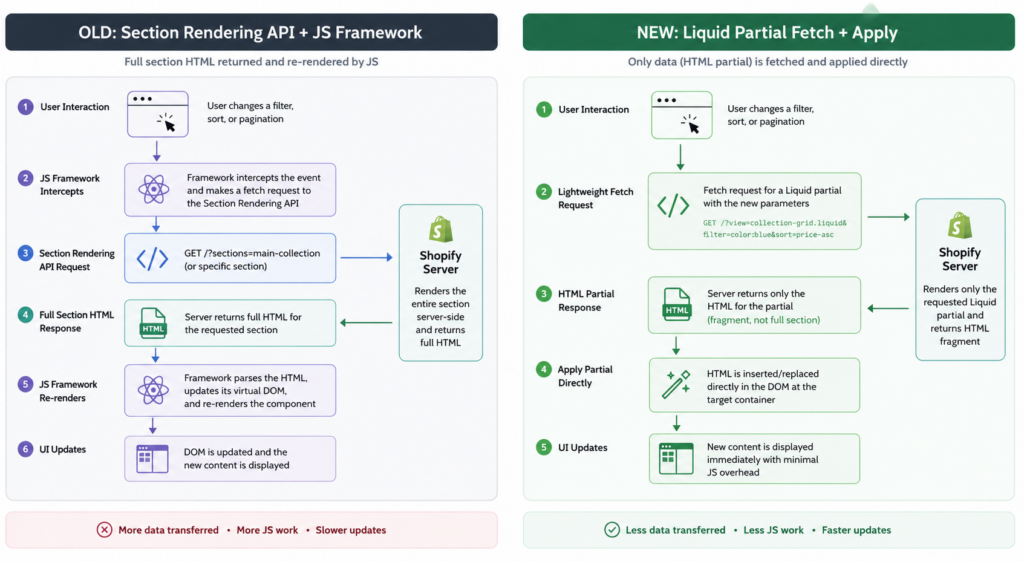
Before this preview, updating part of a page without a reload meant one thing: the Section Rendering API. You’d fetch a section’s HTML from the server, then write JavaScript, often a lot of it, to find the right spot in the DOM and swap the content in.
Most themes and apps skip the hard half of that by installing a client-side framework instead. React or Vue handles the swap, the state, the re-render. It works. It also ships every visitor a bundle of JavaScript just to move HTML from one place to another.
That bundle isn’t free. A new app install adds 50 to 150KB of JavaScript to every page load on average. For a store already sitting near the 2.3 to 2.5 second LCP threshold, one install can push it over the edge.
Multiply that by a filter app, a quick-view app, a wishlist app, and a size-guide app, and you’ve rebuilt a single-page app’s worth of JavaScript weight, one install at a time, to do something the browser and server could have handled together.
Two Tags, One Idea: Compose the Page in Liquid
The preview adds {% block %} and {% partial %}. They solve different problems, but they share one goal: let the Liquid template describe the whole page, not just a slice of it.
{% block %} calls a reusable theme block directly from a template. Instead of routing every block through the theme editor and a JSON template, you name the block file, pass it parameters, and give it body content, the same way you’d use {% render %} for a snippet. A product page might call a metal selector block and hand it the current product:
liquid
{% block 'metal-selector', block.settings.product: product, class: 'pdp-metal' %}
{% endblock %}
{% partial %} marks a region of that page as independently refreshable. Wrap the part that actually changes, not the whole page, and give it a name:
liquid
{% partial 'price-and-stock' %}
  {% render 'price-block', product: product, variant: current_variant %}
{% endpartial %}
When a shopper picks a different karat, a few lines of JavaScript call partials.fetch('price-and-stock', {url: newUrl}) and then partials.apply(update). The server renders the new price in Liquid, same as the first load. No client framework re-renders anything. No app has to inject its own script tag to do it.
That’s the whole shift. Composition and interactivity both stay in Liquid, readable top to bottom in the template, instead of split across a theme file, a JSON template, and a bundle of client-side JavaScript.
What the Browser Handles, and What’s Still Yours
apply() does more than swap HTML. Focus, text selection, form values, and scroll position all carry over the swap automatically, the housekeeping a full page load normally handles for you.
Everything else is still your job:
- Stale responses. If a shopper clicks two filters fast, a slow first request can resolve after the second and overwrite it. Pass an
AbortSignalso the latest request wins. - Loading feedback. Nothing tells the shopper a request is in flight unless you add it. Set
aria-busyon the region while it updates. - Announcements. A silent DOM swap says nothing to a screen reader. Pair it with a live region for messages like “3 rings match your filters.”
- Local UI state. An open accordion or expanded filter panel resets when its region gets replaced. Restore it after the update lands.
None of this is new work exactly. It’s the same accessibility discipline any AJAX interaction needs. What’s new is how little plumbing it takes to get there.
block vs content_for vs render: Pick the Right One
All three render reusable Liquid. Which one fits depends on who’s in charge of the page.
| Tag | Use when | Who controls it |
|---|---|---|
{% block %} | The template decides the structure and passes data in | You, in code |
{% content_for %} | A merchant adds and arranges blocks in the theme editor | The merchant, in the editor |
{% render %} | Repeated internal Liquid with no editor settings | You, for snippets |
A theme built for client stores probably uses all three: content_for for sections a merchant drags around the homepage, block for structural pieces like a product card that always renders the same way, and render for pure logic snippets like a price formatter.
Where It’s Still Rough
This is a developer preview, not a shipped feature. A few things to know before you touch a client store with it:
- You opt in per development store through feature previews. Production stores can’t turn this on yet.
- The theme editor’s design mode doesn’t fully support partial regions. Developers testing it publicly have hit errors when a partial-driven page loads inside the customizer, because that code path predates partials.
- Theme Check 3.28.0 adds new rules for Liquid-first themes, catching oversized files, schema mismatches, and complexity issues, a sign Shopify expects these patterns to get more common, not less.
- Page history, titles, and analytics tracking on a partial-driven navigation are still your responsibility to wire up.
Build it behind a flag, test the customizer path specifically, and don’t put it in front of a client’s live traffic yet.
Why This Matters Now
Shopify’s own performance team reports that 79% of active stores now pass Core Web Vitals, and every shared component they optimize gets faster automatically across every store using it. That’s real progress. It also means the JavaScript your theme or your apps add is an increasingly large share of what’s left to fix.
The rest of the data makes the case sharper. CoreWebVitals.io, tracking real user data across roughly 925,000 mobile URLs, puts the median Shopify store LCP at 4.2 seconds, well past the 2.5 second “good” threshold. Only 48% of stores pass all three Core Web Vitals metrics on mobile, even though mobile drives over 60% of Shopify traffic. And the conversion math hasn’t changed: shave a second off load time and conversions rise by roughly 7%, according to widely cited Deloitte research.
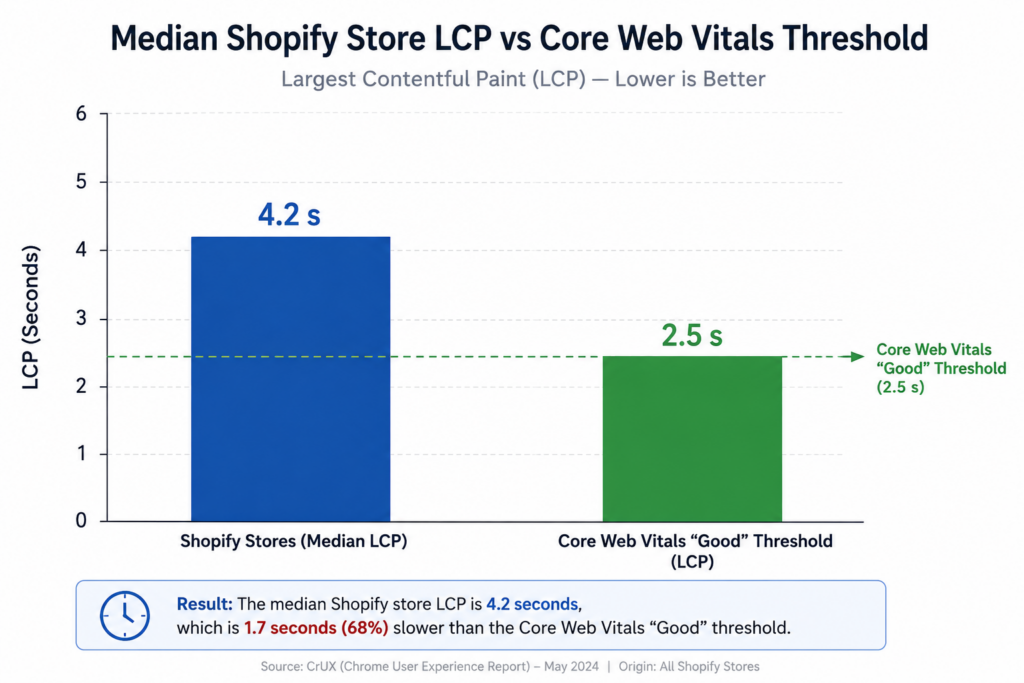
If you’re deciding right now how a new theme handles filtering, price updates, or cart interactions, that decision either adds to the JavaScript weight dragging down that 4.2 second median, or it doesn’t. Partials, even in preview, are worth prototyping for exactly that reason: the interactivity most themes bolt on with an app is the same category of weight hurting mobile Core Web Vitals scores today.
The preview will change before it’s stable. The problem it’s solving won’t.
Is Shopify’s partial tag ready for production stores?
No. It’s a developer preview as of July 2026, available only on development stores through feature previews. Existing production themes are unaffected and keep working exactly as before.
Does {% partial %} replace the Section Rendering API?
For the specific job of refreshing a named region without a reload, yes, that’s the intent. The Section Rendering API still exists and still works for other use cases, but partials give you the fetch-and-swap pattern natively instead of hand-building it.
Do I need to migrate my whole theme to use blocks and partials?
No. Sections, JSON templates, and content_for keep working unchanged. Block and partial are an additional way to compose specific pages or regions, not a rewrite requirement.
Is this related to Hydrogen or headless Shopify?
No, they solve different problems. Hydrogen is a React framework for fully custom, headless storefronts. Blocks and partials keep you inside standard Liquid themes and add framework-like interactivity without leaving that architecture.
The Real Point
You didn’t need a framework to make a price update without a reload. You needed the browser and the server to do the one thing they’re both already good at: render HTML and swap it in. Shopify’s partial and block tags just made that the native path instead of the workaround.
Stop reaching for an app or a framework to fake instant updates. Start asking whether the region you want to refresh is small enough to name and wrap in a {% partial %}.
If you’re building a new theme from the Skeleton base right now, test blocks and partials on a dev store before you hard-code the old fetch-and-stitch pattern into sections you’ll be maintaining for years.

Comments are reviewed before they appear, so yours will not show up straight away. Your email is never published.