
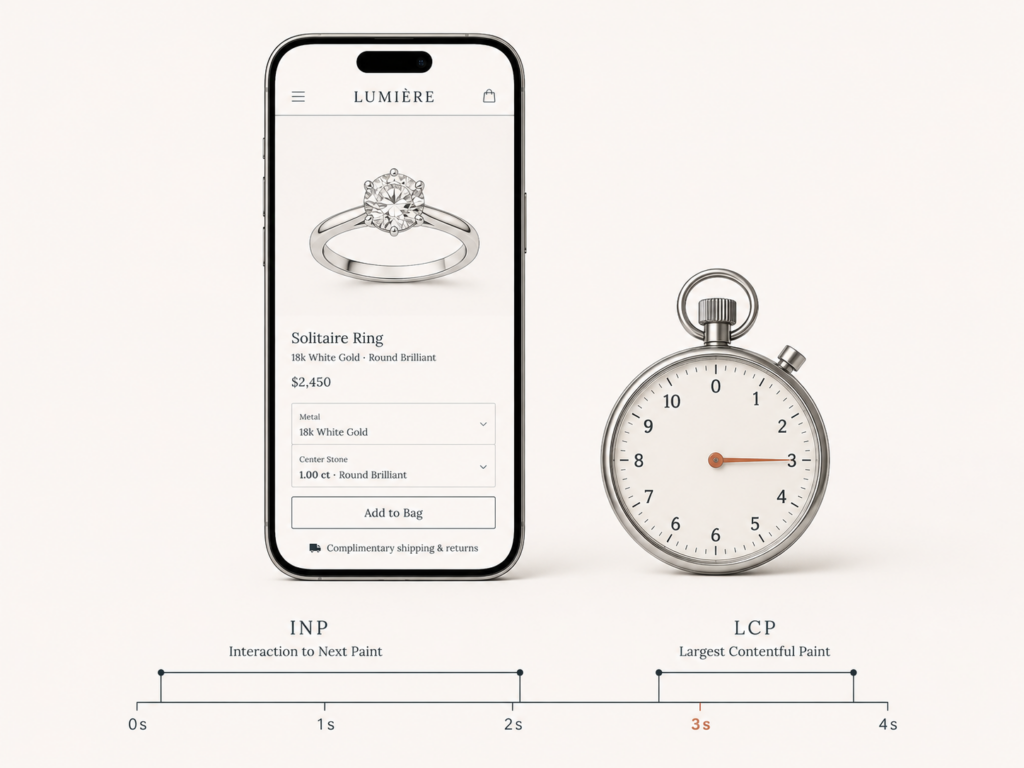
Your Shopify store is losing sales right now, and you probably cannot see it happening. The traffic looks fine. The ads are converting on paper. But somewhere between the tap and the “add to cart,” a chunk of your visitors are bouncing because the page felt slow, sluggish, or janky on their phone.
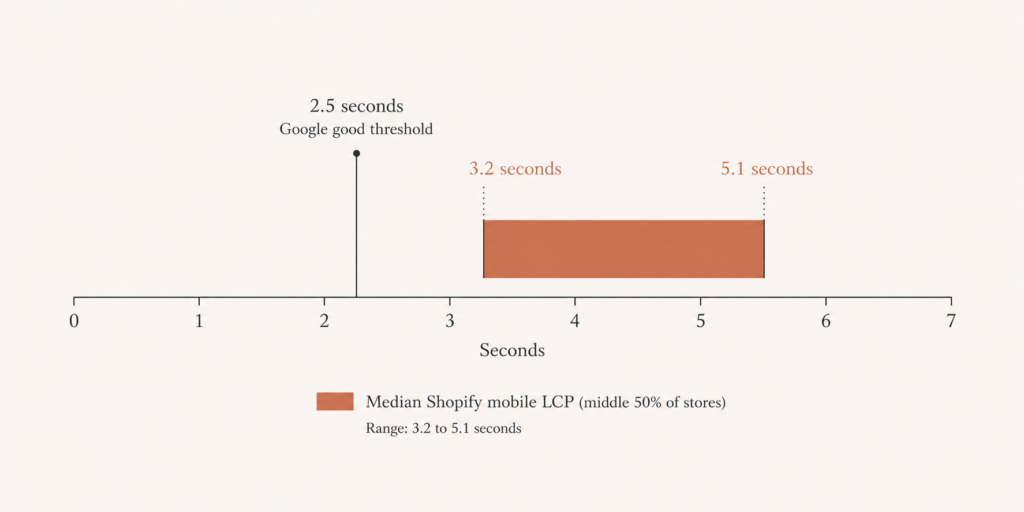
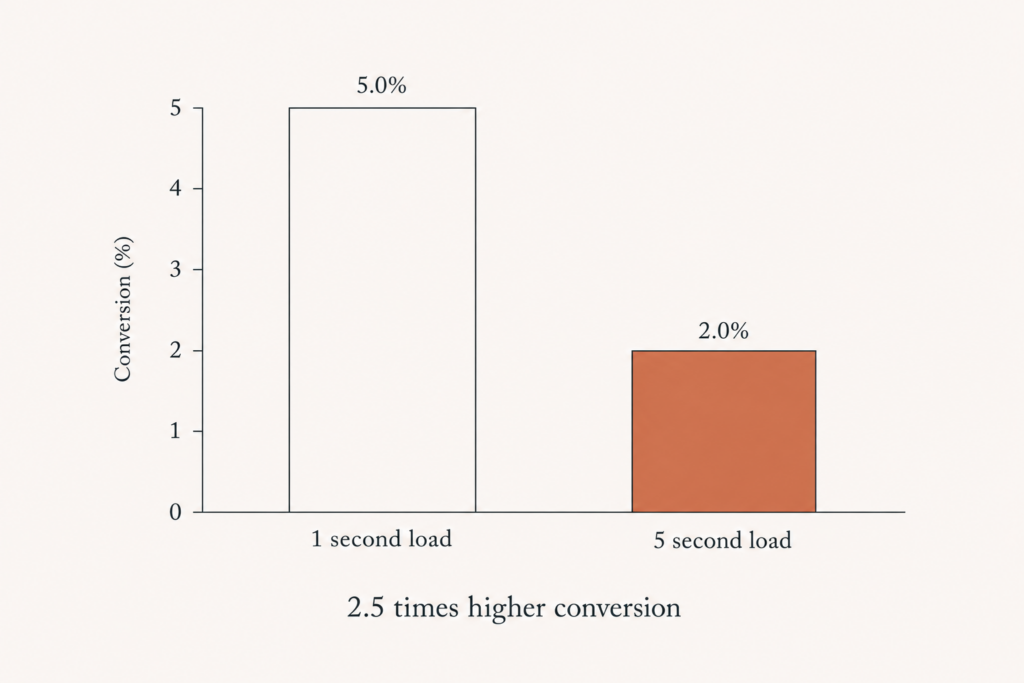
Here is the uncomfortable number. The median Shopify store has a Largest Contentful Paint between 3.2 and 5.1 seconds on mobile, while Google’s “good” threshold is 2.5 seconds. That gap is not cosmetic. A site that loads in 1 second converts roughly 2.5 times higher than one that loads in 5 seconds, and every additional second of mobile load time shaves conversions by around 7 percent.
I have spent six years building and rescuing Shopify, Magento, and WordPress stores, a lot of them image-heavy jewelry brands where speed is brutal to get right. So let me show you exactly what moves the needle in 2026, what changed this year, and how to actually hit a sub-3-second budget instead of just talking about one.
What changed in 2026: INP is the metric you cannot ignore
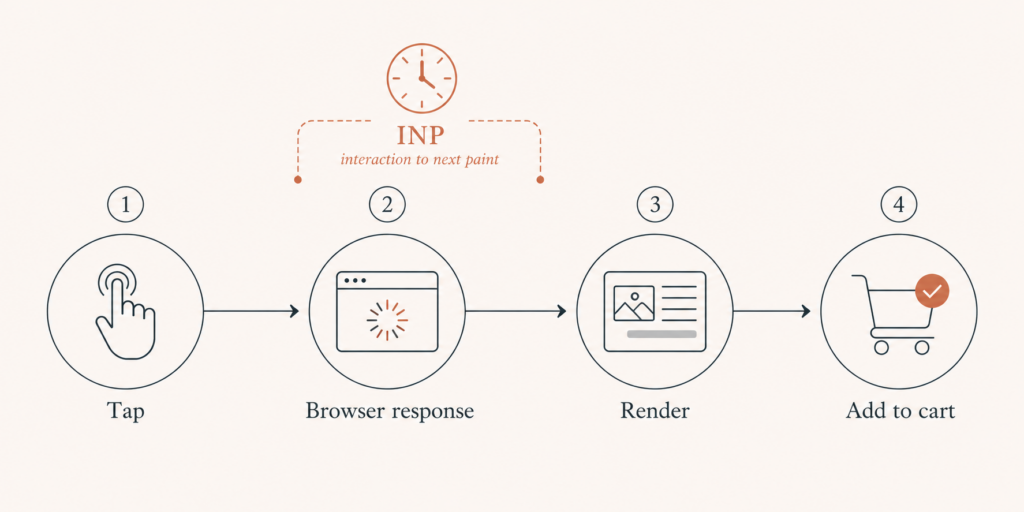
For years, everyone obsessed over load time and First Input Delay. FID is gone. In 2026, Interaction to Next Paint (INP) is the Core Web Vitals metric that quietly decides whether your store feels fast or broken.
Here is the difference that matters. FID only measured the delay on the very first interaction. INP measures every interaction across the entire session, from tapping a variant swatch to opening the cart drawer to filtering a collection. On a Shopify store, that is dozens of interactions, and each one runs through your theme’s JavaScript and every app script you have installed.
Google’s targets for 2026 are clear:
- LCP (loading): under 2.5 seconds
- INP (responsiveness): under 200 milliseconds
- CLS (visual stability): under 0.1
The good news is that the bar is being cleared more often. According to the 2025 Web Almanac, 48 percent of mobile sites now pass all three Core Web Vitals, up from 44 percent in 2024 and 36 percent in 2023. The bad news is that long JavaScript tasks, the number one cause of poor INP, are exactly what Shopify stores accumulate as they bolt on app after app.
Why most Shopify stores are slow (it is almost always the same five things)
When I open a sluggish store, I am not guessing. The culprits are remarkably consistent:
- Too many apps loading render-blocking JavaScript. Every app you install drops scripts onto the page, and most load synchronously whether the shopper needs them or not.
- Unoptimized product images. This is the killer for jewelry and apparel brands shipping 2000px hero shots straight from the photographer.
- Third-party scripts loading synchronously. Chat widgets, review apps, upsell tools, and analytics pixels all fight for the main thread.
- A poorly coded theme. Bloated Liquid, oversized sections, and JavaScript that runs on every page regardless of need.
- Large auto-playing video above the fold. It looks premium and it destroys LCP.
Notice that four of those five are things you added after launch, not the theme itself. That is good news, because it means you can claw most of your speed back without a full rebuild.
The 2026 Shopify speed playbook
Here is the order I actually work in, because sequence matters. Fixing images before you audit apps is like mopping the floor while the tap is still running.
Step 1: Audit and cut your apps first
Open your store and list every app. For each one, ask a blunt question: is this directly making me money, or is it nice to have? Most stores carry three to six apps they no longer use, and each is still injecting scripts.
Uninstall ruthlessly, then check for leftover code. Many apps leave snippets and Liquid behind even after removal. Search your theme for orphaned script tags and delete them. I have seen a single abandoned review app add 400ms to INP across an entire catalog.
Where you can replace an app with native theme code, do it. My Turnstile write-up on this blog is a good example of that philosophy: solve the problem without inheriting another vendor’s bloat.
Step 2: Fix your LCP image (the single biggest win)
Your LCP element is almost always the hero image or the first product photo. Three moves here:
- Preload the LCP image so the browser fetches it immediately instead of discovering it late.
- Serve modern formats. Use WebP or AVIF and let Shopify’s image CDN resize with the correct width and srcset so phones do not download desktop-sized files.
- Stop lazy-loading above-the-fold images. Lazy loading is great below the fold and actively harmful for your hero. Set loading=”eager” on the LCP image and lazy-load everything else.
For jewelry brands, this one step alone routinely pulls LCP from the 4-second range down under 2.5.
Step 3: Break up the JavaScript that tanks INP
This is the 2026 priority. Long tasks on the main thread are why a tap feels delayed.
- Defer non-critical scripts. Anything that is not needed for the first paint should load with defer or async, or after user interaction.
- Load third-party widgets on interaction, not on page load. Your live chat does not need to boot until someone scrolls or clicks. Delaying it can remove hundreds of milliseconds of blocking time.
- Break long tasks into smaller chunks so the browser can respond to taps between them rather than freezing.
Key takeaway: if you only fix one thing for INP, delay your third-party scripts until the shopper actually needs them.
Step 4: Reserve space so nothing shifts (CLS)
Layout shift is the cheapest metric to fix and the most embarrassing to ignore. Set explicit width and height (or aspect-ratio) on every image and embed. Reserve space for banners, cookie notices, and dynamically injected app content. If a “Free shipping” bar pops in after load and shoves your hero down, that is a CLS penalty and an annoyed shopper.
Step 5: Trim the theme itself
Once the apps and images are handled, profile the theme. Remove unused sections, eliminate duplicate jQuery loads, and avoid running collection-page scripts on the homepage. A clean theme is the foundation; everything else is damage control on top of it.
How to measure it without fooling yourself
Do not trust a single lab score. Run PageSpeed Insights for the lab view, but pay closest attention to the field data, because Google ranks on real-world Chrome User Experience data, not on your one fast test from a fiber connection.
Test on a real mid-range Android phone over a throttled connection, not just your MacBook on office wifi. Test the templates that matter: home, a collection page, a product page, and the cart. The product page is where the money is, and it is usually the heaviest.
Re-measure after each step so you know what actually moved the metric. Speed work without measurement is just superstition.
What this is worth in real money
Let me put a dollar figure on it, because “faster” is abstract and revenue is not. Slow sites cost retailers an estimated 2.6 billion dollars in lost sales every year. Mobile bounce probability rises about 90 percent as load time goes from 1 to 5 seconds, and bounce rates climb toward 53 percent once a page crosses the 3-second mark.
Flip that around. If your store does 50,000 dollars a month and you cut load time from 4.5 seconds to 2.5, even a conservative conversion lift can mean thousands of dollars a month you were leaving on the table. That is why I treat a sub-3-second budget as a business decision, not a vanity score.
Your next move
Speed is not a one-time project, it is a budget you defend every time someone wants to install another app. Set the threshold (under 3 seconds, INP under 200ms), measure against it monthly, and say no to anything that breaks it without earning its keep.
If you want a second set of eyes, I offer a free performance audit where I run your real templates, find the app and image culprits dragging your Core Web Vitals down, and tell you exactly what to fix first. No deck, no pitch, just a clear read on where speed is costing you sales. You can grab one over at Contact page.
Your shoppers already decided how fast your store should be. The only question is whether you are going to meet that expectation before your competitor does.
Want this handled for you? I speed up your Shopify store and lift Core Web Vitals.

4 comments
[…] Whatever theme you run, the same speed fundamentals apply, and I walk through them in my guide on getting a Shopify store under 3 seconds in 2026 and the Core Web Vitals […]
[…] store leaks carts before recovery ever kicks in, so if your checkout drags, read my guide on getting a Shopify store under 3 seconds and the Core Web Vitals […]
[…] you have read my note on getting a Shopify store under three seconds, the philosophy is identical here. The platform changes. The discipline does […]
[…] WordPress site under. I wrote about the same shift on the commerce side in the note on getting a store under three seconds where INP is the metric that now matters, and the principle carries straight over to […]
Comments are reviewed before they appear, so yours will not show up straight away. Your email is never published.