
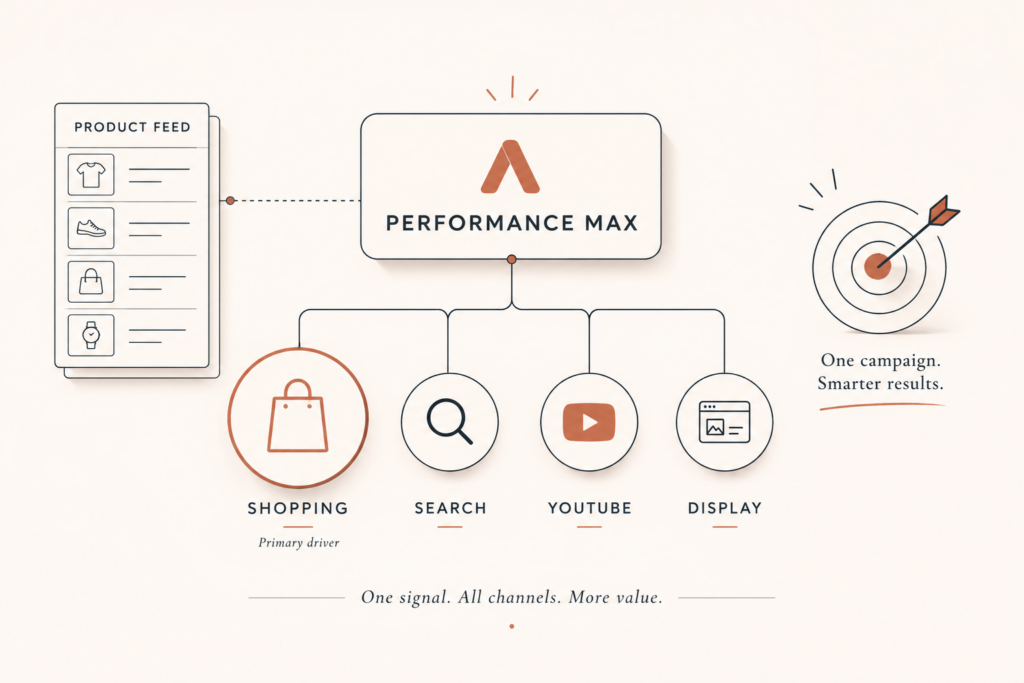
If you are running Performance Max for ecommerce and you cannot say exactly where your budget is going, you are not running a campaign. You are funding Google’s guesses. I see this constantly when I audit ad accounts: one big PMax campaign, broad targeting, a feed nobody has touched since launch, and a ROAS number that swings every week for reasons no one can explain.
Here is the truth most agencies will not tell you. Performance Max can hit your target ROAS, but only when you give it structure, a clean product feed, and the steering controls Google finally handed us. Left alone, it drifts toward cheap clicks and easy conversions, and your average order value quietly slides. This guide walks through the exact campaign structure I use to make Performance Max for ecommerce pay back. Let me show you how to take the wheel back.
Why Performance Max for ecommerce wins or loses on one thing: the feed
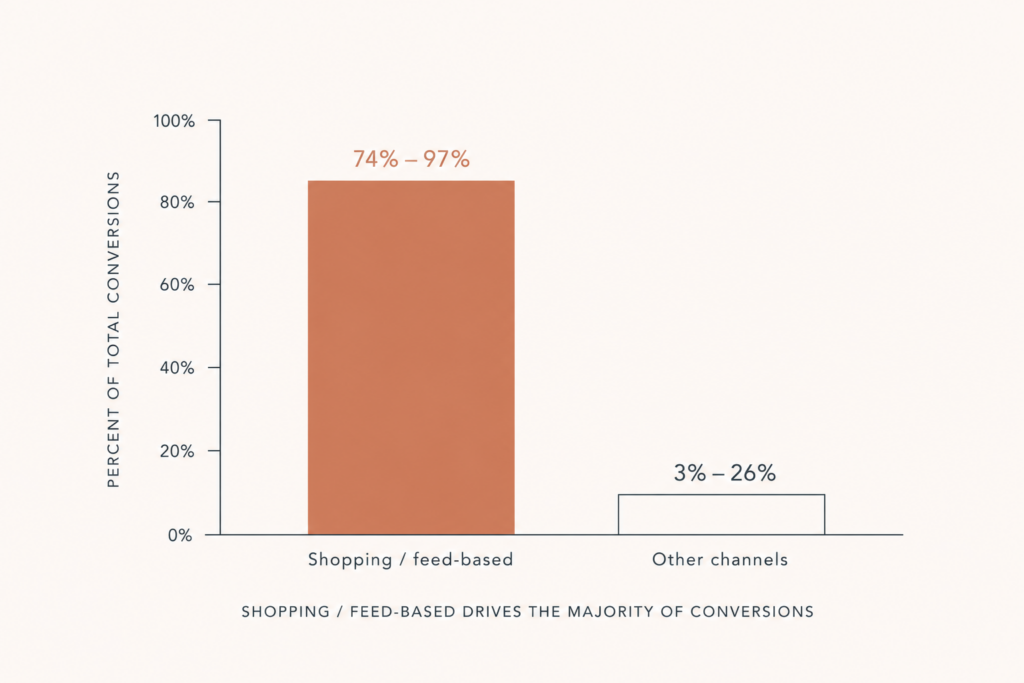
Before you touch bids, audiences, or creative, understand where the money actually goes. In a typical ecommerce Performance Max campaign, feed-based Shopping ads account for 74 to 97 percent of total spend. That is not a rounding error. That is the whole campaign.
Which means your product feed in Google Merchant Center is the biggest lever you have. A feed with complete attributes, accurate GTINs, and keyword-rich titles can expand your impression share by 40 to 60 percent without changing a single bid. You can buy more of the right traffic by editing text, not by raising budgets.
So the work order is simple. Fix the feed first, structure the campaign second, and only then worry about bidding.
Here is what a strong feed looks like in practice:
- Titles built for search, not for your warehouse. Put product type, brand, and the key attributes in the first 70 characters, because that is roughly what shows. “14k Yellow Gold Diamond Tennis Bracelet 2ct” beats “Bracelet SKU 4471” every time.
- GTINs and accurate availability. Missing or wrong identifiers get products throttled or disapproved, and you never see the impressions you paid to compete for.
- High-resolution images, including lifestyle shots. The grid is a beauty contest. Win it.
- Custom labels for margin and seasonality. This is the hidden weapon. Tag products by margin tier and season so you can later split campaigns and bid by profit, not just revenue.
Key takeaway: if your Performance Max results are mediocre, the feed is the first suspect, not the algorithm. I cover the feed mechanics in depth in my Google Merchant Center Next guide, so pair that with this.
The campaign structure I actually use
A single Performance Max campaign with everything dumped into one asset group is the default, and the default loses. The brands winning with Performance Max for ecommerce treat structure as a discipline. Here is the architecture that works.
1. Segment asset groups by product category, not by whim
Each asset group should map to a real product category with its own creative and its own search themes. Jewelry brands, for example, want separate asset groups for engagement rings, tennis bracelets, and everyday studs, because the buyer intent and the imagery are completely different. One generic asset group serving all of them tells Google nothing.
2. Run a hybrid PMax plus Standard Shopping structure
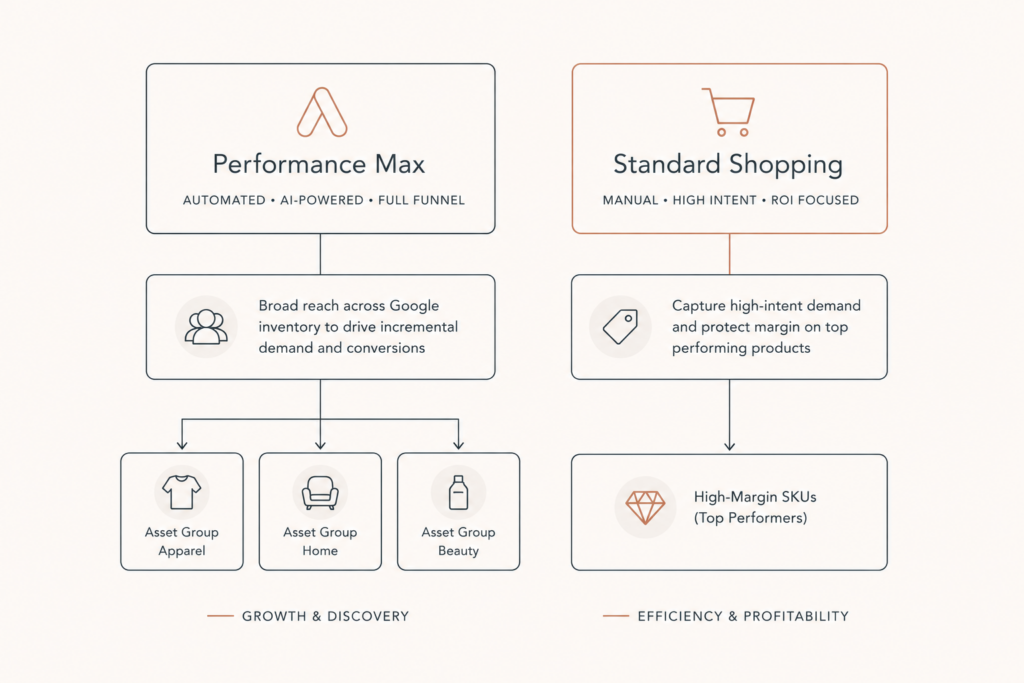
This is the part most people skip. Standard Shopping gives you full control and, in clean accounts, frequently matches or beats PMax with far better visibility. The 2026 data backs it up: well-run Standard Shopping campaigns are landing around 5.2x ROAS with full control, while Performance Max averages closer to 4.1x and typically delivers 95 to 116 percent of your target ROAS.
The smart play is not either-or. Use both. Let PMax cover full-funnel reach and discovery, and use Standard Shopping for the high-margin, high-intent SKUs where you want a firm hand on the wheel. The hybrid approach has become the standard for high-performing accounts, and for good reason.
3. Layer in your first-party data
Feed Customer Match lists and enhanced conversions into the campaign. Your buyers, your email subscribers, your repeat customers. This is how you teach Google what a good customer looks like instead of letting it guess from scratch. If you have a Klaviyo list doing real work, that audience belongs here, and I explain how those lists earn their keep in my Klaviyo flow stack post.
The new controls that finally let you steer
For years the complaint about Performance Max was that it was a black box. That excuse is gone. Google rolled out a set of steering and reporting controls that change how you should run these campaigns. If you are not using them, you are leaving control on the table.
Channel-level reporting. You can now see performance broken down by network: Search, Shopping, Display, YouTube, Discover, Gmail, and Maps. There is even a visual timeline showing how each channel contributed over time. Use it. For a healthy ecommerce campaign you want 60 to 80 percent of spend landing on Shopping. If Display or YouTube is eating your budget, that is a red flag. It usually means your Shopping feed is weak, so the algorithm finds it easier to spend on cheap awareness placements than on high-intent Shopping.
Negative keywords at scale. Performance Max now supports full negative keyword lists at the campaign and account level, with capacity raised to 10,000 negatives. This is how you stop wasting spend on irrelevant searches and cannibalizing your own brand terms. Add your brand terms as negatives if you want PMax to chase new demand instead of buying customers who were already searching for you.
Brand exclusions. Google now identifies brands as entities, so you can exclude competitors across all channels without manually blocking endless search terms. Broader and cleaner than old negatives.
Search themes. You can give each asset group up to 25 search themes that act like broad-match signals, telling the algorithm which queries to prioritize. This is your steering wheel for intent. Use it to point PMax at your money queries.
Key takeaway: Performance Max is no longer set-and-forget. The accounts that win in 2026 know exactly when to let Google’s AI run and when to step in.
Stop letting PMax quietly lower your AOV
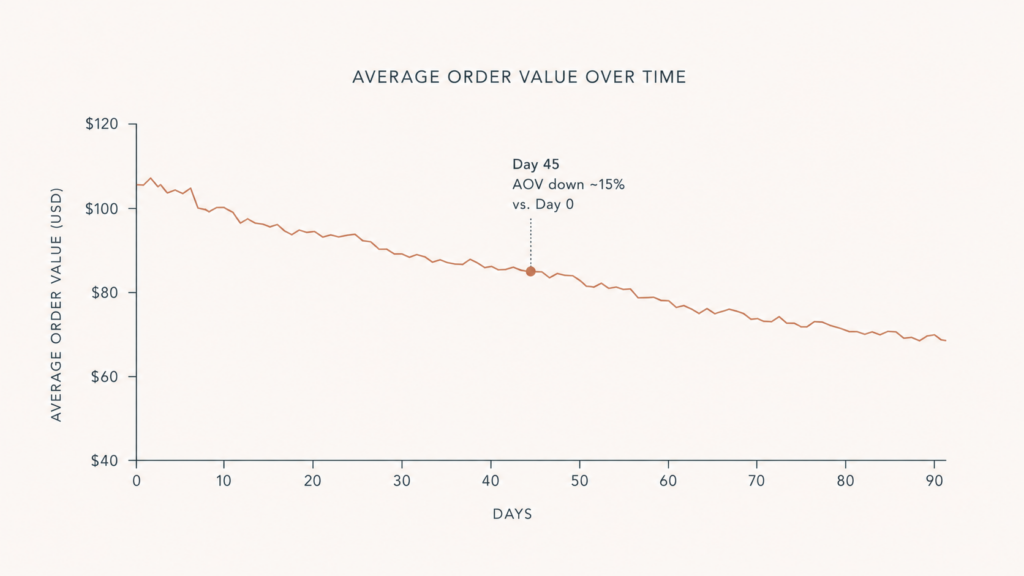
This is the trap I pull jewelry clients out of again and again. Performance Max optimizes for conversions, so it pushes budget toward whichever SKUs convert easiest. That lifts your conversion rate, which looks great on the dashboard, but it often lowers your average order value because the cheap, easy products soak up the spend.
If you sell a $180 pair of studs and a $4,200 engagement ring through the same unsegmented campaign, guess which one PMax will favor. Standard Shopping holds AOV better because you control the bidding. So for premium catalogs, do three things:
- Split high-AOV products into their own asset groups or into Standard Shopping entirely.
- Use custom labels to bid by margin, not just by revenue.
- Watch AOV as a primary metric in the first 30 days.
Revenue and ROAS can both look fine while your margin bleeds. Protect the order value.
Know your benchmark before you judge the campaign
You cannot tell if Performance Max is working without a yardstick. Here is where ecommerce ROAS sits in 2026 so you can judge honestly.
The average sits around 4.0 to 1, with a median near 3.5 to 1. By vertical the spread is real: health and beauty trend higher at roughly 4.5 to 1, food and beverage runs about 5.1 to 1 when subscriptions layer in, apparel sits near 4.2 to 1, and furniture runs lower around 2.8 to 1.
So if your furniture store is at 3.0x, you are doing fine, but a beauty brand at 3.0x has room to climb. Context decides whether a number is good. And none of these benchmarks mean anything if your conversion tracking is leaking, which is why I lock down server-side tracking before scaling spend.
Where AI Max and Demand Gen fit
The 2026 recommendation from Google’s own playbook is three campaign types working together: Performance Max for full-funnel performance, Demand Gen for mid-funnel awareness, and AI Max for enhanced Search coverage.
You do not need all three on day one. Start with PMax plus Standard Shopping, get the feed and tracking right, then add Demand Gen and AI Max once the core is producing. Layering complexity onto a broken foundation just burns money faster. If you want the broader account blueprint, my Google Ads campaign structure guide lays out how these pieces connect.
A 7-step launch checklist
The order of operations I follow on a new Performance Max for ecommerce build:
- Audit and rewrite product titles, fix GTINs, and confirm availability in Merchant Center.
- Add custom labels for margin tier and seasonality.
- Build asset groups segmented by product category with distinct creative.
- Add 25 search themes per asset group pointed at your money queries.
- Upload Customer Match lists and enable enhanced conversions.
- Add brand terms and junk queries as negative keywords, and set brand exclusions.
- Launch, then watch channel-level reporting and AOV for the first 30 days and intervene if Shopping share drops below 60 percent.
Do these in order. Skipping the feed step is the single most common reason these campaigns underperform.
FAQ
What is Performance Max for ecommerce? Performance Max is Google’s AI-driven campaign type that runs your ads across Search, Shopping, YouTube, Display, Discover, Gmail, and Maps from a single campaign. For ecommerce, it leans heavily on your Merchant Center product feed, with feed-based Shopping ads making up 74 to 97 percent of spend, so it functions mostly as an automated Shopping engine with extra reach.
Is Performance Max better than Standard Shopping in 2026? Not automatically. Standard Shopping often hits a higher ROAS, around 5.2x versus roughly 4.1x for PMax, with much better visibility and control. The best accounts run a hybrid: Performance Max for full-funnel reach and Standard Shopping for high-margin, high-intent products where control matters most.
Can you add negative keywords to Performance Max now? Yes. As of 2026 Performance Max supports full negative keyword lists at the campaign and account level, with capacity raised to 10,000 negatives. Use them to block irrelevant queries and to stop PMax from buying your own brand traffic.
Why is Performance Max lowering my average order value? Because it optimizes for conversions and shifts budget toward whichever products convert easiest, which are usually your cheaper items. That lifts conversion rate but drags AOV down. Split high-ticket products into their own asset groups or into Standard Shopping, and bid by margin using custom labels.
How much budget should go to Shopping inside Performance Max? For a healthy ecommerce campaign, aim for 60 to 80 percent of spend on Shopping. Use the new channel-level reporting to check. If Display or YouTube is consuming too much, your feed usually needs work.
Conclusion
Performance Max for ecommerce is not magic and it is not a scam. It is a powerful engine that does exactly what you steer it to do, and the stores that win are the ones that stopped treating it as a black box. Fix the feed, segment your asset groups, run a hybrid with Standard Shopping, use the new negative keywords and channel reporting, and watch your AOV like a hawk. Do that and target ROAS stops being a hope and starts being a setting.
If your campaigns spend well but you cannot tell where the money goes or why the numbers swing, that is exactly what I untangle. I build and audit ecommerce ad accounts, feeds, and tracking for US and UK retailers, including high-AOV jewelry brands. Book a call or grab a free audit at contact and we will find where the budget is leaking.

Comments are reviewed before they appear, so yours will not show up straight away. Your email is never published.