
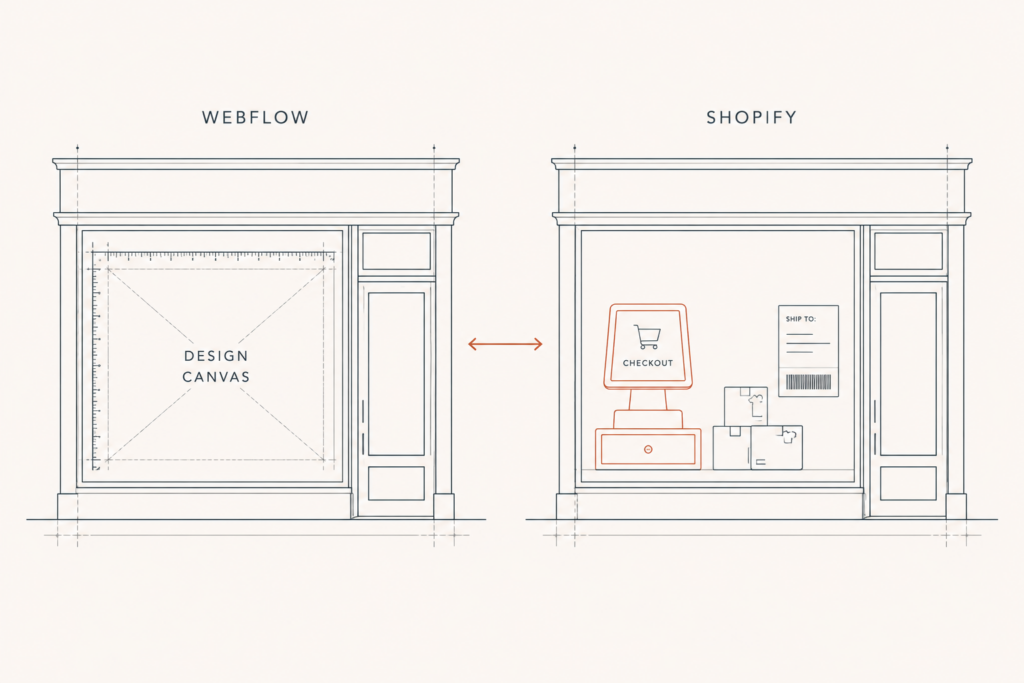
Picture this: the brand has a beautiful site. The typography is considered, the motion is subtle, the founder is proud of it, rightly. Then a wholesale buyer asks for net-30 terms, a customer wants to pay with Klarna, and the ops lead asks why the fulfilment tool has no integration. The site was built as a portfolio that happens to take money. Now it has to behave like a store.
That’s the real shape of the Webflow vs Shopify decision. It isn’t design tool versus commerce tool. It’s a question of which failure you’d rather live with: a store that looks generic, or a store that can’t do the commercial thing you need next quarter.
Most comparison posts answer that by listing features. That’s backwards. The right way in is to find where the ceiling sits on each platform and how fast you’ll hit it. This article covers the full picture: catalog and variant limits, payments and fees, real cost at real revenue, speed and SEO, and where each one is clearly the right call.
What Webflow vs Shopify is really a choice between
Webflow is a visual development platform with commerce bolted on. Shopify is a commerce platform with design layered on top. Everything downstream follows from that sentence.
Webflow gives you control of the DOM. You’re not fighting a theme’s opinions, you’re not overriding Liquid you didn’t write, and you can build a layout that looks like nothing else in the category. For a brand where the story is the moat, that matters commercially, not just aesthetically.
Shopify gives you the machinery. Payments, taxes, shipping rules, order management, POS, an app ecosystem, a checkout conversion-tested against a volume of traffic no independent build will ever see.
Here’s the thing: most founders choose on the first impression and get bitten by the second. The design is what you feel on day one. The machinery is what you feel on day four hundred.
The limits that decide the answer for you
Before any taste-based argument, there are hard numbers, and they settle a lot of cases without debate.
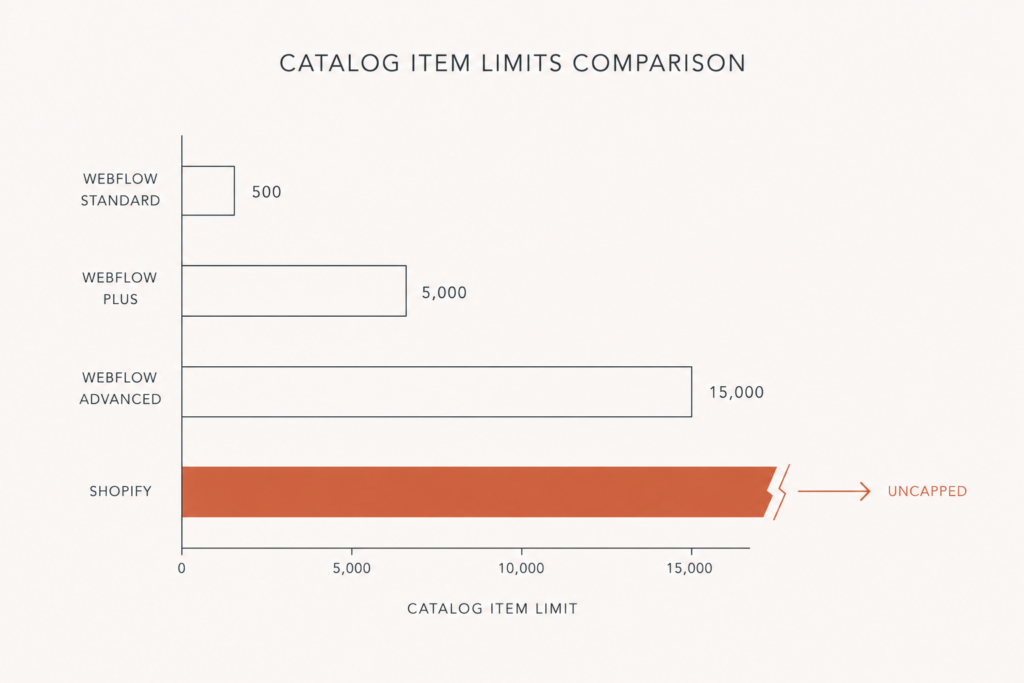
Webflow caps your catalog by plan. According to Webflow’s pricing page, the Standard Ecommerce plan supports up to 500 catalog items, Plus goes to 5,000, and Advanced tops out around 15,000. Per-product variants are capped as well, at 50. Shopify does not cap product count, and comparison data from Style Factory puts Shopify’s variant ceiling at 2,048 per product.
Then there’s payments. On Webflow you’re effectively choosing between Stripe and PayPal. Shopify supports Shopify Payments plus a long list of third-party gateways, which matters the moment you sell into a market where the local payment method is the payment method.
Run the checklist honestly:
- Catalog size. More than a few thousand SKUs, or a supplier feed that grows on its own? Webflow is out.
- Variants. Jewelry, apparel, and configurable products chew through 50 variants faster than you’d think. Metal, stone, carat, ring size, and you’re done.
- Payments. If you need anything beyond Stripe and PayPal, including buy-now-pay-later options and local wallets, Webflow is out.
- Operations. POS, multi-location inventory, complex shipping rules across fulfilment centres, ERP sync. That’s Shopify territory, and it isn’t close.
- Subscriptions. Recurring revenue on Webflow means gluing third-party tooling to a checkout you don’t fully control.
If none of those five apply to you, congratulations: you’re in the narrow band where Webflow Ecommerce is genuinely a good answer, and the rest of this article is about how to make that call well.
The fee math nobody runs before they commit
Sticker prices are the least interesting part of platform cost, and they’re the only part most people compare.
Webflow’s Standard Ecommerce plan runs $29/mo billed annually and carries a 2% transaction fee. Plus and Advanced sit at roughly $74/mo and $212/mo annually with no Webflow transaction fee, per Webflow’s help centre notes on the May 2026 pricing update. Stripe and PayPal still take their cut on top of all of it.
Now run the math. At $10,000/mo in sales, that 2% is $200/mo on top of the $29 plan. The Standard plan quietly becomes the most expensive one you can be on. The break-even against Plus arrives at around $3,700/mo in revenue, which is not a milestone, it’s a Tuesday.
Shopify plays the same game from a different angle. Its published plans run $39, $105 and $399/mo, and its extra transaction fees, 2% on Basic down to 0.6% on Advanced, apply only when you use a third-party gateway instead of Shopify Payments, as laid out on Shopify’s pricing page. Use Shopify Payments and that surcharge disappears. You’re left with card processing, which every platform has.
The trap on Shopify isn’t the plan fee. It’s the apps. One of the most common conversations at Javaid Ahmad starts with a founder who’s paying more per month for apps than for the platform, and who cannot say what half of them do. On one audit the app bill came to $480/mo, and most of it was replaceable with native code. On another store the stack went from 27 apps down to 5.
So the honest comparison: Webflow charges you a fee that punishes growth on the entry plan and more custom development for anything the platform doesn’t do. Shopify charges you nothing extra if you use Shopify Payments, then lets a subscription stack grow quietly until someone audits it. Neither one is cheap. They’re expensive in different places, and the places are the point.
Speed and SEO: the argument is closer than either side claims
Webflow’s pitch has always included clean output, and there’s something to it. Optimized Webflow builds do post strong Largest Contentful Paint and Cumulative Layout Shift numbers, largely because you aren’t inheriting a theme plus a dozen apps injecting scripts into the head.
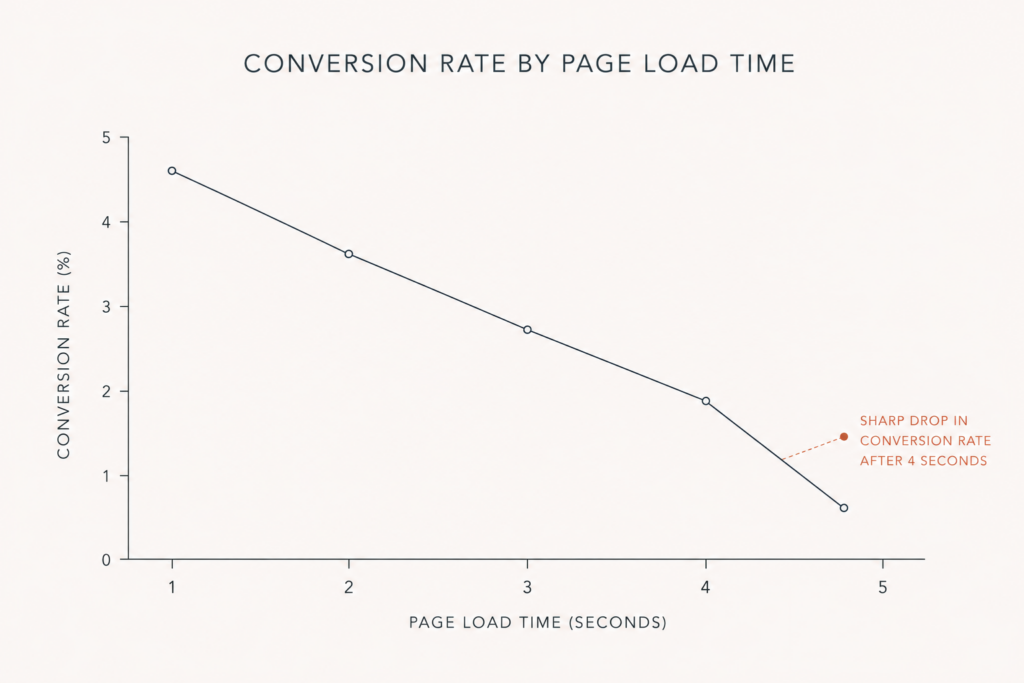
But Shopify’s platform-wide numbers are better than its reputation. Roughly 75 to 80% of Shopify stores pass Core Web Vitals, among the highest of any major ecommerce platform, and Shopify’s own analysis of store speed and conversion puts real money on the line: shoppers abandon at a steep rate past four seconds, and each second of LCP improvement is worth meaningful conversion.
Here’s what actually happens in practice. A slow Shopify store is almost never slow because of Shopify. It’s slow because of apps, third-party scripts, and an image strategy nobody owns. A slow Webflow store is slow because someone shipped a hero video and eight interactions. The platform sets your ceiling. Your build decisions set your floor, and the floor is where most stores live. The sub-3s budget is an engineering discipline, not a platform feature.
On SEO, both give you the controls that matter: clean URLs, meta fields, canonicals, structured data if you do the work. Webflow gives tighter control over markup. Shopify gives a larger ecosystem for scale problems like faceted collection pages. Neither will rank a store with nothing to say.
Where Webflow is quietly losing ground
There’s a strategic point worth naming, because it’s the one that changes over a three-year horizon.
Webflow’s recent product energy is going into AI, CMS, analytics, AEO, and Webflow Cloud. Look at Webflow’s own updates feed and Ecommerce is not where the shipping is happening. The May 2026 pricing simplification left the Ecommerce site plans essentially untouched, which is a tell.
That doesn’t make Webflow Ecommerce bad. It makes it stable. Stable is fine if your store is simple. It’s a real risk if you’re betting on the platform to grow into the thing you need in two years, because right now it isn’t visibly trying to. Shopify’s roadmap, whatever you think of it, is unambiguously about commerce: checkout, B2B, markets, agentic buying surfaces.
The two builds I’d actually recommend
Most of the interesting answers here aren’t “pick one”.
Content-led brand, small catalog, story is the moat. Build on Webflow. Design freedom is worth real money when the brand is the product, and 500 items is plenty. Just go straight to Plus if you’re over $4k/mo, and don’t pretend the 2% fee is nothing.
Everything else. Build on Shopify and spend the design budget on the theme instead of the platform. A well-built custom theme closes most of the aesthetic gap. The gap it can’t close is the one Webflow can’t close either: checkout, payments, ops. If you’re tempted to solve design with architecture, read the honest case for when headless Shopify is worth it first, because the answer is “less often than agencies say”.
There’s also a third pattern that gets ignored: Webflow for the brand narrative, Shopify handling catalog and checkout, connected properly.
The bottom line on Webflow vs Shopify
The choice isn’t design versus function. It’s a bet on which constraint you can live with.
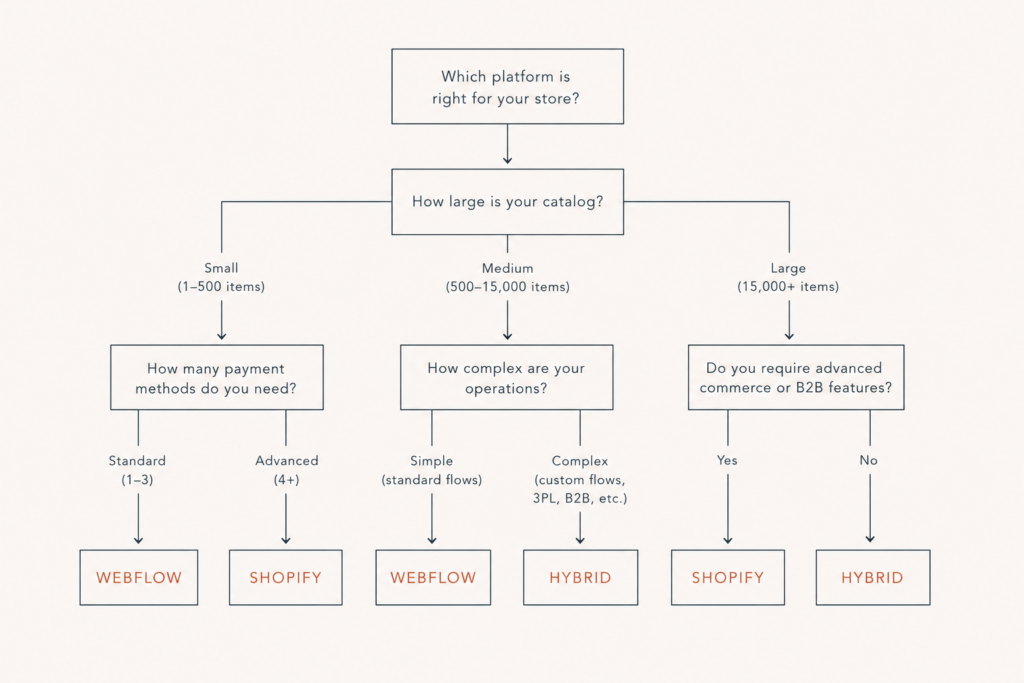
Webflow constrains your commerce: 500 to 15,000 products, 50 variants, two payment processors, no POS. Shopify constrains your design, and charges you in app subscriptions for the things it doesn’t do natively. One ceiling is structural. The other is mostly a discipline problem, and discipline problems are fixable.
If your store is simple, under a few thousand SKUs, Stripe-and-PayPal is enough, and the brand carries the sale, build on Webflow and go straight to a no-fee plan. If your catalog is large, your variants are deep, your payments are international, or your operations touch inventory, POS, wholesale or subscriptions, build on Shopify and put the money you saved into a theme and a lean app stack. If you’re already on Webflow and hitting the ceiling, the migration is not the disaster you’re imagining, but the redirects are, and they’re where the traffic gets lost.
If you want a second opinion before you commit, reach out to Javaid Ahmad for a straightforward conversation about which platform actually fits your catalog and your operations. No lengthy discovery calls, no vague proposals, just a clear answer on next steps. A free store audit or a 30-minute call is usually enough to settle it.
FAQ
Q: Is Webflow good for ecommerce? A: For small, design-led stores, yes. Webflow Ecommerce handles a straightforward catalog and checkout well, and gives you design control no Shopify theme can match. It’s a poor fit once you need more than a few thousand SKUs, deep variants, payment methods beyond Stripe and PayPal, POS, or subscriptions.
Q: How many products can you sell on Webflow? A: Webflow’s plans cap catalog items by tier, at 500 on Standard Ecommerce, 5,000 on Plus, and roughly 15,000 on Advanced, with 50 variants per product. Shopify does not cap product count and supports up to 2,048 variants per product.
Q: Does Webflow charge transaction fees? A: The Standard Ecommerce plan carries a 2% Webflow transaction fee. Plus and Advanced carry none. Stripe and PayPal processing fees apply on every plan. Past roughly $3,700/mo in sales, Plus is cheaper than Standard even though the plan price is higher.
Q: Is Shopify cheaper than Webflow? A: On plan price alone they’re comparable. The real cost difference is elsewhere: Webflow charges you a transaction fee on the entry plan, and Shopify charges you indirectly through app subscriptions, which routinely reach hundreds of dollars a month before anyone audits them.
Q: Can I move from Webflow to Shopify without losing SEO? A: Yes, if you plan the redirects before you plan anything else. Map every existing URL to its new destination, keep the URL structure sane, preserve product and collection metadata, and monitor Search Console for the first six weeks. Traffic loss in a migration is almost always a redirect problem, not a platform problem.
Q: Can I use Webflow for the website and Shopify for the store? A: Yes, and for some brands it’s the strongest option. Webflow keeps design control on the marketing site, Shopify handles catalog, checkout, payments and fulfilment. It costs more to maintain, so it earns its place only when both halves are pulling weight.
Webflow and Shopify are two answers to the same question. I compare the other platforms, including Wix and WordPress, in CMS comparisons.

Comments are reviewed before they appear, so yours will not show up straight away. Your email is never published.