
Your WooCommerce store works, until it doesn’t. The plugins fight each other, the hosting bill creeps up, security patches eat your weekends, and every “small” change turns into a developer ticket. If you are reading this, you are probably weighing a WooCommerce to Shopify migration and quietly terrified of one thing: losing the traffic and revenue you spent years building.
That fear is fair. A botched migration can tank your rankings overnight. But a planned one barely registers a blip. I have moved stores both ways, and the difference is never luck. It is process. So let me give you the exact plan I use, the traps that sink most stores, and the numbers you need to make the call.
Why stores are moving to Shopify in 2026
Let’s start with the honest part. WooCommerce is not dead. By store count it still leads, powering roughly 4.53 million stores, about 33.4% of the market, versus Shopify’s 2.66 million. So why migrate at all?
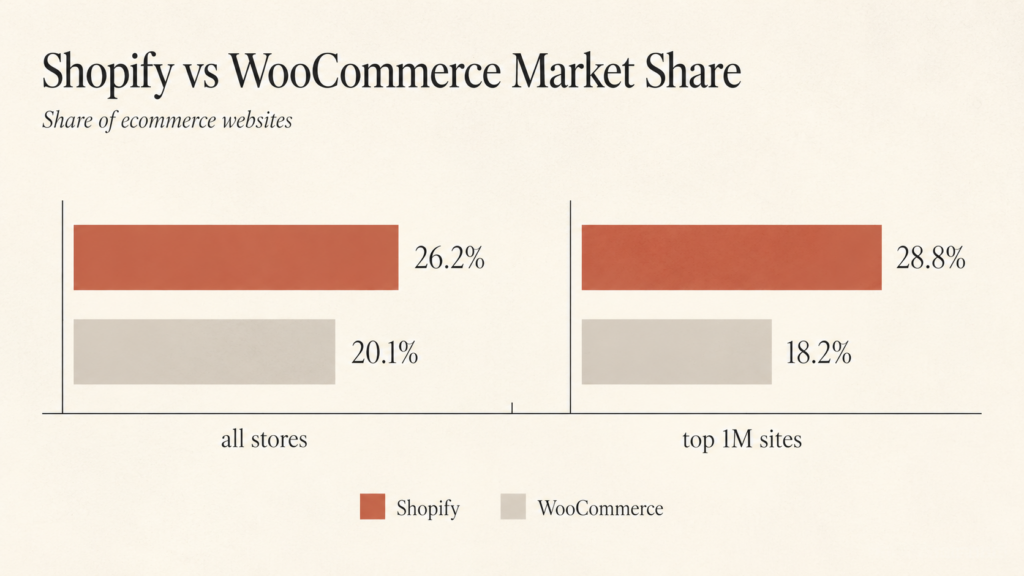
Because the picture flips when you look at serious, high-traffic stores. Among the top 1 million ecommerce sites, Shopify leads with 28.8% versus WooCommerce’s 18.2%. Shopify’s GMV hit $292 billion in 2024 and was on pace to clear $350 billion in 2025. Translation: bigger brands with real volume keep choosing the hosted, managed path.
Here is the takeaway: you are not migrating because WooCommerce is bad. You are migrating to stop maintaining infrastructure and start spending that energy on growth.
The mistake that kills migrations before they start
Most people think a WooCommerce to Shopify migration is a data-transfer problem. It is not. The damage happens before a single product moves, in the planning you skip.
Here is what skipping costs you. WooCommerce and Shopify use different URL structures. Woo gives you yourdomain.com/shop/category/product. Shopify gives you yourdomain.com/products/product. If you do not map every old URL to its new home, search engines drop those pages and shoppers hit error screens. The cumulative effect can erase years of SEO.
So before you touch data, do this:
- Crawl your current site with Screaming Frog or Ahrefs and export every indexable URL, H1, and meta description.
- Audit every active plugin and decide what is native in Shopify, what needs an app, and what you can finally kill.
- Pull your top 50 products and top 20 landing pages by organic traffic. These are your protect-at-all-costs list.
Spend a week here and you save a month later.
The 5-phase migration that actually holds up
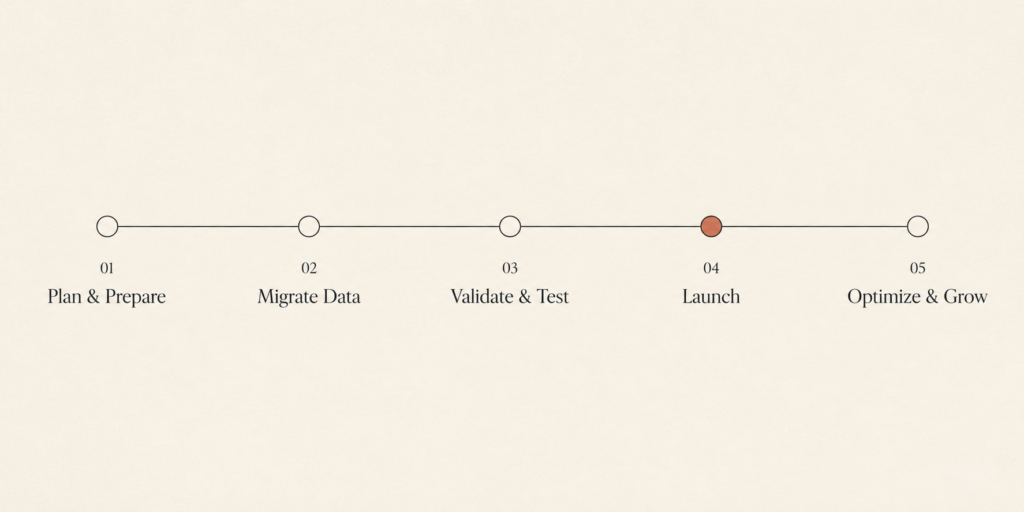
I run every WooCommerce to Shopify migration through the same five phases. It is boring on purpose. Boring is what keeps revenue steady.
Phase 1: Discovery and audit. Map the data, the URLs, and the plugin stack as above. Decide which apps you are replacing and which you are retiring for good. (If app sprawl is your real problem, read how I cut $480 a month in Shopify app spend before you rebuild it.)
Phase 2: Setup and configuration. Spin up a Shopify development store, set tax and shipping rules, and configure payments. Build the structure before the content lands.
Phase 3: Data transfer and validation. Move products, collections, customers, and orders. Then validate, because the import is never as clean as the tool promises.
Phase 4: Theme and UX. Rebuild the storefront on a fast Shopify theme. Do not copy your Woo design pixel for pixel. Rebuild it lean.
Phase 5: SEO mapping and launch. Ship the 301 redirects, point the domain, and watch the logs. This phase decides whether your traffic survives.
How to move the data without breaking it
You have four real options for the transfer itself.
- Manual copy-paste. Fine for a small store under 50 products. Painful past that.
- Shopify’s Store Migration app. Native and improving, currently in early access. Good for standard catalogs.
- LitExtension or Cart2Cart. Automated tools built for standard stores with thousands of SKUs.
- Matrixify. The one I reach for on complex stores with heavy metafields, custom data, and high order volume. It is the safety net for anything non-trivial.
Whatever you choose, two limitations will bite you if nobody warns you.
Customer passwords do not transfer. WooCommerce and Shopify hash passwords differently, so every customer resets on first login. Plan the email that explains why, or your support inbox will explode on launch day.
Shopify caps products at 3 options and 100 variants. WooCommerce variable products with more than three attributes will lose options unless you restructure them first. For jewelry and configurable products this is the single most common surprise. Catch it in Phase 1, not Phase 3.
Protecting your SEO with 301 redirects
This is the part everyone underestimates and then regrets. Done right, it is undramatic.
Build a spreadsheet that maps every old WooCommerce URL to its exact Shopify destination, one to one. Every product, collection, blog post, and key page gets a home. No “redirect everything to the homepage” shortcuts, because Google treats those as soft 404s.
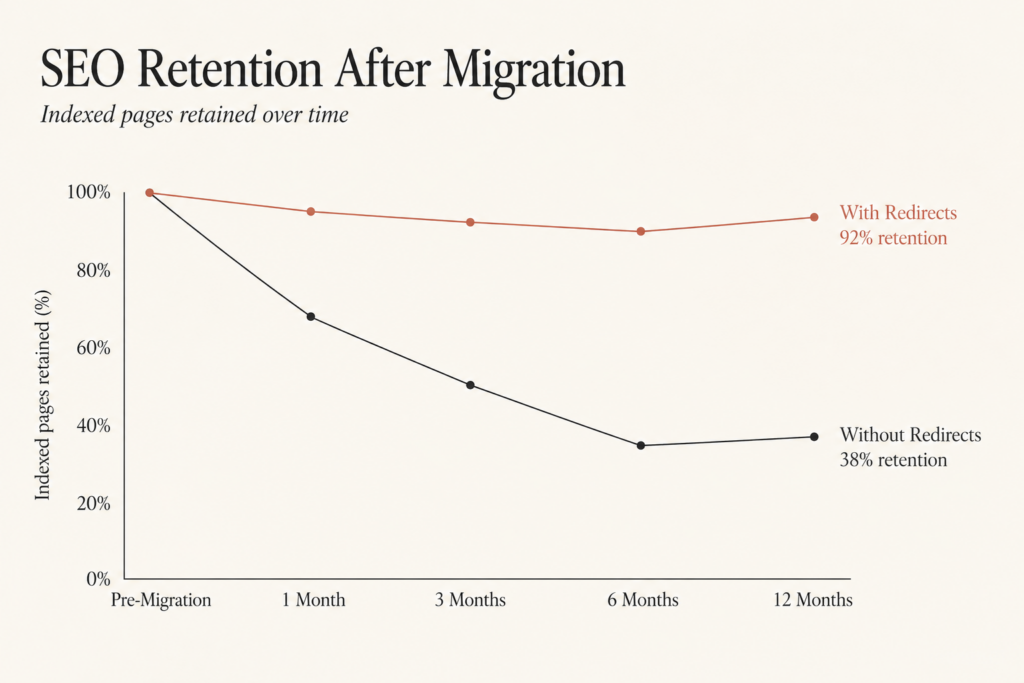
Why bother? Real numbers. Stores that set up 301 redirects properly have retained around 92% of their rankings within two weeks of launch. Stores that skip redirects lose rankings, full stop. The redirect file is not optional housekeeping. It is the difference between a quiet launch and a traffic cliff.
My redirect mechanics mirror the process in my Magento to Shopify SEO redirects checklist, so if you want the granular version, start there. The principle is identical across platforms: one indexable URL, one permanent destination, verified in your logs after launch.
What it costs and how long it takes
Two questions every owner asks. Here are honest ranges.
Timeline: a typical WooCommerce to Shopify migration runs 4 to 8 weeks. Stores above 10,000 products should plan for 8 to 12 weeks, mostly because validation and variant restructuring take real time.
Cost varies wildly with complexity, so treat anyone quoting a flat number with suspicion. A clean small catalog migrated with an automated tool is cheap. A 140,000-SKU catalog with custom apps and metafields is a project. The cost driver is rarely the data move itself. It is the theme rebuild, the variant restructuring, and the redirect mapping.
A useful way to budget is to split the work into three buckets. First, the data move, which is mostly tool fees and validation hours. Second, the storefront, which is design and theme development time. Third, the SEO safety net, which is redirect mapping and post-launch monitoring. Most owners underprice the third bucket and overpay for the first. Flip that. The transfer is commodity work. The redirects and the validation are where an experienced hand earns its fee, because that is exactly where revenue leaks when a migration goes wrong. Get those two right and the rest is repeatable.
One thing worth saying: do not rebuild slow. The whole point of leaving WooCommerce is a faster, calmer stack. Hit a sub-3-second budget and watch INP from day one, and pair it with a Core Web Vitals checklist so you launch fast, not just functional.
FAQ
How long does a WooCommerce to Shopify migration take? Most migrations take 4 to 8 weeks. Large catalogs above 10,000 products usually need 8 to 12 weeks because data validation and variant restructuring add time.
Will I lose my SEO when I migrate from WooCommerce to Shopify? Not if you map and ship 301 redirects properly. Stores that do retain roughly 92% of rankings within two weeks. Stores that skip redirects lose rankings, so the redirect map is non-negotiable.
Can I migrate customer accounts and passwords to Shopify? You can migrate customer records, but not passwords. WooCommerce and Shopify hash them differently, so every customer resets on first login. Send a heads-up email at launch.
What happens to products with many variants? Shopify caps products at 3 options and 100 variants. WooCommerce products with more attributes need restructuring before import, or they lose options. Plan this in the audit phase.
Which migration tool is best? Manual works under 50 products. Shopify’s Store Migration app or LitExtension and Cart2Cart suit standard catalogs. For complex stores with heavy metafields and high order volume, Matrixify is the safer choice.
The bottom line
A WooCommerce to Shopify migration is not risky because of the platform. It is risky when it is rushed. Plan the audit, map every URL, restructure your variants, validate the import, and ship clean redirects. Do that and you keep your rankings, your customers, and your revenue while you finally stop babysitting infrastructure.
If you would rather not gamble your organic traffic on a DIY move, that is exactly the work I do. Book a call or get a free audit at javaid.dev/contact and I will tell you honestly what your migration involves and where the risk actually sits.

Comments are reviewed before they appear, so yours will not show up straight away. Your email is never published.