

Your Magento store is slow, and you already know it. The product pages crawl, the category grids stutter on mobile, and you have watched the analytics drop off a cliff the moment load time creeps past three seconds. That feeling in your stomach is not paranoia. It is lost revenue, and it compounds every day you leave it alone.
Here is the part nobody tells you. Magento 2 speed optimization is not magic, and it is not a single plugin you install on a Friday afternoon. It is a stack of specific fixes applied in a deliberate order, from the server up to the last image on the page. Get the order right and a store that loads in six seconds can hit two.
I have done this on real stores with real catalogs, including a 140,000 SKU migration into a live storefront. So let me walk you through exactly how I get a Magento 2 store under three seconds, and what is a waste of your time.
Why three seconds is the line you cannot cross
Speed is not a vanity metric. It is the single cheapest conversion lever you own.
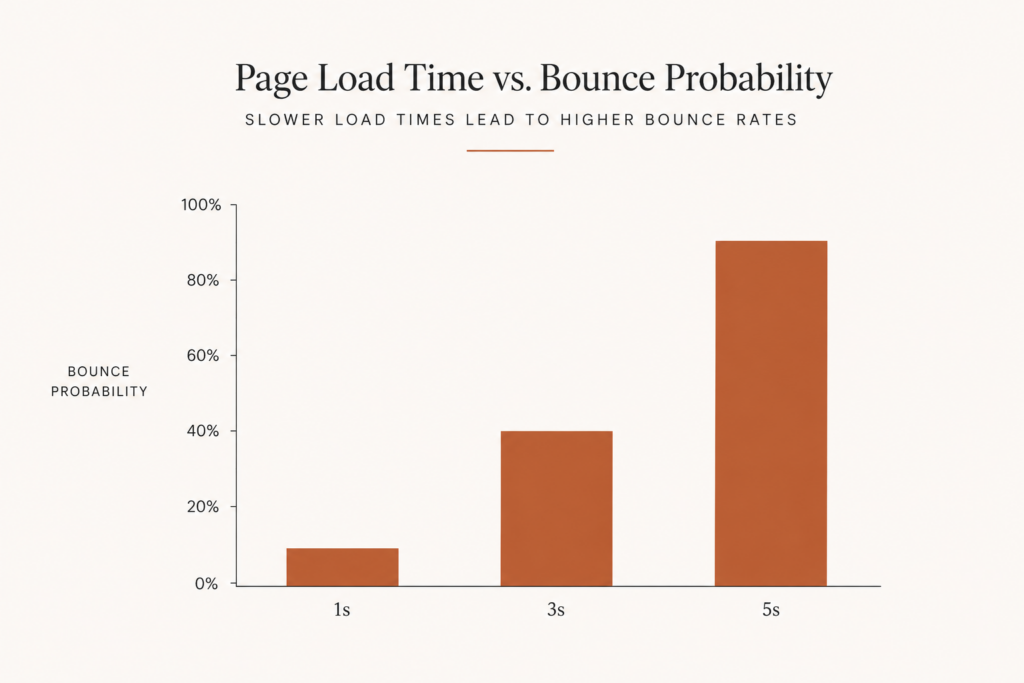
The data is brutal and consistent. A one second delay in page load time costs the average ecommerce store roughly 7% of conversions, a Deloitte figure replicated for over a decade. Google’s research shows bounce probability jumps 32% when load time goes from one to three seconds, and 90% when it goes from one to five. On mobile, 53% of users abandon a site that takes more than three seconds.
Translation: every second you shave is money you keep. If your store does six figures a month, a single second can be worth thousands per month in recovered orders. That is why I treat three seconds as a hard budget, not a nice to have.
Start at the foundation: caching is everything in Magento
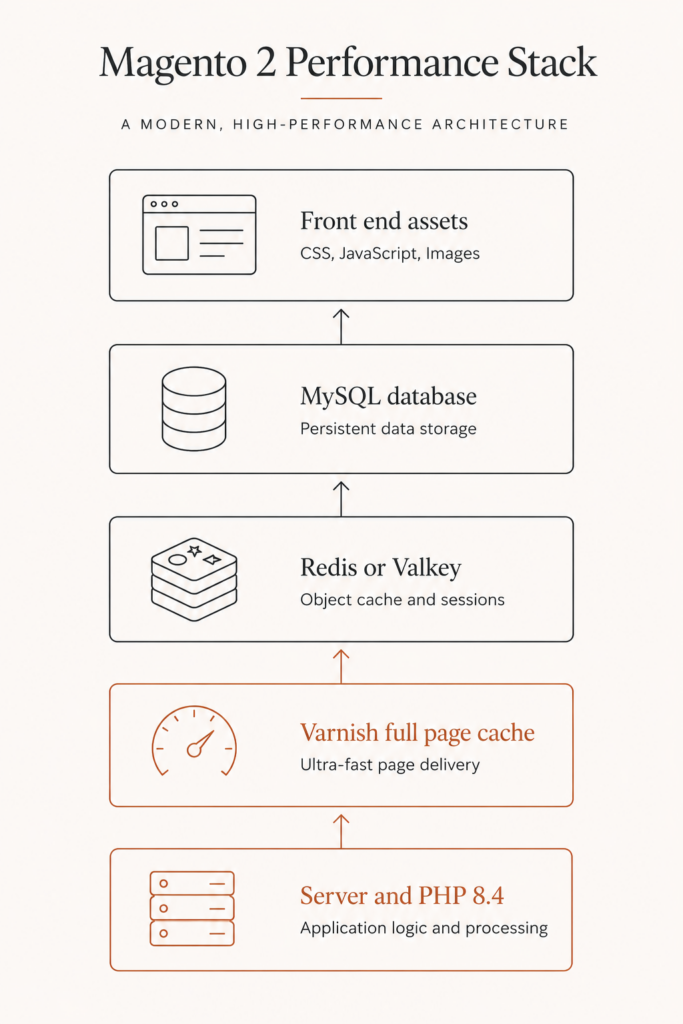
If you only fix one thing, fix caching. An uncached Magento page can take two to five seconds just to generate on the server, before a single image even loads. The same page served through Varnish full page cache returns in under 100 milliseconds. That is not a tweak. That is the difference between a usable store and a broken one.
Here is the caching stack I insist on for every production Magento 2 store:
- Varnish for full page cache. Never use the built in file or database cache in production. Configure Varnish 7.6 as your full page cache backend and your time to first byte drops off a cliff in the right direction.
- Redis 7.2 or Valkey 8 for sessions and the default cache. Magento 2.4.8 added Valkey 8 support, now the recommended choice for new installs. Valkey 8.1 shows around 37% higher SET throughput and over 60% lower tail GET latency versus comparable Redis.
- OpenSearch 2.19 for catalog search. A misconfigured or undersized search engine quietly drags down category and search pages.
Once Varnish is doing its job, keep the cache warm and reduce invalidations. Frequent full flushes from sloppy deploys undo everything. Warm cache equals fast store. Cold cache equals angry customers.
Move to PHP and the server: the unglamorous wins
Most slow Magento stores run on the wrong PHP version and an under provisioned server, and the owner has no idea.
PHP 8.4 is the recommended version for Magento 2.4.8, with 8.3 also supported. If you are still on PHP 7.4 or even 8.1, you are leaving a free 30% to 40% speed gain on the table, because the 8.x branch is dramatically faster for Magento than 7.4. Upgrading PHP is often the highest return half day of work I do on a legacy store.
A few server level moves that consistently pay off:
- Run on dedicated or properly sized cloud hosting, not shared hosting. Magento is hungry and shared plans choke under real catalog load.
- Use OPcache with enough memory to hold your compiled code. This alone removes a surprising amount of per request overhead.
- Put a CDN in front of static assets and images. A CDN can cut time to first byte by 60% to 80% for visitors far from your origin, which matters if you sell across the US, UK, and beyond.
If you have read my note on getting a Shopify store under three seconds, the philosophy is identical here. The platform changes. The discipline does not.
Tame your database before it tames you
Slow queries from unoptimized indexes are the number one cause of backend bottlenecks on a maturing Magento store. As your catalog and order history grow, the database quietly becomes the slowest part of the stack.
Here is my database checklist:
- Run indexers on a sane schedule. Keep indexers in “update on schedule” mode and let cron handle them, rather than reindexing on every save. Reindex weekly at minimum for large catalogs.
- Tune InnoDB. Set innodb_buffer_pool_size to roughly 70% of available RAM so your hot data lives in memory, not on disk.
- Use MySQL 8.4 or MariaDB 11.4, the versions Magento 2.4.8 expects, and keep your slow query log on so you can see what is hurting you.
- Clean the bloat. Magento’s log and report tables grow without limit if you never prune them. Schedule cleanup so the database does not balloon.
Fix the front end: where customers actually feel the lag
The server can be fast and the page can still feel slow, because the browser is choking on bloated assets. This is where you win the Core Web Vitals fight.
Crush your images
Images make up 50% to 70% of total page weight on most Magento stores. That is where the easy weight is hiding.
- Serve modern formats like WebP or AVIF instead of oversized JPEG and PNG files.
- Enable lazy loading so images below the fold only load when the user scrolls toward them.
- Size images correctly for their container instead of shipping a 2000 pixel hero into a 400 pixel slot.
Get JavaScript and CSS under control
Render blocking JavaScript and CSS delay the moment your page becomes visible. Magento ships with minification and merging tools in the admin panel, so turn them on. Then go further with critical CSS: extract only the styles needed for above the fold content, inline them, and defer the rest.
The goal is simple. Show something useful fast, then quietly load the rest. That single principle drives most front end speed work.
Watch your third party scripts
Every chat widget, review app, heatmap, and ad pixel adds weight and blocks the main thread. Audit them ruthlessly. If a script is not earning its place in revenue, it does not belong on the page. I have seen stores claw back a full second by removing two abandoned tags.
Keep your Magento version current
Running an old Magento minor version is a slow, silent tax. Magento Open Source 2.4.8 landed in April 2025 with 580+ quality fixes, faster imports and exports, and better caching out of the box. Staying current means you inherit performance work the core team already did for free.
It is also a security and support question. 2.4.8 is supported through April 2028, so upgrading buys you both speed and runway. If you are several versions behind, test on staging and treat it as the performance project it actually is.
Measure, do not guess
You cannot optimize what you refuse to measure. Before you touch anything, capture a baseline.
- Run Google PageSpeed Insights and Lighthouse on your home page, a category page, and a product page. Those three templates behave very differently.
- Track the real Core Web Vitals: Largest Contentful Paint, Interaction to Next Paint, and Cumulative Layout Shift. INP punishes heavy JavaScript, which Magento stores have plenty of.
- Use real user monitoring, not just lab tests, because your customers are on mid range phones, not your office laptop.
I keep a Core Web Vitals checklist I work through on every store, and the metrics translate cleanly to Magento. Measure, change one thing, measure again. That loop is the whole game.
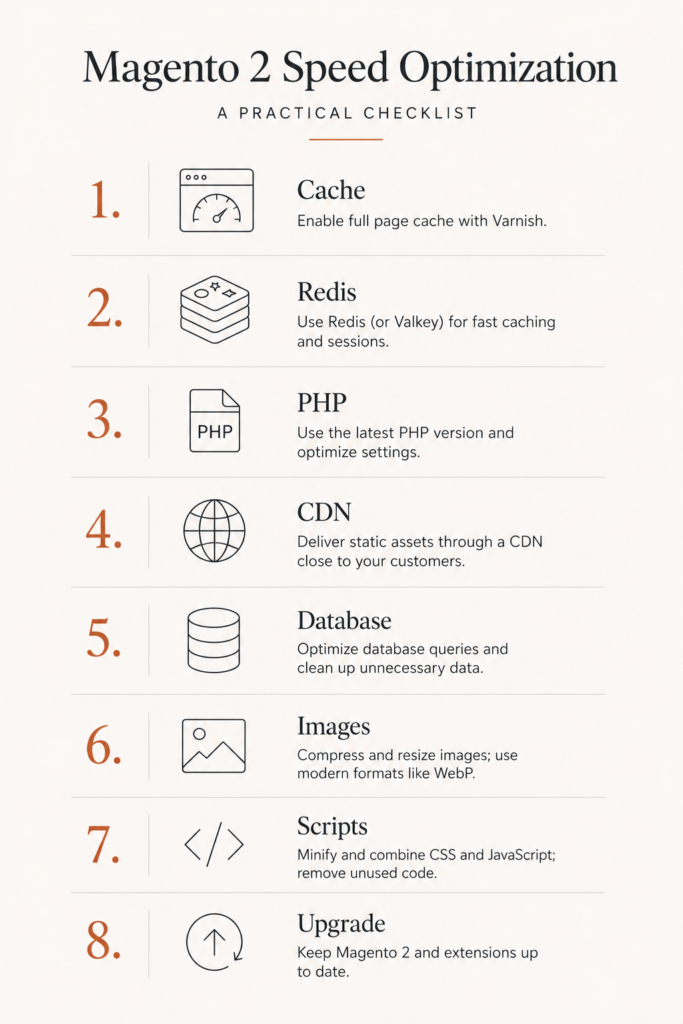
My Magento 2 speed optimization priority order
Here is exactly how I sequence the work on a store I have never seen before:
- Confirm Varnish full page cache is on and configured correctly.
- Move sessions and cache to Redis 7.2 or Valkey 8.
- Upgrade PHP to 8.4 and enable OPcache.
- Put a CDN in front of static and media assets.
- Tune the database, indexers, and InnoDB buffer pool.
- Compress and lazy load images, then minify and defer CSS and JavaScript.
- Audit and remove dead third party scripts.
- Upgrade to the latest Magento 2.4 minor version on staging.
- Re measure, then repeat on the next slowest template.
Work top to bottom and you fix the expensive structural problems before the cheap cosmetic ones. Most people do this backwards, which is why their store is still slow after a month of effort.
When Magento itself is the problem
Sometimes the honest answer is that Magento is heavier than your business needs. If you run a smaller catalog without complex B2B pricing, multi warehouse logic, or deep ERP integration, you may be paying for a Ferrari engine to drive to the shops. The fastest path to a fast store is then a different platform, not another round of tuning. My Magento to Shopify migration guide walks through doing it without losing your SEO. But if Magento fits your operation, everything above will get you to the speed your customers expect.
FAQ
How fast should a Magento 2 store load?
Aim for a fully interactive page under three seconds, and under two seconds on your highest traffic templates. More than half of mobile users abandon a site that takes longer than three seconds, so that is your hard ceiling, not your target.
What is the single biggest cause of a slow Magento 2 store?
Caching, almost always. An uncached Magento page can take two to five seconds to generate on the server alone. Properly configured Varnish full page cache plus Redis or Valkey usually delivers the largest single improvement.
Does upgrading PHP really speed up Magento?
Yes, significantly. Moving from PHP 7.4 to PHP 8.3 or 8.4 typically delivers a 30% to 40% speed gain on Magento workloads, and 8.4 is the recommended version for Magento 2.4.8. It is one of the highest return changes you can make on a legacy store.
Is Valkey better than Redis for Magento?
For new installs on Magento 2.4.8, Valkey 8 is now the recommended choice. It shows higher throughput and lower tail latency than comparable Redis, and a cleaner open source license. Existing Redis 7.2 setups still work fine, so there is no urgency to migrate a healthy store.
How do I optimize Magento images without breaking quality?
Convert images to WebP or AVIF, size them to their actual display dimensions, and enable lazy loading. Since images are 50% to 70% of page weight on most Magento stores, this is where the biggest front end savings live, with no visible quality loss when done correctly.
The takeaway
A slow Magento store is not a permanent condition. It is a stack of fixable problems that almost always live in the same places: caching, server and PHP, the database, and bloated front end assets. Fix them in that order and three seconds is achievable, even on a large catalog.
If you would rather not spend a month learning Varnish and InnoDB tuning, that is exactly the work I do. I will audit your store, find where the seconds are leaking, and tell you straight whether to optimize Magento or move off it. Book a call or grab a free audit at javaid.dev/contact.

Comments are reviewed before they appear, so yours will not show up straight away. Your email is never published.