
You finally decide to modernize your store, you swap in the new WooCommerce checkout blocks, and the next morning your payment gateway is missing, your Meta pixel stopped counting purchases, and a customer emails to say they could not check out at all. That is the nightmare every WooCommerce store owner is quietly afraid of, and it is exactly why most of you are still running the same classic shortcode checkout you set up years ago.
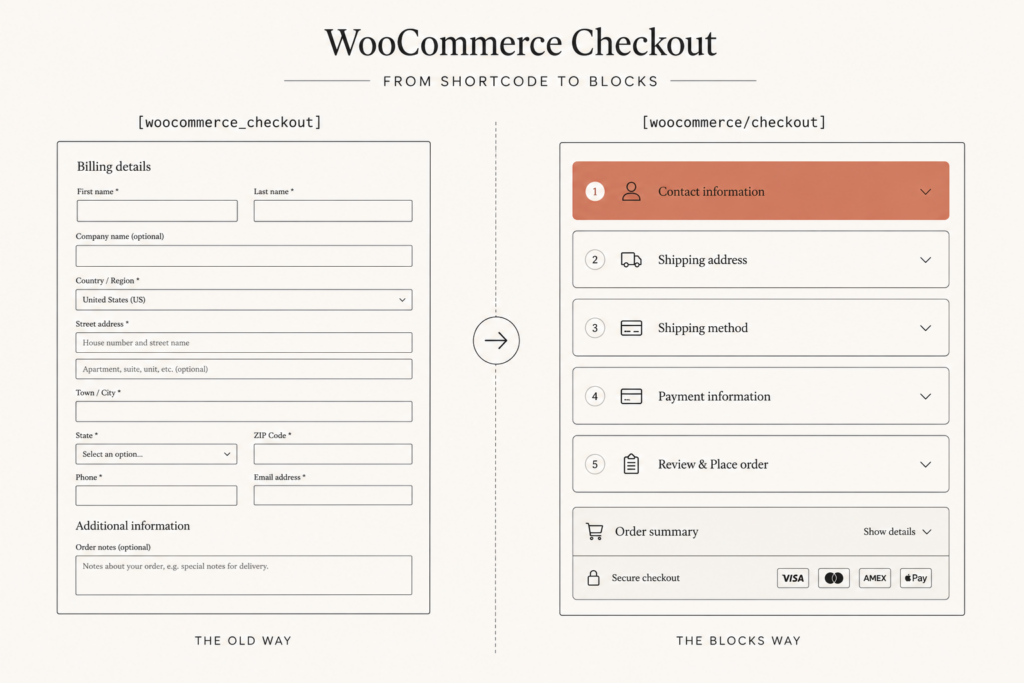
Here is the truth. The WooCommerce checkout blocks are not optional forever, and the classic shortcode is on borrowed time. But you do not have to gamble your revenue to make the switch. In this guide I will walk you through how I migrate real stores from the legacy [woocommerce_checkout] shortcode to the block checkout without losing payments, tracking, or conversions, and how to roll back in one click if something looks wrong.
Why WooCommerce checkout blocks matter now
The checkout block has technically existed since November 2023. Yet most merchants are still sticking with the classic shortcode checkout, and I get why. It works, it is paid for, and nobody wants to touch the one page that takes the money.
But the ground is shifting under you. WooCommerce 10.6 shipped on March 10, 2026 with a batch of Cart and Checkout block enhancements designed to accelerate migration off the legacy shortcode. Every new theme, extension, and doc now assumes you are on blocks. The classic checkout is moving from “the default” to “the legacy fallback,” and legacy fallbacks do not get attention forever.
The takeaway: you are not choosing whether to migrate, you are choosing whether to do it on your schedule or in a panic later.
There is also a real conversion case, not just a maintenance one. The block checkout ships with a modern, responsive layout that adapts far better to mobile, native express wallets, and real-time field updates through the Store API. Those are not cosmetic. They map directly to money, and I will get to the numbers in a second.
The real reason most stores are still on the shortcode
Let me name the actual blocker, because it is not laziness. It is plugin compatibility.
The classic checkout runs on PHP. The block checkout runs on JavaScript and React. That single architectural difference breaks a huge amount of older customization. If you ever added custom fields with woocommerce_checkout_fields, overrode a checkout template in your theme, or installed a plugin that hooks into the old PHP actions, none of that carries over automatically.
The most common casualties I see during a migration:
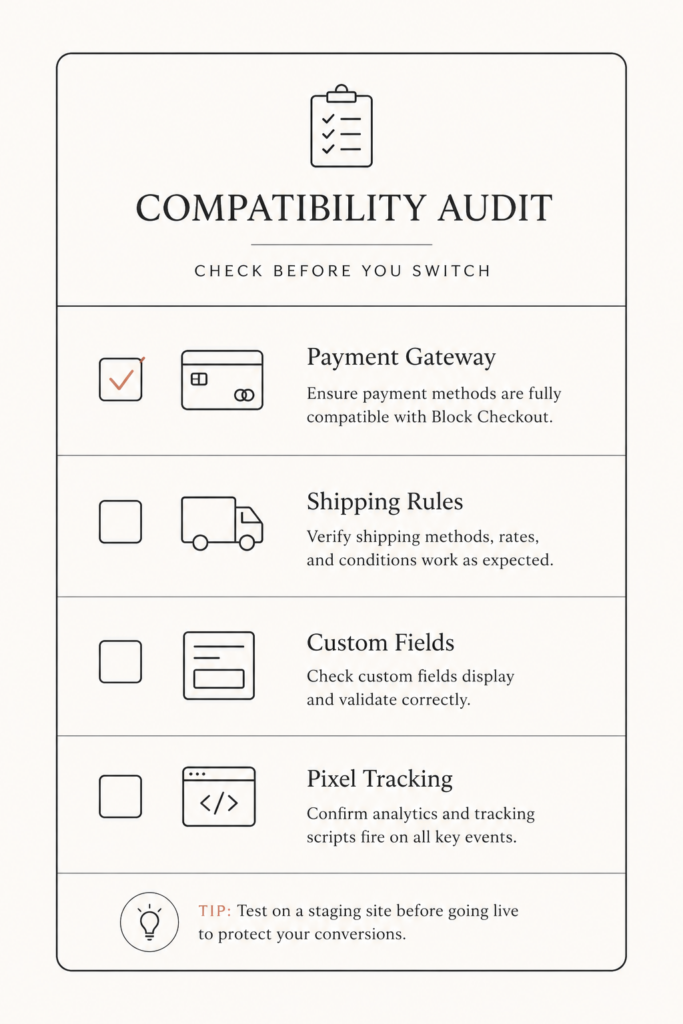
- Payment gateways that have not shipped block support. If your gateway is not registered through the blocks-registry API, it simply will not appear as an option on the block checkout. Customers reach the final step and there is nothing to click.
- Shipping and fee plugins built on the old hooks, which stop adjusting totals.
- Custom checkout fields added through PHP, which silently vanish.
- Tracking pixels listening on legacy jQuery events like
added_to_cartandwoocommerce_checkout_init, which stop firing the moment you switch. Your AddToCart and InitiateCheckout events go dark, and your ad platforms start optimizing on bad data.
That last one is brutal because it is invisible. The store looks fine, orders still come in, but your Meta and Google campaigns slowly lose their signal. If you run paid traffic, read my notes on GA4, Meta and LinkedIn conversion tracking before you flip the switch.
The numbers that make the migration worth it
So why bother at all? Because checkout is where your money leaks, and the block checkout closes several of those leaks by default.
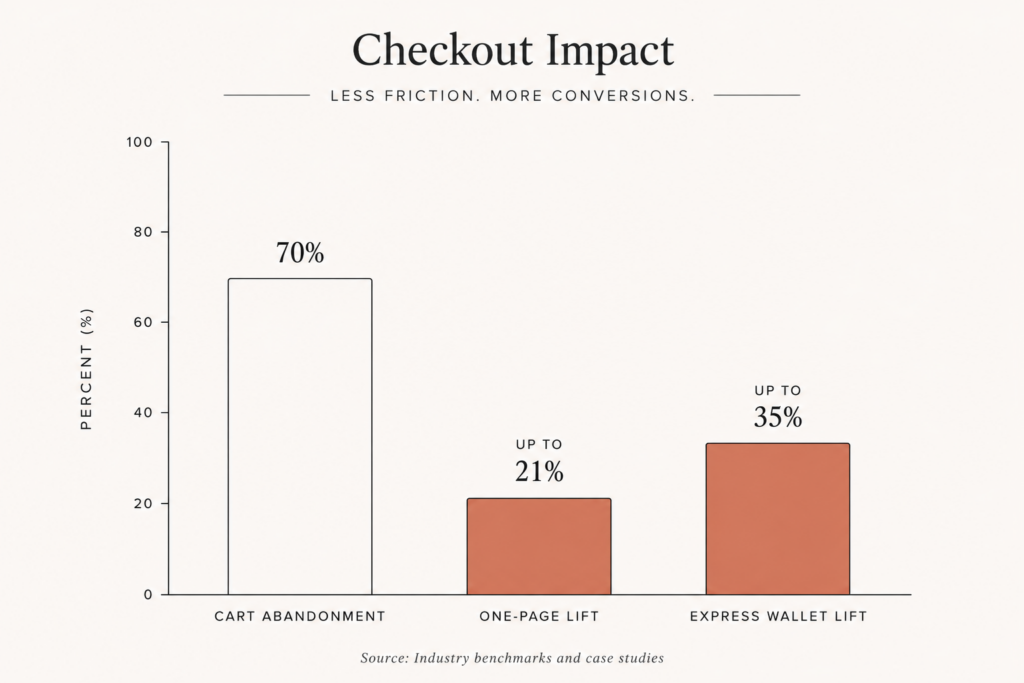
Start with the baseline. The Baymard Institute pegs average cart abandonment at 70.22% across ecommerce in 2026. Mobile runs even worse at 75 to 85%, while desktop sits around 66 to 69%. So roughly seven of every ten people who add to cart never finish, and the worst offenders are on phones, which is exactly where the old shortcode layout struggles most.
Now layer on what a modern, well-built checkout does:
- One-page checkout can lift conversion by up to 21% over a clunky multi-step flow, and stores moving to a properly designed single-page checkout typically see 12 to 30% better completion, with the biggest gains on mobile.
- Express wallets skip about 90% of the manual form. Merchants who enable Apple Pay and Google Pay through WooPayments or Stripe report up to 35% higher mobile conversion. The block checkout supports these natively through the express payment area.
- Speed is conversion. Industry data in 2026 shows that for every 100 milliseconds of checkout latency, conversion can drop by up to 7%. A lean block checkout that updates totals through the Store API, instead of a full page reload, shaves real time off each step. Pair this with the rest of your speed work in my WooCommerce speed optimization guide.
Bottom line: the block checkout is not just a maintenance upgrade, it is one of the highest-leverage conversion changes available to a WooCommerce store. You just have to land it without breaking anything.
How to migrate to WooCommerce checkout blocks, step by step
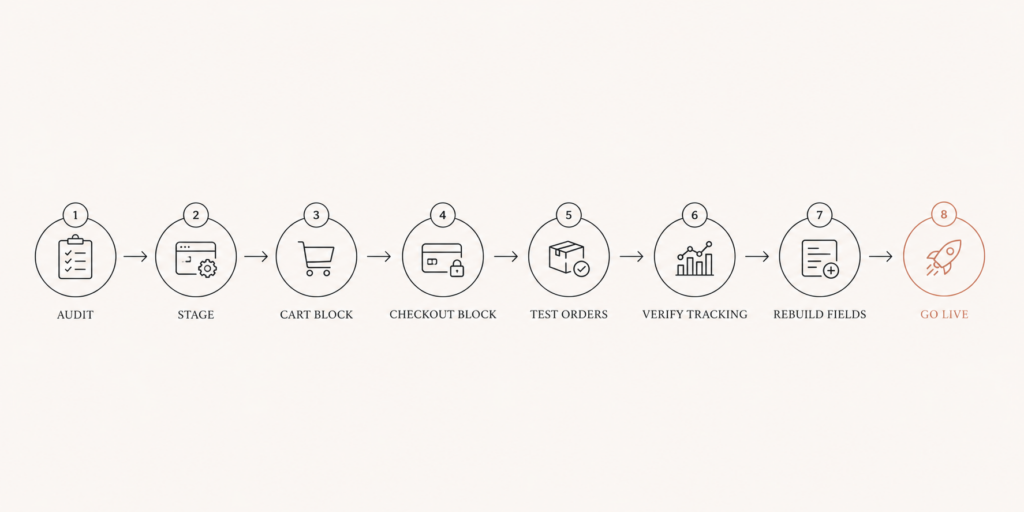
Here is the process I run on client stores. Do not skip the staging step, and do not do this on a Friday afternoon during peak traffic.
Step 1: Audit before you touch anything. Make a list of every plugin that touches cart, checkout, shipping, payments, or tracking. For each one, confirm it explicitly supports the block checkout. Check your payment gateway first, because that is the single most likely thing to break. If your gateway has no block support, stop here and resolve that before going further.
Step 2: Clone to staging. Migrate on a staging copy of the live site, never on production. See the broken things in private, not in front of customers.
Step 3: Swap the cart page. Edit your Cart page, remove the [woocommerce_cart] shortcode, and insert the Cart block from the block inserter. Save and test adding, updating, and removing items.
Step 4: Swap the checkout page. Edit your Checkout page, remove the [woocommerce_checkout] shortcode, and insert the Checkout block. This is the moment of truth.
Step 5: Place real test orders. Run a full order through every payment method you offer. Test a coupon, a virtual product, a physical product with shipping, and a guest checkout. Confirm the order appears correctly in WooCommerce and that the confirmation email fires.
Step 6: Verify your tracking. Open your browser console and your tag manager preview, then confirm AddToCart, InitiateCheckout, and Purchase events all fire on the block checkout. If they do not, your pixels are still bound to the old jQuery hooks and need to be rebound to the block events.
Step 7: Rebuild custom fields and customizations the block way. Anything you previously added with PHP hooks or template overrides has to be rebuilt using the block extensibility APIs. More on that next.
Step 8: Go live, then watch. Push to production during a quiet window and monitor conversion rate, payment success rate, and pixel events for at least 48 hours. If something looks wrong, you have an escape hatch, which I cover in the rollback section.
Customizing the block checkout without breaking it
This is where the classic-checkout muscle memory gets you in trouble. You cannot use woocommerce_checkout_fields or drop a template override into your theme anymore. The block checkout does not read those.
Instead, WooCommerce gives you two main tools. The first is the block extensibility API, built on a pattern called Slots and Fills. WooCommerce defines specific Slots throughout the Checkout block, and your code registers a Fill that injects a custom React component into that slot. Want a gift-message field above the order summary, or a trust badge under the payment section? That is a Fill targeting the right Slot.
The second is the payment method integration through the blocks-registry API (wc.wcBlocksRegistry). This is how both regular and express payment methods register themselves on the block checkout. If you maintain a custom gateway, this is the work you cannot avoid.
The honest tradeoff: this requires JavaScript and React, not just PHP. The recommended setup is to align with WordPress tooling and use @wordpress/scripts for your build. For a one-off field, an Additional Fields plugin or a compatible field manager may be enough. For anything bespoke, you are looking at a real development task, which is the classic build-versus-buy decision I broke down in custom plugin vs off-the-shelf.
Key takeaway: the block checkout is more powerful and more flexible, but the customization happens in JavaScript now, so budget for that shift instead of being surprised by it.
Your one-click rollback if something goes wrong
Here is the safety net that makes this whole thing low-risk. If the block checkout misbehaves on a specific store and you need time to sort it out, you do not have to manually rebuild the page from memory.
Select the Checkout block, open the block toolbar, click the Transform button, and choose Classic Shortcode. WooCommerce converts the block back into a classic shortcode placeholder, restoring your old PHP-based checkout. Do the same for the Cart block if needed.
That means your real plan is: migrate on staging, and if a critical plugin is not ready, fall back to the shortcode on production while you wait for the vendor to ship block support or while you build the integration yourself. You are never trapped. This is also why a clean WooCommerce-to-something-else decision, like the one in my WooCommerce to Shopify migration plan, should only come after you have actually tried the modern WooCommerce stack, not before.
FAQ
Is the classic WooCommerce shortcode checkout being removed? Not immediately, but it is now treated as the legacy option while the block checkout is the default direction. WooCommerce 10.6 in March 2026 added enhancements specifically to push migration along. Plan to move on your own timeline rather than waiting for a forced cutover.
Will migrating to WooCommerce checkout blocks break my payment gateway? It can, if your gateway has not added block support. Gateways must register through the blocks-registry API to appear on the block checkout. Always confirm your gateway supports blocks on a staging site before going live.
Do WooCommerce checkout blocks improve conversion rate? They can, mainly through better mobile layout, native express wallets like Apple Pay and Google Pay, and faster Store API updates. One-page checkouts can lift conversion by up to 21%, and express wallets report up to 35% higher mobile conversion, though your actual result depends on your store.
Why did my tracking pixels stop working after switching to the block checkout? Because many pixels listen on legacy jQuery events like added_to_cart and woocommerce_checkout_init, which do not fire on the block checkout. You need a tracking setup bound to the block events instead, then verify AddToCart, InitiateCheckout, and Purchase all fire before trusting your ad data.
Can I switch back from blocks to the classic shortcode checkout? Yes. Select the Checkout or Cart block, click Transform in the toolbar, and choose Classic Shortcode. WooCommerce restores the shortcode-based page, so you always have a one-click rollback.
Conclusion
The WooCommerce checkout blocks are where the platform is going, and the conversion upside is real, especially on mobile where most of your abandonment lives. The risk is not the blocks themselves. It is migrating blind, on production, with a payment gateway or pixel that quietly breaks. Do it on staging, audit your plugins first, verify tracking, and keep the Transform rollback in your back pocket.
If you would rather have someone run this migration cleanly, protect your tracking, and rebuild any custom fields the block way, that is exactly the kind of WooCommerce work I do every week. Book a call or grab a free audit at javaid.dev/contact and I will tell you honestly whether your store is ready to move.

Comments are reviewed before they appear, so yours will not show up straight away. Your email is never published.