
You opened a new Shopify store, saw a theme you did not recognize, and now you are wondering if your old Dawn knowledge just expired. That is the Shopify Horizon theme, and the confusion is real. Half the advice online tells you to switch immediately, and the other half tells you to never touch it.
I build and rescue Shopify stores for a living, so let me cut through it. Horizon is genuinely the future of Shopify themes. But “the future” and “right for your store today” are two different questions, and conflating them is how merchants waste a month rebuilding something that already worked.
Here is the straight version of what changed, what it costs you, and the one rule I use to decide whether a client should move.
What the Shopify Horizon theme actually is
Horizon launched at Shopify Editions Summer ’25 and got promoted to the flagship default slot with the Winter ’26 release. Translation: every brand-new Shopify store now starts on Horizon, not Dawn.
And merchants are taking it. Within two weeks of launch, 21,197 new active stores had adopted Horizon, which was about 42% of all new active stores on Shopify in that window. That is not a quiet beta. That is the new normal.
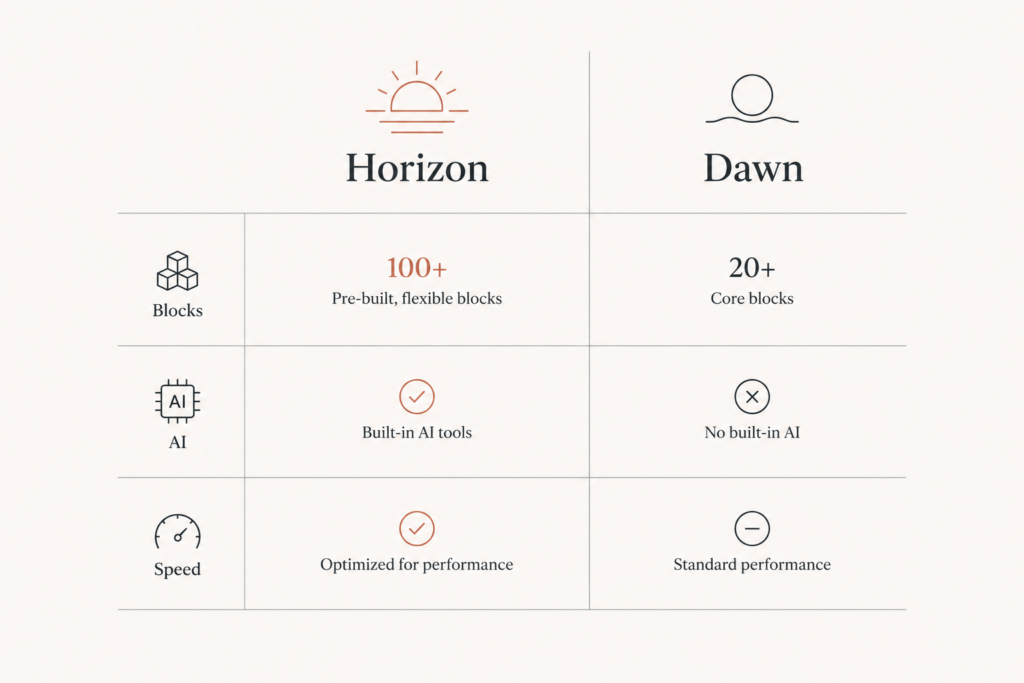
But here is the part most “review” posts gloss over. Horizon is not a redesigned Dawn. It is a different architecture entirely. Dawn is built on Liquid sections. Horizon is built on Web Components with a modular theme-blocks system. Same platform, different engine.
The block system is the real upgrade
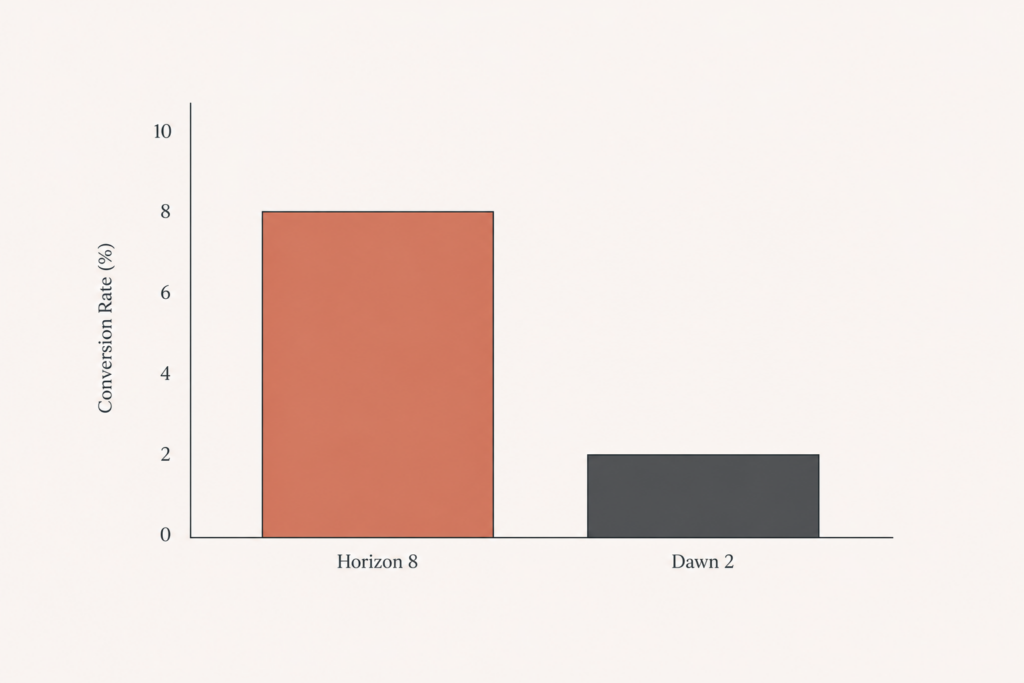
This is where Horizon earns its hype. Dawn topped out at 2 levels of nested blocks. Horizon supports up to 8.
In plain terms: you can build layouts inside layouts inside layouts, all from the theme editor, without a developer touching code for every tweak. Group blocks let you bundle a header, a product grid, and a promo banner into one unit you can move or reuse in a single drag.
The editor itself is faster too. You get hover-to-preview before you add a block, one-click direct text editing on the canvas, and copy-paste of blocks across templates. If you live in the theme editor a few hours a week, this alone changes your day.
Then there is Shopify Magic, the AI layer. You describe a custom block in plain English, and Horizon generates the HTML, CSS, and Liquid for it. It is not magic-magic (you still need taste and QA), but for simple sections it removes a real bottleneck. If you are tracking where AI is genuinely useful in commerce, this is one of the clearer wins.
What the Shopify Horizon theme actually is
Horizon launched at Shopify Editions Summer ’25 and got promoted to the flagship default slot with the Winter ’26 release. Translation: every brand-new Shopify store now starts on Horizon, not Dawn.
And merchants are taking it. Within two weeks of launch, 21,197 new active stores had adopted Horizon, which was about 42% of all new active stores on Shopify in that window. That is not a quiet beta. That is the new normal.
But here is the part most “review” posts gloss over. Horizon is not a redesigned Dawn. It is a different architecture entirely. Dawn is built on Liquid sections. Horizon is built on Web Components with a modular theme-blocks system. Same platform, different engine.
The block system is the real upgrade
This is where Horizon earns its hype. Dawn topped out at 2 levels of nested blocks. Horizon supports up to 8.
In plain terms: you can build layouts inside layouts inside layouts, all from the theme editor, without a developer touching code for every tweak. Group blocks let you bundle a header, a product grid, and a promo banner into one unit you can move or reuse in a single drag.
The editor itself is faster too. You get hover-to-preview before you add a block, one-click direct text editing on the canvas, and copy-paste of blocks across templates. If you live in the theme editor a few hours a week, this alone changes your day.
Then there is Shopify Magic, the AI layer. You describe a custom block in plain English, and Horizon generates the HTML, CSS, and Liquid for it. It is not magic-magic (you still need taste and QA), but for simple sections it removes a real bottleneck. If you are tracking where AI is genuinely useful in commerce, this is one of the clearer wins.
The catch nobody wants to say out loud: performance
Now the part that matters for revenue. Horizon is built to prioritize Interaction to Next Paint (INP) and Largest Contentful Paint (LCP) out of the box, with smarter asset loading and script deferral. On paper, that is exactly what you want.
In practice, today, there is a mobile performance gap. Right now Horizon trails Dawn by roughly 30 mobile PageSpeed points. That is not a rounding error. On a slow phone connection, that gap is the difference between a sale and a bounce.
Here is the nuance that makes it a timing call, not a verdict:
- Horizon has been gaining roughly 5 mobile PageSpeed points per quarter since launch.
- Dawn is mature and basically flat (it is not getting faster).
- By Q4 2026, the expected gap is 10 to 15 points, not 30.
- By 2027, the expectation is rough parity.
So the architecture is sound and the trajectory is up. You are just looking at a theme that is still closing the distance on a four-year-old, battle-hardened one. Whatever theme you run, the same speed fundamentals apply, and I walk through them in my guide on getting a Shopify store under 3 seconds in 2026 and the Core Web Vitals checklist.
There is no migration button, so switching means rebuilding
This is the cost most merchants underestimate. Shopify did not build an automatic Dawn-to-Horizon migration, and they were not being lazy. The architectures do not translate. A Horizon block tree has no equivalent in Dawn’s section model, and vice versa.
So when you “switch,” you are not flipping a setting. You are rebuilding your pages on a new system. Your custom sections, your app embeds, your carefully tuned product templates: those get reconstructed, not copied. Plan accordingly, the same way you would plan any platform-level change with a hard cutover.
It also still has rough edges. Plenty of merchants report small bugs and quirks that come with a fast-moving, weekly-updated theme. That settles over time, but it is real today.
Will your apps and integrations survive the move?
This is the question I get asked least and worry about most. Because Horizon runs on Web Components and theme blocks, app embeds and theme-app extensions do not always behave the way they did on Dawn. Most well-built apps that use the official app-block and app-embed APIs carry over fine. The trouble shows up with older apps that injected custom Liquid or hard-coded snippets into Dawn sections, because those hooks may simply not exist in Horizon.
So before you commit to a rebuild, do a quick inventory. List every app that touches your storefront: reviews, upsells, wishlists, currency switchers, subscription widgets, and tracking pixels. Then check each one against the developer’s Horizon compatibility notes. The apps that break are predictable, and finding out on a staging theme is a free afternoon. Finding out on your live store during a sale is not.
A clean approach is to duplicate your theme, build the Horizon version on the copy, and test every app and checkout path before you ever publish. You keep selling on Dawn the entire time, and you flip the switch only when the new build is genuinely ready.
My honest rule for 2026
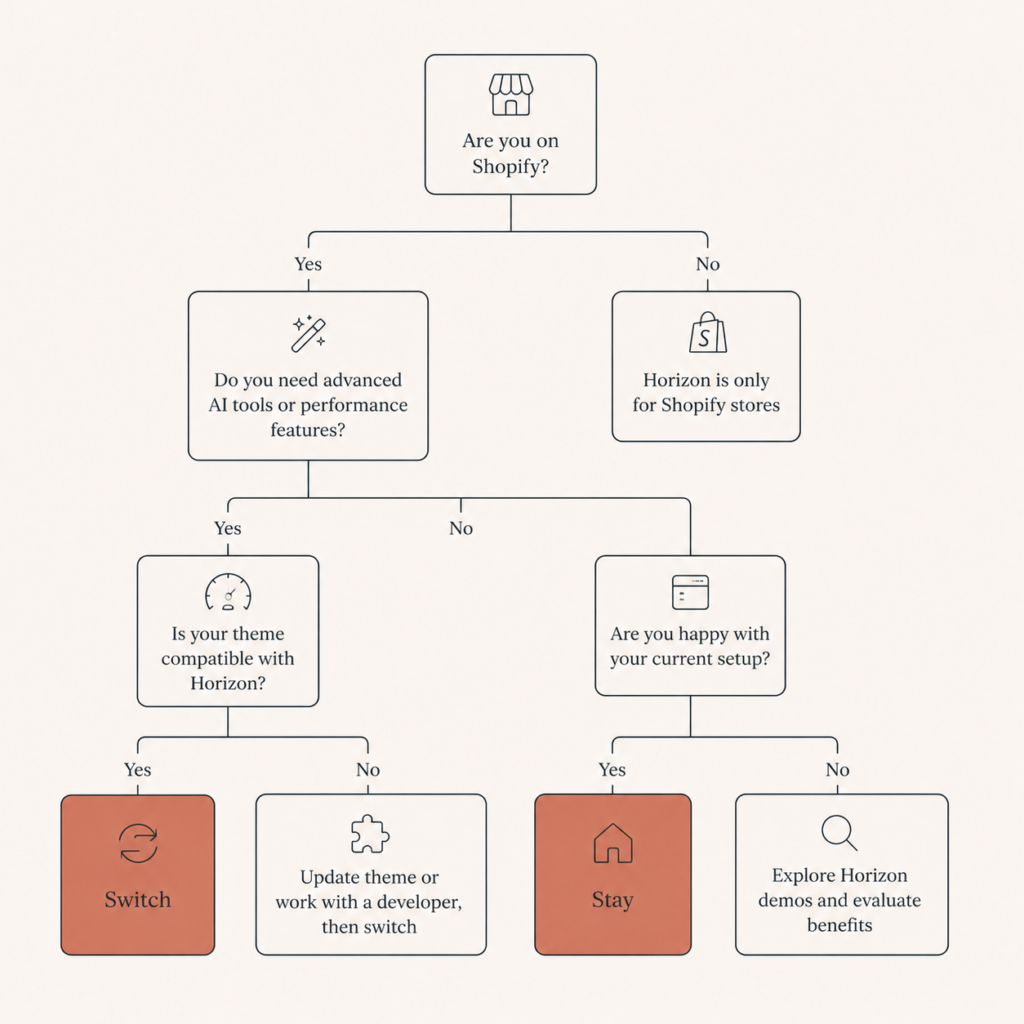
Strip away the noise and the decision is simple. Here is how I advise clients right now.
- Brand-new store? Start on Horizon. You get the modern editor and AI blocks, and you are building on the platform Shopify will invest in for the next 18 months. No reason to start on a theme that is being phased out of the spotlight.
- Mature Dawn store with a custom design that converts? Stay on Dawn for now. Migrating costs you a full rebuild, and the mobile speed gap is too large to absorb without a strong reason. Revisit in about six months.
- Already planning a redesign or a big campaign? Build the new version on Horizon. If you are rebuilding anyway, do it on the future, not the past.
- You spend hours weekly in the theme editor? The copy-paste, group blocks, and AI generation may justify the move sooner, especially for editorial or lifestyle catalogs under about 200 SKUs.
One more practical note: Horizon shines for fashion and lifestyle brands where visuals and story drive the experience. In testing on catalogs over 500 products, the shopping flow got cumbersome. If you run a large catalog, weight that heavily, or consider whether headless is the better long-term answer.
The bottom line
The Shopify Horizon theme is where the platform is heading, and the block system is a real, daily-life upgrade for anyone who builds pages. The only thing holding it back is a temporary mobile performance gap that is closing about 5 points a quarter. Match the move to your situation instead of the hype, and you will not waste a rebuild on the wrong timing.
FAQ
Is the Shopify Horizon theme free? Yes. Horizon is a free first-party Shopify theme, and it is now the default for new stores, the same way Dawn was before it.
Should I switch my existing store from Dawn to Horizon? Not automatically. If your Dawn store is mature, custom, and converting, stay for now because there is no automatic migration and a mobile speed gap still exists. Switch when you are already redesigning, or revisit in about six months.
Is Horizon faster than Dawn? Not yet on mobile. Horizon currently trails Dawn by roughly 30 mobile PageSpeed points, but it is gaining about 5 points per quarter, with rough parity expected by 2027. Its INP and LCP architecture is built to win long term.
Can I migrate from Dawn to Horizon automatically? No. Shopify did not build an automatic migration because the architectures differ (Liquid sections versus Web Components and theme blocks). Moving means rebuilding your pages on the new system.
Is Horizon good for large catalogs? It is best for fashion and lifestyle brands under about 200 SKUs. In testing above 500 products, the shopping flow became cumbersome, so large catalogs should weigh that or consider a headless build.
Want a clear call before you rebuild?
If you are staring at Horizon and Dawn and not sure which one earns the work, I can give you a straight answer in 30 minutes, with no pitch. Book a call or get a free audit at javaid.dev/contact, and I will tell you exactly where the speed and money tradeoffs land for your store.
Want a clean move? See my custom Shopify theme build.
Wondering about budget before you switch? See how much a custom Shopify theme costs in 2026.

1 comment
[…] my custom Shopify theme service and the real builds behind it, or read my honest take on the Shopify Horizon theme versus Dawn before you decide what base to start […]
Comments are reviewed before they appear, so yours will not show up straight away. Your email is never published.