
If your Shopify Plus store runs custom discounts, shipping rules, or payment logic through Scripts, you have days, not months. On June 30, 2026, every Shopify Script stops running. There is no grace period and no rollback.
The scary part is how quietly it breaks. No banner. No warning email at checkout. Your custom discount logic just stops applying, and orders go through at the wrong price until someone in finance notices weeks later.
I will give you the timeline, what actually replaces Scripts, and a migration checklist you can start today.
The two dates that matter
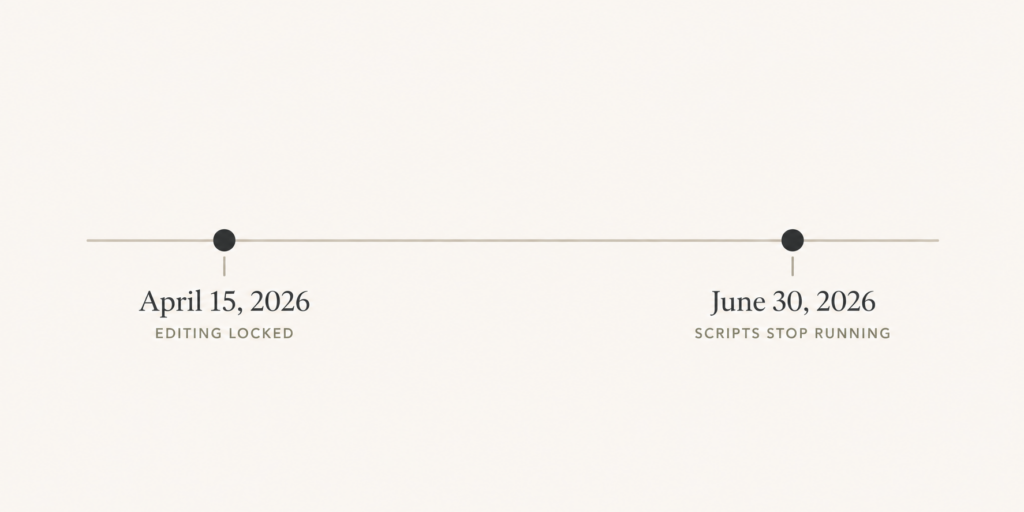
Most merchants only know about the June date. There are really two.
April 15, 2026. Editing and publishing new Scripts was switched off. If you find a bug in a Script after this date, you cannot fix it inside the Script Editor. Your published Scripts keep running, but they are frozen.
June 30, 2026. All Scripts stop executing. Discount logic, shipping rules, payment gating, anything built on Scripts, simply turns off. Customers see standard Shopify behavior instead.
Worth knowing: Shopify has pushed this deadline twice already, from August 2024 to August 2025 to June 2026. They have stated this one is final. Plan as if it holds, because the cost of being wrong is real revenue.
What replaces Scripts
The answer is Shopify Functions. And honestly, it is a better tool.
Scripts ran Ruby code on Shopify’s servers at checkout. Functions run compiled code that is faster, safer, and sandboxed. Shopify reports lower latency and no per-Function fee. They are free to use.
Functions cover the same ground Scripts did: discounts, shipping rate customization, payment method customization, and cart and checkout validation. Over the past two years Shopify has been closing the feature gaps so most Script logic now has a clean Functions equivalent.
There are two paths to get there. You can install a public app from the App Store that contains the Function you need, which works on any plan. Or, if you are on Plus, you can build a custom app with your own Functions for logic that no app covers.
Step-by-step migration checklist
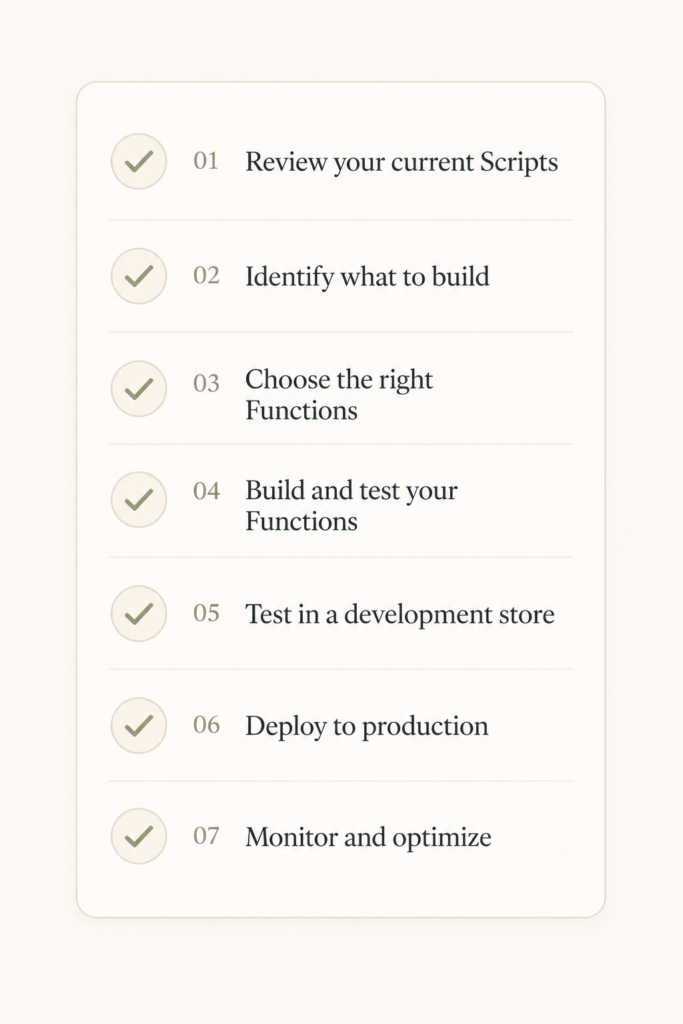
Here is the order I would work in. Do not try to rewrite everything at once.
1. Run the Scripts customizations report. Shopify gives you a report that lists every Script your store runs and flags which ones a public app or Function can replace. This is your map. Start here.
2. Sort your Scripts into three buckets. Dead Scripts you can just delete. Simple cases a public app already handles. Complex, high-risk logic like wholesale tiers and stacked promotions that needs careful rebuilding. Tackle them in that order, easy to hard.
3. Handle the quick wins with apps. For common discount and shipping rules, there is probably an App Store option that does the job. No code needed. Knock these out first to shrink your list fast.
4. Rebuild the complex logic as Functions. This is the real engineering work. B2B pricing tiers, conditional discounts based on customer tags, and complex stacking rules take time to analyze and rebuild correctly. Budget for it.
5. Test in a development store first. Always. Build and run your Functions in a dev store before they touch production. Checkout bugs are expensive bugs.
6. Run both systems in parallel briefly. Deploy your Functions to production and watch them alongside the existing setup for a couple of weeks. Compare the discount and shipping outputs to catch any mismatch before Scripts switch off.
7. Monitor after cutover. Keep an eye on error logs and order totals for the first weeks. Have a plan for fixing anything that slips through.
How long this really takes
For a mid-sized Plus store, a full migration runs roughly three to five weeks once someone starts. If your checkout logic is simple, you have more runway than you think. If it is complex, you have less, and developer availability is tightening as the deadline closes in.
The math is simple. The deadline is fixed at June 30. Migration takes weeks. So the right time to start was last month, and the second-best time is today.
Don’t ignore the Summer Editions while you’re in there
Shopify runs its Editions showcase twice a year, in winter and summer, and each drops a pile of new features. The Winter 2026 Edition already shipped a major upgrade to Sidekick, turning it from a help chatbot into an assistant that can execute multi-step tasks like creating a discount and drafting the announcement email from a single prompt.
Since you are already in your checkout and discount setup for the migration, it is a good moment to see what native tools can now replace the apps you have been paying for. A lot of merchants are using the Scripts cutover as a reason to audit their whole app stack and cut the monthly bloat.
The takeaway
June 30, 2026 is a hard stop with no warning at checkout. Run the customizations report this week, sort your Scripts into delete, app, and rebuild, and start with the easy wins so your list shrinks fast.
Functions are faster, free, and the right long-term home for your logic. The only real risk here is waiting too long to move.
Short on time? See my Shopify Scripts to Functions migration help for an emergency plan.

2 comments
[…] So when you “switch,” you are not flipping a setting. You are rebuilding your pages on a new system. Your custom sections, your app embeds, your carefully tuned product templates: those get reconstructed, not copied. Plan accordingly, the same way you would plan any platform-level change with a hard cutover. […]
[…] broke down the full timeline and the technical detail in my longer migration guide. If you still have live Scripts, do not wait for the deadline to make the decision for you. Tell me […]
Comments are reviewed before they appear, so yours will not show up straight away. Your email is never published.