
You are about to spend real money building a store, and you cannot tell whether Webflow or Wix is the platform that will carry your revenue or quietly cap it. That is the worst place to make a decision from, because both look gorgeous in the demo and both promise everything. I build and rescue ecommerce stores for US and UK retailers, and I have watched founders pick the wrong one and pay for it in transaction fees, lost SEO, and a replatform eighteen months later.
So let me settle the Webflow vs Wix for ecommerce question the way I would on a paid call. No platform loyalty, just where the money leaks and where it does not.
Here is the short version. Wix (specifically Wix Studio) is the easier, cheaper path to a working store, and Webflow is the more flexible, design-led path that costs you in setup and product limits. The right answer depends on what you are actually selling. Stay with me, because the details are where people get burned.
The honest one-line summary
If you want a store live this month, with abandoned cart recovery, subscriptions, and dropshipping built in, lean Wix. If you want pixel-perfect design control, clean code output, and you are running a smaller, curated catalog where brand experience drives the sale, lean Webflow.
That is the headline. Now the receipts.
Pricing and fees: where Wix quietly wins
This is the part most comparison posts blur, so read closely.
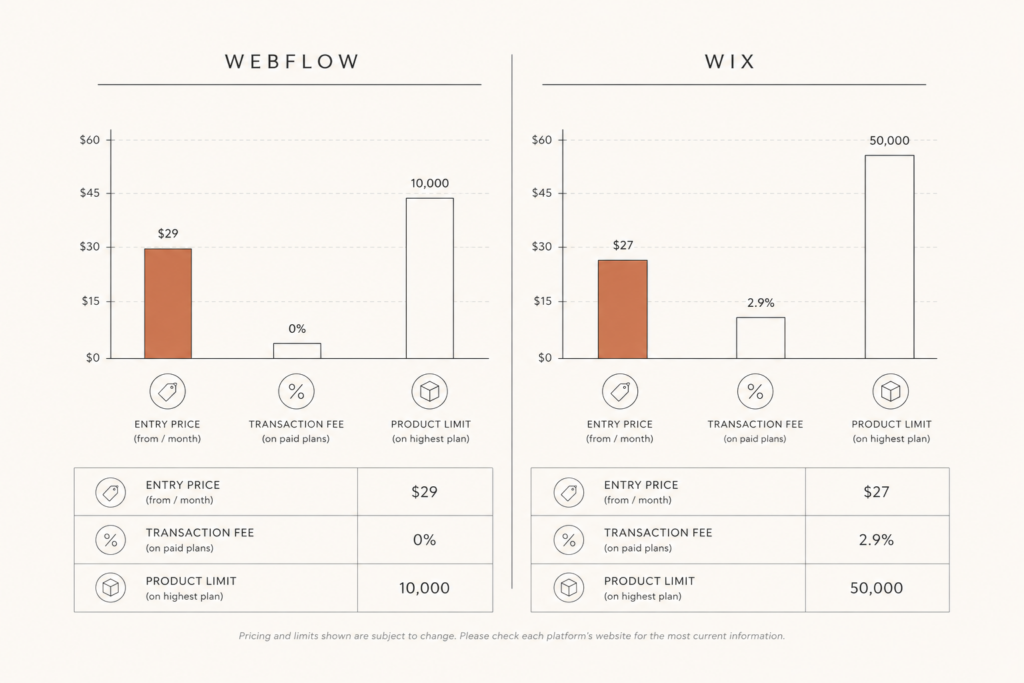
Wix includes ecommerce from its Core plan at around $29 per month, and crucially charges zero platform transaction fee. You still pay the normal payment processor cut (roughly 2.9% plus $0.30 per transaction in the US through Wix Payments), but Wix does not take an extra slice on top.
Webflow is different. Its Standard ecommerce plan also starts around $29 per month, but that tier carries a 2% transaction fee and caps you at 500 products. To remove that 2% fee you have to jump to the Plus plan at roughly $74 per month, and the Advanced plan at about $212 per month is what unlocks the bigger catalog and uncapped sales volume.
That 2% is not a rounding error. On $100,000 of annual sales, Webflow’s entry tier quietly takes $2,000 before you have paid your processor. Wix takes none of that. If margin matters to you (and in ecommerce it always does), this single line can decide the whole comparison.
Product limits and scale
Here is the trap nobody warns first-time builders about.
Webflow’s cheapest ecommerce plan holds 500 products. That is fine for a curated jewelry line or a focused DTC brand, and genuinely painful for anyone with variants, bundles, or a growing catalog. You climb to 5,000 products on Plus and around 15,000 on Advanced.
Wix goes much higher. Wix Stores supports up to 50,000 products on its top tier, which is more headroom than most independent retailers will ever use.
So if you are building a small, story-driven catalog, Webflow’s limit is irrelevant and its design freedom matters more. If you are running a broad inventory, dropshipping, or print-on-demand, Wix gives you room to grow without a forced upgrade. This is the same scale-versus-control trade I covered in my Shopify vs WooCommerce breakdown, just with different names on the boxes.
Built-in features vs build-it-yourself
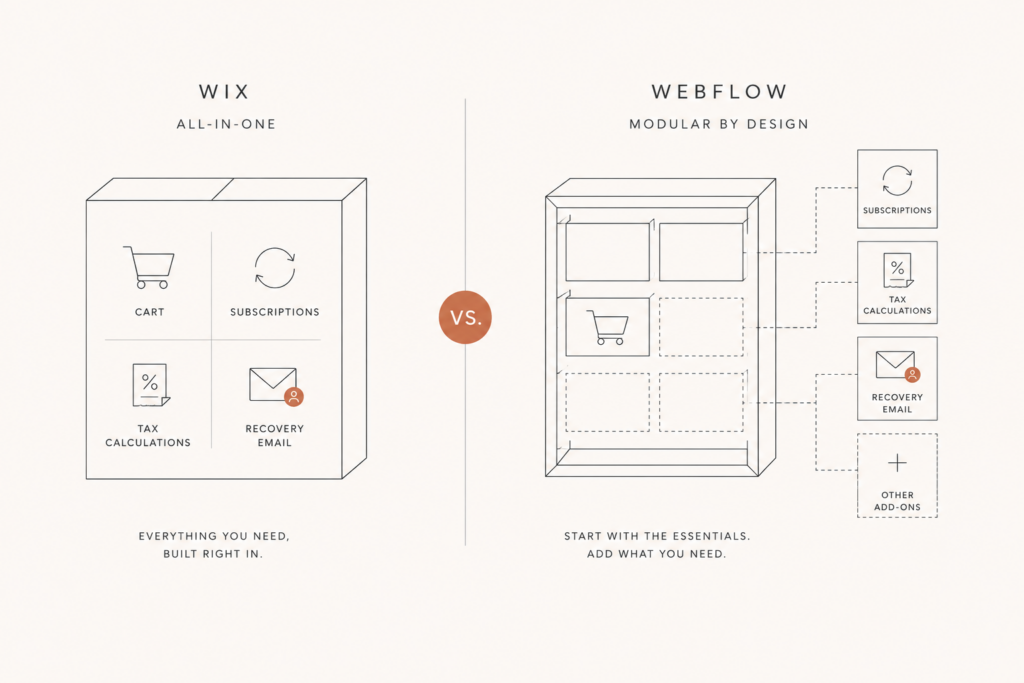
Wix is an all-in-one. The store features you actually need on day one are already in the box:
- Abandoned cart recovery (on the Business tier and above), which alone can recover a meaningful slice of lost checkouts
- Subscription and recurring-payment selling from the Core plan up
- Native dropshipping and print-on-demand through Modalyst, Spocket, Printful, and Printify
- Built-in automated sales tax, loyalty apps, and review widgets through the Wix App Market
Webflow takes the opposite philosophy. Its ecommerce is intentionally lean and leans on integrations and custom work for advanced functionality. You get total control over the cart, the product template, and the checkout styling, but features like sophisticated subscriptions or abandoned cart flows often mean third-party tools or custom logic.
Translation: Wix hands you a working machine. Webflow hands you a beautiful chassis and assumes you (or a developer) will fit the engine you want. Neither is wrong. They are aimed at different buyers.
SEO and Core Web Vitals: the part that decides traffic
If organic traffic is your plan, this section matters more than price.
Webflow has a strong reputation here for a reason. Its hosting runs on AWS and Fastly with a global CDN, automatic SSL, and clean semantic markup. According to 2026 benchmarks from agencies tracking the platform, optimized Webflow sites hit mobile PageSpeed scores of 84 or higher, with faster LCP than typical WordPress builds and competitive CLS. The code output is tidy, which search engines and the newer AI crawlers both reward.
But here is the nuance most posts skip: Webflow does not automatically pass Core Web Vitals. The real-world INP problems I see on Webflow stores come from heavy page animations, marketing pixels, chat widgets, and custom JavaScript stacking up. The platform gives you a fast foundation, then lets you slow it down. If you want the full picture on why INP is now the metric that bites, my Core Web Vitals checklist walks through the same failure points.
Wix has improved enormously, and Wix Studio in particular produces far cleaner, faster output than the old Wix many developers still mock. It is genuinely good for straightforward stores. For a heavy, animation-rich, content-led brand site where you want to win competitive keywords, Webflow still edges ahead on raw technical SEO ceiling. For a normal store that just needs to be fast and indexed, Wix is more than enough.
Key takeaway: Webflow has a higher SEO ceiling, Wix has a higher SEO floor. Webflow rewards a developer’s hand. Wix protects a non-developer from themselves.
Ease of use and who actually maintains it
Be honest with yourself about who edits this store after launch.
Wix is built for the owner-operator. The editor is forgiving, the dashboard is friendly, and you can add a product, run a promo, or fix a typo without calling anyone. That independence has real dollar value over a year.
Webflow has a steeper curve. It is closer to a visual development tool than a drag-and-drop builder, which is exactly why agencies and developers love it and why some founders feel stranded in it. The CMS and editor are powerful, but the design side assumes comfort with concepts like the box model, classes, and breakpoints.
So ask the practical question: after I pay for this build, will I be able to run it myself, or am I signing up for ongoing developer time? Wix lowers your maintenance cost. Webflow raises your design ceiling. Pick the trade you can live with.
Market reality check
A quick gut-check with real numbers, because hype distorts this debate.
Wix powers roughly 4.3% of all websites and grew about 32.6% year over year, with more than 260 million registered users. Webflow accounts for around 0.9% of all websites with about 3.5 million users and 45,000 paying customers, and it is the fastest-growing builder in the developer-focused segment.
What that tells you: Wix is the mainstream, proven, owner-friendly choice at massive scale. Webflow is the smaller, sharper, design-led tool growing fast among professionals. Both are safe bets. They are simply built for different hands.
So which should you build on?
Here is how I would advise a client in one breath.
- Choose Wix (Wix Studio) if you want to launch fast, sell a broad or growing catalog, need built-in abandoned cart and subscriptions, plan to dropship, and want to run the store yourself without a developer on retainer.
- Choose Webflow if you sell a curated, brand-led catalog, you care deeply about pixel-perfect design and clean code, you are chasing competitive organic rankings, and you have a developer (or me) to set it up and keep it fast.
- Choose neither if you are scaling past tens of thousands of SKUs, need heavy native subscriptions, or want the deepest checkout control. At that point a dedicated commerce platform earns its keep, and that is a different conversation.
Whatever you pick, the platform is only half the job. A fast, well-structured build, a clean product feed, and a checkout that does not leak is what actually moves revenue. I have seen a great platform wasted by a sloppy build and a modest platform punch far above its weight because the build was disciplined.
FAQ
Is Webflow or Wix better for ecommerce? Wix is better for most owner-run stores because it includes more ecommerce features out of the box, charges no platform transaction fee, and supports up to 50,000 products. Webflow is better for design-led, smaller catalogs where pixel control and clean code matter more than built-in features.
Does Webflow charge transaction fees on ecommerce? Yes, on its entry Standard plan Webflow charges a 2% transaction fee on top of your payment processor’s cut. You remove that fee by upgrading to the Plus or Advanced plans. Wix charges no platform transaction fee on its business plans.
How many products can you sell on Webflow vs Wix? Webflow caps the Standard plan at 500 products, with higher tiers reaching about 5,000 and 15,000. Wix Stores supports up to 50,000 products on its top tier, which gives broad or dropshipping catalogs far more room.
Is Wix or Webflow better for SEO? Webflow has a higher technical SEO ceiling thanks to clean code and fast AWS and Fastly hosting, which suits competitive organic strategies. Wix Studio is genuinely fast and indexes well for typical stores. Both can pass Core Web Vitals, but only if you control animations, scripts, and third-party widgets.
Can I move from Wix or Webflow to another platform later? Yes, but migrations cost time and can risk SEO if redirects are handled poorly. That is why picking the right platform up front, and exporting your data cleanly, matters. Plan the build around where you expect to be in two years, not just launch day.
Conclusion
The Webflow vs Wix for ecommerce decision is not about which platform is “best.” It is about which trade fits your store. Wix gives you a faster, cheaper, more self-sufficient path with features in the box. Webflow gives you a higher design ceiling and cleaner code, at the cost of fees, product limits, and a steeper learning curve.
Match the platform to your catalog, your margin, and who maintains the store after launch, and you will avoid the expensive replatform most founders learn about the hard way.
If you want a second opinion before you commit, I build and audit stores on both. Get a free, no-pitch read on which platform actually fits your business at javaid.dev/contact, and if you are weighing a calculator or quote tool on either platform, my quote calculator guide and WordPress calculator buyer’s guide are good next reads.

Comments are reviewed before they appear, so yours will not show up straight away. Your email is never published.