
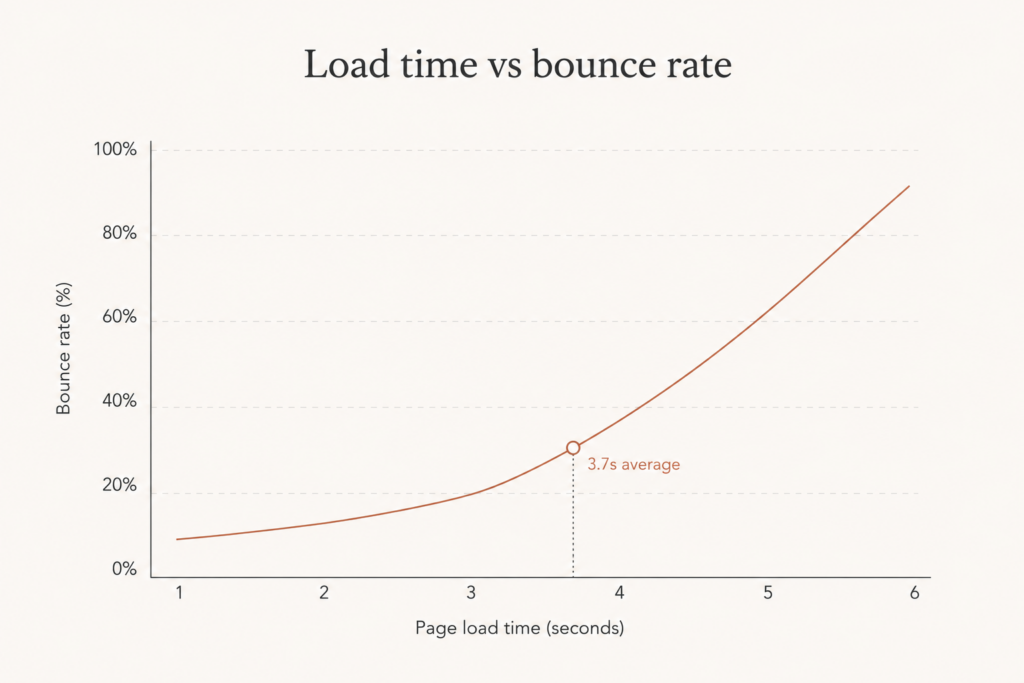
Your WooCommerce store is losing money every second it makes a visitor wait. Around 53% of mobile shoppers abandon a site that takes longer than three seconds to load, and the average WooCommerce store currently sits at 3.7 seconds. Do the math and you realize your homepage is quietly bleeding sales before a single product even renders.
Here is the truth: most WooCommerce stores are slow not because WordPress is broken, but because nobody fixed the obvious bottlenecks. That is good news for you. WooCommerce speed optimization in 2026 is mostly a checklist, not a miracle.
In this guide I will walk you through exactly how I get client stores under three seconds, with the specific numbers and tools that move the needle. Let’s get into it.
Why WooCommerce Speed Optimization Matters More Than Ever.
Speed stopped being a vanity metric long ago. It is tied directly to revenue and to where you rank in Google.
The data is brutal. A 100-millisecond delay can drop conversion rates by 7%, and a two-second delay increases bounce rates by 103%. That is a business problem, not a technical inconvenience.
Then there is Google. Core Web Vitals are a confirmed ranking signal, and Google now grades your store on three metrics:
- LCP (Largest Contentful Paint): how fast your main content loads. Target under 2.5 seconds.
- INP (Interaction to Next Paint): how quickly the page responds to a tap or click. Target under 200 milliseconds.
- CLS (Cumulative Layout Shift): how stable the layout is as it loads. Target below 0.1.
INP replaced First Input Delay back in March 2024, and it is the metric that trips up most WooCommerce stores, because WooCommerce ships a lot of JavaScript. I covered the same shift on the Shopify side in my piece on getting your store under 3 seconds in 2026, and the lesson carries over: responsiveness now matters as much as raw load speed.
Bottom line: a fast store ranks higher, converts more, and wastes less of your ad budget. Now let’s fix yours.
Start With Hosting, Because Nothing Else Matters If This Is Wrong
You can install every caching plugin on the planet, but if your store lives on cheap shared hosting, you are polishing a slow engine.
Roughly 65% of WooCommerce stores run on shared hosting, and that is the single biggest reason they crawl. Moving to managed or cloud WooCommerce hosting makes a store load two to five times faster on its own. That is the highest-leverage change you can make.
Here is what to insist on in 2026:
- PHP 8.2 or newer. Older PHP versions are dramatically slower, and WooCommerce runs noticeably better on modern PHP. If your host is still serving PHP 7.x, that alone is costing you.
- Managed or cloud hosting built for WooCommerce, not a generic budget plan sharing a server with a thousand other sites.
- Server-level caching and OPcache enabled, so PHP is not recompiling on every request.
- HTTP/2 or HTTP/3 support for faster parallel asset delivery.
If you are weighing a custom setup against an off-the-shelf hosting stack, my breakdown on custom plugin versus off-the-shelf total cost of ownership uses the same TCO thinking you should apply to hosting decisions.
Layer Your Caching Properly
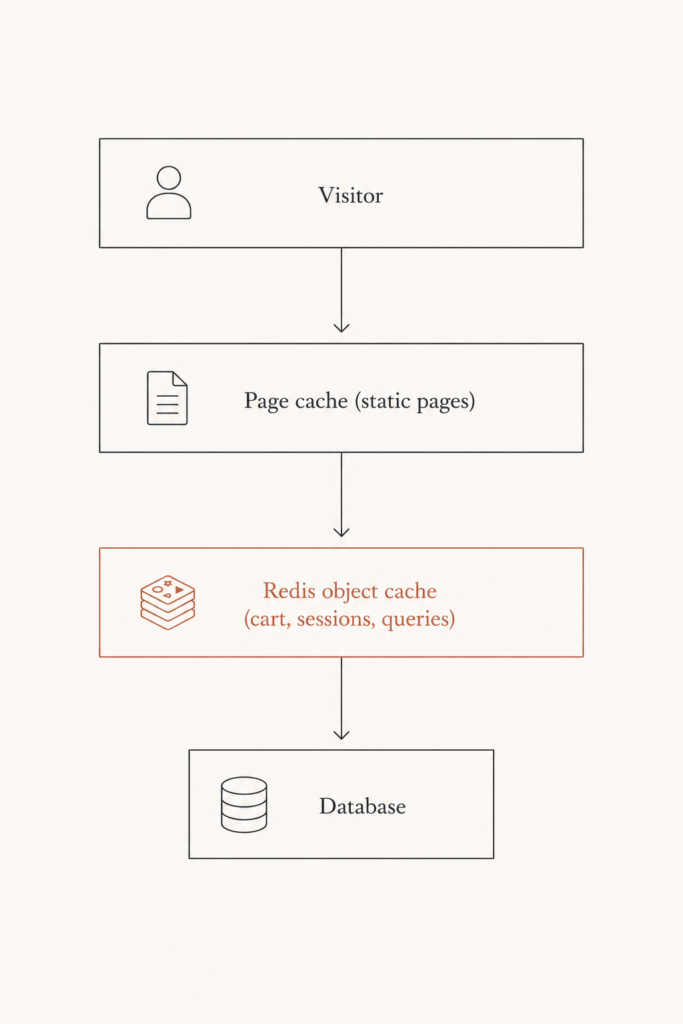
Caching is where most WooCommerce speed optimization lives, and doing it well can cut CPU load by 50 to 90%. But WooCommerce is dynamic, so you cannot just slap a page cache on it and call it done.
You need two layers working together.
Page caching for static content
A page cache stores a ready-made HTML copy of pages like your homepage, blog posts, and category pages, so the server stops rebuilding them on every visit. WP Rocket remains the most WooCommerce-friendly caching plugin in 2026, and it is smart enough to leave cart, checkout, and account pages uncached automatically.
Redis object caching for the dynamic stuff
This is the piece most stores skip, and it is huge. Object caching with Redis targets the dynamic elements a page cache cannot touch: carts, logged-in sessions, and personalized content.
The numbers are striking. One UK ecommerce client on managed hosting saw a 65% drop in database queries after enabling Redis, with checkout TTFB falling from 800ms to 45ms and conversions rising 22%. Persistent object caching routinely cuts database load by 70 to 90%.
There is a catch worth knowing. WooCommerce leans on transients, and transients are only fast when backed by a persistent object cache. Without Redis, those transients get written straight to your database, piling up rows and slowing everything during traffic spikes. Redis is not a luxury here. It is what makes the rest of your caching honest.
Tame the WooCommerce-Specific Bottlenecks
Generic WordPress advice will only take you so far. WooCommerce has quirks that quietly drag down speed, and a few targeted fixes go a long way.
The most notorious is cart fragments. By default, WooCommerce loads cart-fragments.min.js on every page and fires an AJAX request on load to update the cart count, even for visitors who have never added anything to their cart. On a busy store that is thousands of pointless requests a day. Limit that script so it only runs where a live cart count matters, like product and cart pages.
A few more WooCommerce-specific moves that pay off:
- Clean expired transients monthly. One audit I read removed 2.3 million expired transient rows from a single database. That is not a typo.
- Disable scripts where they are not needed. Tools like Perfmatters or Asset CleanUp let you toggle off plugin scripts on pages that do not use them. Your contact page does not need your product gallery slider loading.
- Simplify checkout. Switching to a streamlined checkout has been shown to cut INP by 30 to 40%, because there is simply less JavaScript firing on the most important interaction in your funnel.
Fix Your Images and LCP
Images are almost always the heaviest thing on a WooCommerce product page, which makes them your fastest LCP win.
Convert your product galleries to WebP (or AVIF where supported). That reduces LCP by 0.8 to 1.6 seconds on average, which can drag a borderline store under the three-second line on its own.
Then handle the LCP image deliberately:
- Preload it with
fetchpriority="high"so the browser grabs your hero or main product image first. - Lazy load everything below the fold, but never the LCP image itself, or you will make it slower.
- Serve correctly sized images so a 2000px file is not being squeezed into a 600px slot.
These three steps are the bulk of LCP optimization for a typical store. The rest is just keeping your theme from loading render-blocking CSS before the main content paints.
Win the INP Battle by Getting JavaScript Off the Main Thread
Here is where 2026 gets interesting. LCP is mostly solved by hosting, caching, and images. INP is the harder fight, and it is where most WooCommerce stores quietly fail.
The problem is simple to name. The 2025 Web Almanac measured a median JavaScript payload of around 615KB on mobile, and most of that comes from third-party scripts: analytics, chat widgets, A/B tools, ad pixels, and tag managers. A single chat widget can add 300ms of processing time. When the main thread is busy, your buttons feel laggy.
The single most impactful thing you can do for INP is get JavaScript off the main thread during page load. Here is how.
- Delay JavaScript execution. Good optimization plugins can pause non-critical scripts entirely until the user moves the mouse or touches the screen. The thread stays free, so the page responds instantly.
- Use facades for heavy embeds. Replace a live chat widget or embedded video with a static image that only loads the real script after a click. You get the feature without the upfront cost.
- Defer marketing tags. Heatmaps, A/B tools, and ad pixels almost never need to run before first paint. Load them late, or through a tag manager with strict rules.
- Strip scripts per page. If a script does not earn its place on a given page, turn it off there.
Expect this to be real work. For most WooCommerce sites, plan on one to two focused weeks to audit third-party scripts, defer the non-critical ones, and verify the improvement in field data. If you want a parallel reference, my Shopify Core Web Vitals 2026 checklist walks through the same INP-first mindset on a different platform.
Your Step-by-Step WooCommerce Speed Optimization Checklist
Want the short version you can hand to a developer? Work through this in order, because each step builds on the last.
- Move to managed or cloud WooCommerce hosting on PHP 8.2 or newer.
- Enable server-level caching and OPcache.
- Install a WooCommerce-aware page cache (WP Rocket is my default).
- Add Redis object caching for carts, sessions, and queries.
- Limit cart fragments to pages that need them.
- Convert images to WebP and preload the LCP image.
- Lazy load below-the-fold images, never the LCP image.
- Delay and defer non-critical JavaScript, especially third-party scripts.
- Clean expired transients and unused plugin scripts monthly.
- Verify everything in the Google Search Console Core Web Vitals report.
Done well, this combination reduces load times by 50 to 80%, and stores that were sitting at six to eight seconds routinely land at one to two seconds afterward. That is the difference between losing half your mobile traffic and keeping it.
FAQ
How fast should a WooCommerce store load in 2026?
Aim for a fully loaded page under three seconds, with LCP under 2.5 seconds and INP under 200 milliseconds. The current WooCommerce average is 3.7 seconds, so simply hitting these targets puts you ahead of most competing stores.
Does Redis really make WooCommerce faster?
Yes, significantly. Redis object caching handles the dynamic data a page cache cannot, such as carts and sessions. Real-world stores have seen database queries drop 65% and checkout TTFB fall from 800ms to 45ms after enabling it, which is why it is one of the highest-impact changes you can make.
What is the biggest cause of slow WooCommerce stores?
Cheap shared hosting, by a wide margin. Around 65% of WooCommerce stores run on shared plans, and moving to managed or cloud hosting alone makes a store two to five times faster. Fix hosting first, then layer caching and image optimization on top.
Why is my WooCommerce store failing INP?
Almost always because of too much JavaScript on the main thread, much of it from third-party scripts like chat widgets, analytics, and ad pixels. Delaying script execution until the first interaction, using facades for heavy embeds, and deferring marketing tags will usually fix it.
Which caching plugin is best for WooCommerce?
WP Rocket remains the most WooCommerce-friendly caching plugin in 2026 because it automatically excludes cart, checkout, and account pages from caching. Pair it with Redis object caching for the dynamic data, and you get the best of both layers.
Get Your Store Under Three Seconds
WooCommerce speed optimization is not magic. It is hosting, layered caching, lean images, and disciplined JavaScript, applied in the right order. Work through the checklist above and most stores will comfortably cross under the three-second line, rank better in Google, and convert more of the traffic you are already paying for.
If you would rather not spend two weeks chasing INP scores and Redis configs yourself, that is exactly the kind of work I do every day for US and UK retailers. Book a call or grab a free speed audit at javaid.dev/contact, and I will tell you precisely what is slowing your store down and what it will take to fix it.

Comments are reviewed before they appear, so yours will not show up straight away. Your email is never published.