
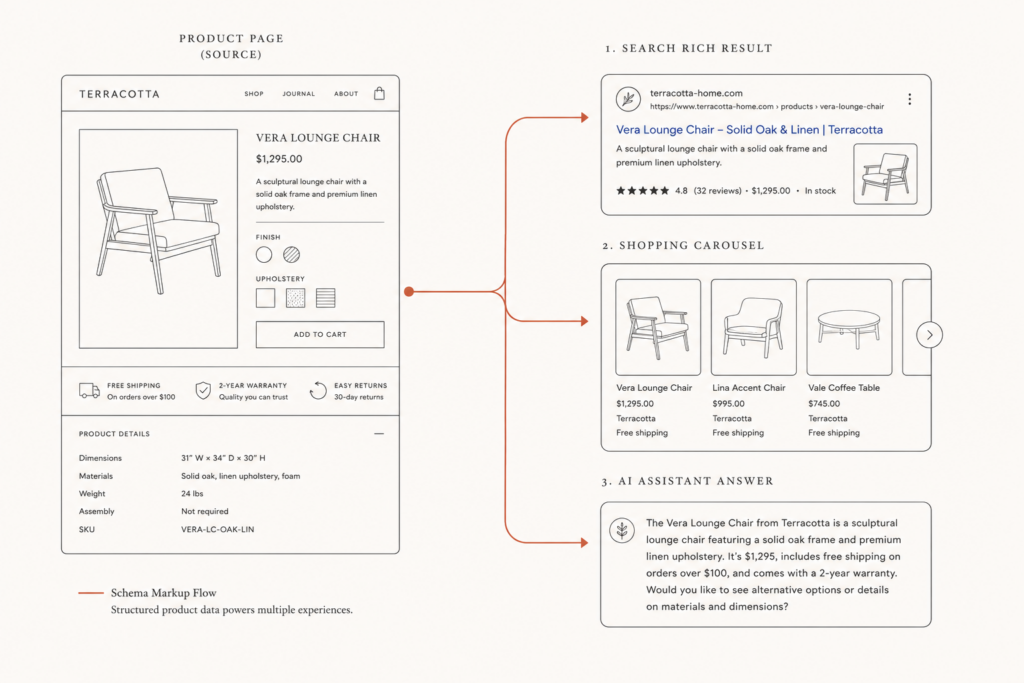
Picture this: a jeweler’s product page ranks on page one, the product is in stock, the price is right, and the listing in Google is a bare blue link. No price. No stars. No availability. The competitor two positions down gets the carousel tile, the rating, and the click.
Nothing is wrong with the page. Something is wrong with what the page is telling the machines that read it.
That gap is what product schema markup closes. It’s the layer of machine-readable data, invisible to shoppers, that tells Google, Bing, and now ChatGPT what your product actually is, what it costs, and whether it’s available to buy. Get it right and you become eligible for rich results, merchant listings, and AI-generated recommendations. Get it wrong, or install three apps that each write their own version, and you get warnings, disapprovals, and silence.
This article covers the full picture: what product schema markup is, the properties Google actually requires, the duplicate-schema problem that quietly breaks most Shopify and WooCommerce stores, how the 2026 deprecations changed what’s worth marking up, and a concrete implementation and validation sequence you can run this week.
What product schema markup actually is (and what it isn’t)
Product schema markup is structured data written in JSON-LD, a small script in your page’s HTML that describes the product using the shared vocabulary at schema.org. Name, image, brand, SKU, price, currency, availability, condition, rating.
It isn’t a ranking factor. Google has been consistent on this, and the March 2026 structured data changes didn’t change it: schema doesn’t move you up the results page. It changes what your result looks like when you’re already there, and it changes whether machines can confidently repeat your facts.
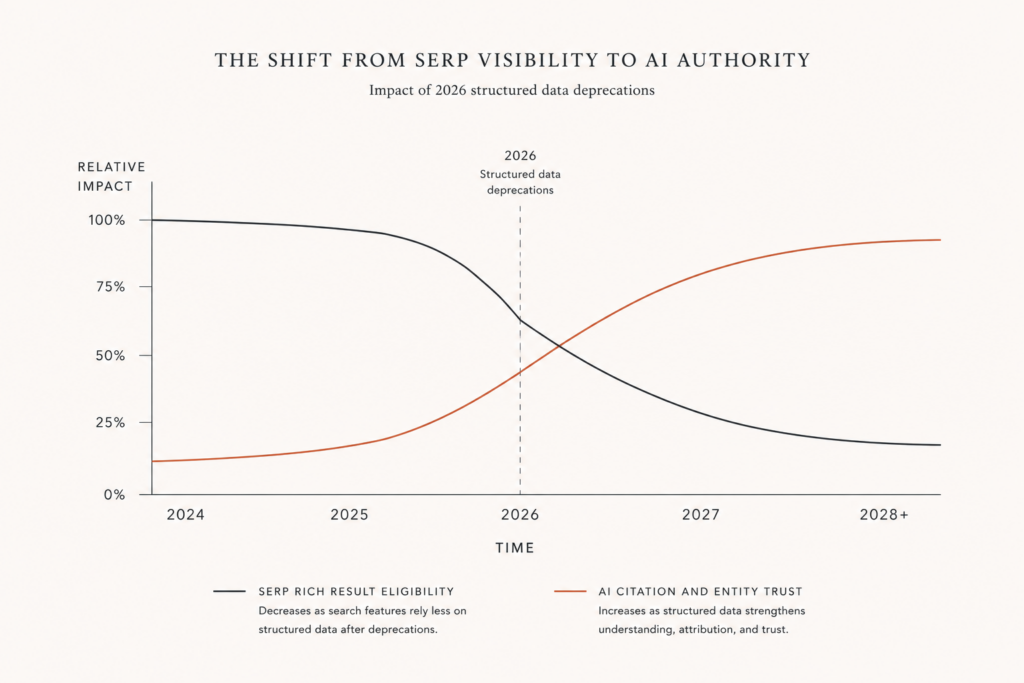
Here’s the thing: that second job now matters more than the first. Google and Microsoft have both confirmed they use schema markup to feed their generative AI features, and structured data is associated with meaningfully higher citation rates in AI answers, with published analyses putting the lift anywhere from 40% to 3x depending on method. Treat those as directional, not gospel. The direction is unambiguous.
Schema used to be a display trick. It’s now an identity document.
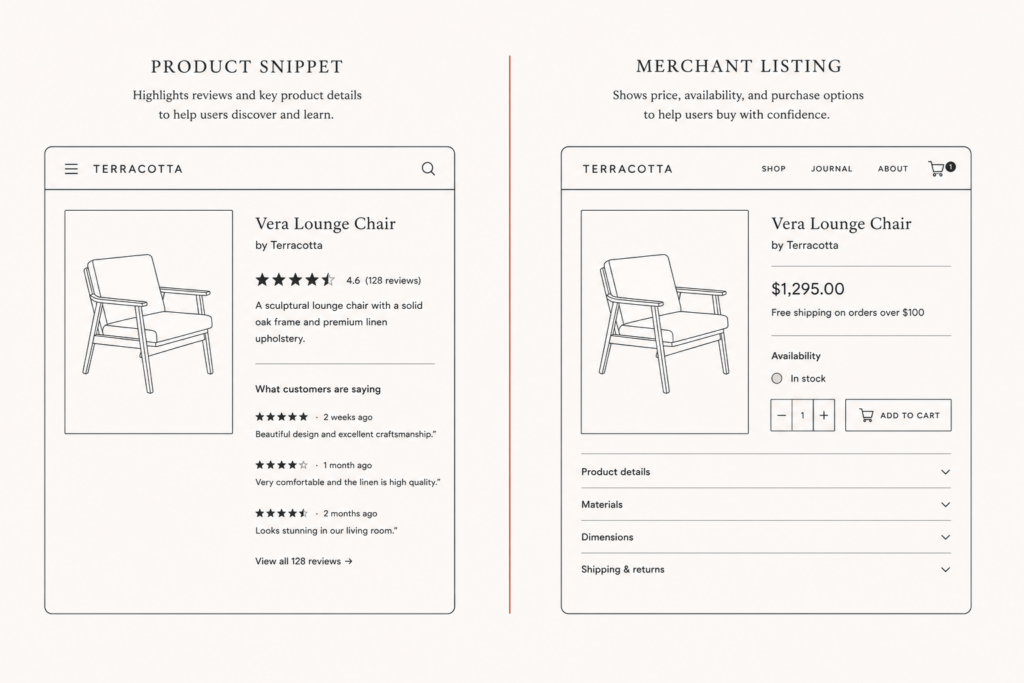
The two flavors: product snippets vs merchant listings
Google splits product structured data into two types, and mixing them up is a common own goal.
Product snippets are for pages where you can’t buy the thing. Review posts, comparison pages, roundups. The emphasis is on ratings and review content.
Merchant listings are for pages where you can buy the thing. Your actual product page. Per Google’s merchant listing documentation, these are the pages eligible for shopping surfaces, price-drop notifications, and the product knowledge panel.
If you sell it, you want merchant listing markup. That means a Product with a valid nested Offer, and the Offer needs price, priceCurrency, and availability at minimum. Add itemCondition, and you become eligible for automatic item updates, where Google refreshes price and stock from your page rather than waiting on your feed.
One rule people miss constantly: the markup has to be in the HTML the server returns. Google’s documentation is explicit that structured data generated by JavaScript after page load is not reliably picked up for these features. A React or headless build that injects JSON-LD client-side is a build that quietly forfeits eligibility.
The properties that actually matter
Skip the vocabulary tour. This is the working set for a purchase page:
name: the product title exactly as shown to the customer.image: one or more high-resolution URLs, not a lazy-loaded placeholder.brand: as a nestedBrandobject, not a bare string.skuandgtin: the identifiers that let Google reconcile your page with your feed and with other retailers selling the same item. If you have a GTIN, use it. It does more for shopping visibility than most of the rest combined.offers: nestedOfferwithprice,priceCurrency,availability(https://schema.org/InStockorOutOfStock),itemCondition, andurl.aggregateRatingandreview: only if genuine, first-party, customer-submitted reviews exist on the page.
That last condition is not optional advice anymore. Google’s 2026 tightening means review markup on content with no real user-submitted reviews now carries manual action risk, including editorial star ratings and self-assessed scores. If you’re marking up a rating your customers didn’t give you, remove it today.
And the biggest single cause of failure has nothing to do with which properties you chose.
Why your store probably has two competing schemas fighting each other
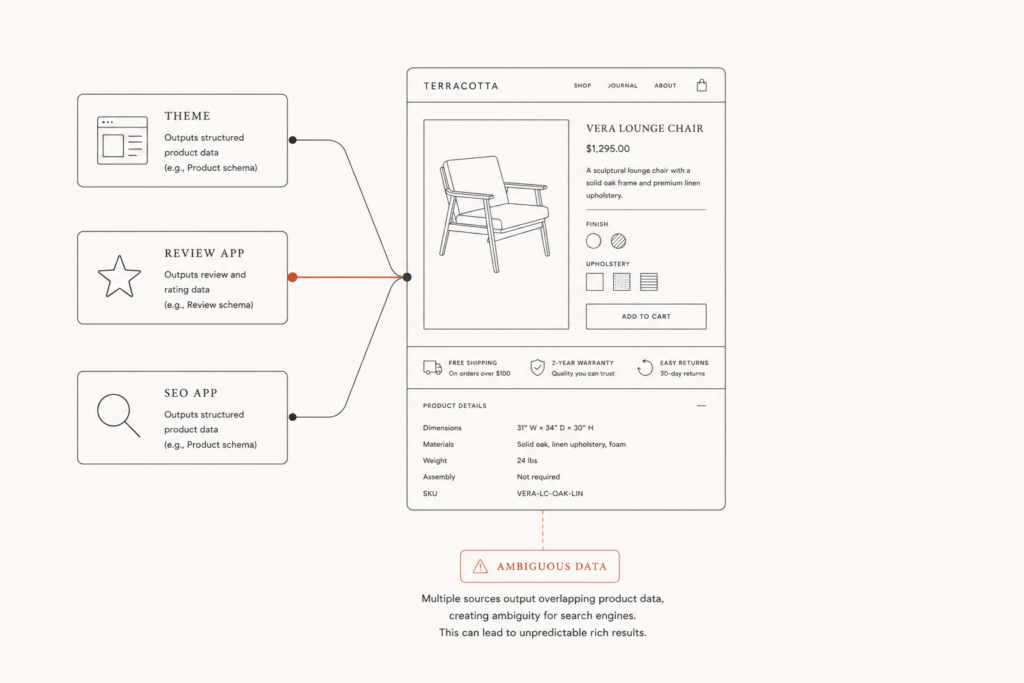
Almost every modern Shopify theme outputs Product JSON-LD on its own. So does your review app. So does your SEO app. So, often, does a “rich snippets” app someone installed in 2023 and forgot about.
The result? Two or three Product blocks on one page, each claiming to be the authority. One says InStock, the app-generated one says OutOfStock. One carries the sale price, the other the compare-at price. Googlebot doesn’t pick a winner. It flags ambiguous data, the most common product structured data warning in Search Console, and moves on.
It gets worse on the paid side. Google cross-validates your on-page markup against your Merchant Center feed, and a mismatch in price or availability is enough to trigger product disapprovals in Google Shopping. The page didn’t change. The feed didn’t change. An app you barely use started writing schema, and your shopping traffic went quiet.
That’s not a schema problem. It’s an app-sprawl problem wearing a schema costume. It’s the same pattern behind most bloated stores, and it’s why an app audit and a structured data audit tend to be the same job. One of the most common conversations at Javaid Ahmad starts with a merchant convinced their SEO broke, when what actually broke was three plugins writing to the same well.
The diagnosis takes ninety seconds. View source on a product page, search for application/ld+json, and count the blocks that contain "@type": "Product". If the answer is more than one, you’ve found it.
The fix: one source of truth, server-rendered
The rule is simple. One Product block per page. Rendered by the server. Owned by one system.
Pick the owner deliberately. On Shopify, the cleanest answer is usually the theme, because the theme already has the product object with the real price and the real inventory state, and it renders before the page ships. Then go into each app that offers a schema toggle and turn it off. Most review apps have a setting for exactly this, sometimes called microdata filtering or “disable structured data output,” precisely because the conflict is so common.
On WooCommerce, Woo itself emits Product schema and every major SEO plugin offers to do the same. Let one win. Turning off the plugin’s product output is usually less fragile, because Woo is the system that actually knows the stock status.
Then validate, in order:
- Run the page through Google’s Rich Results Test to confirm the block parses and is eligible for merchant listings.
- Check the Schema Markup Validator for vocabulary errors the Rich Results Test ignores.
- Open Search Console, go to the Merchant listings and Product snippets reports, and watch for a week. This is where duplicate-source problems surface at scale, not on the one page you tested.
- If you run Shopping, reconcile your feed values against your on-page values. Price, availability, and title should match exactly. If you want the deeper version of that reconciliation, it pairs directly with the Google Merchant Center Next feed work.
Fix once, verify twice, then leave it alone. Schema is infrastructure, not a channel you optimize weekly.
What changed in 2026, and what it means for you
Two shifts are worth your attention.
First, the pruning. Google retired FAQ rich results in Search in May 2026, and tightened Review and How-to markup hard. If your structured data strategy was a scattergun of every type schema.org offers, half of it is now doing nothing visible. The surviving high-value types for ecommerce are narrow: Product, BreadcrumbList, Organization, and Article on your content pages.
Second, the reweighting. What Google removed from the SERP, it kept for the models. Schema stopped being mainly a display trigger and became an entity and trust signal, the thing an assistant leans on when it has to decide whether your $4,200 ring is really in stock before it recommends it to someone. That’s the connective tissue between classic technical SEO and the newer generative-answer work, which is the same argument made at length in GEO for product pages and, for high-AOV catalogs specifically, in structured product data for jewelry.
Fewer schema types. Higher stakes on the ones that remain.
When markup is enough, and when the page underneath is the problem
Schema describes the page. It doesn’t rescue it.
If your product page has one image, a two-line description, no reviews, and no specifications, perfect markup makes a thin page legible rather than compelling. Assistants and shopping surfaces both want attributes: material, dimensions, carat, certification, return window, delivery estimate. Mark them up if they exist. Write them if they don’t.
Fill the page, then describe it. Not the reverse.
The bottom line on product schema markup
Product schema markup isn’t an SEO tactic. It’s a data contract. You’re telling every machine that reads your store what’s true about your products, and the cost of ambiguity is no longer just a missing star rating, it’s exclusion from the surfaces where buying decisions increasingly get made.
If your setup is simple, do this: audit for duplicate Product blocks, keep one server-rendered source, include SKU and GTIN, mark up only real reviews, and validate in Search Console. That’s a morning’s work and it fixes most stores.
If your setup is complex, headless, multi-app, multi-market, or a jewelry catalog with configurable variants and supplier-fed inventory, the markup is downstream of an architecture question, and patching it at the theme layer will keep breaking.
If you want a second pair of eyes on which system in your store should own the schema, reach out to Javaid Ahmad for a straightforward conversation about it, or run the free store audit at javaid.dev/contact. No lengthy discovery calls, no vague proposals, just a clear answer on what to remove and what to keep.
FAQ
Q: What is product schema markup in simple terms? A: It’s a small block of JSON-LD code in your product page’s HTML that describes the product in a format search engines and AI assistants can read directly: name, brand, SKU, price, currency, availability, and condition. Shoppers never see it. Machines rely on it.
Q: Does product schema markup improve my rankings? A: No. It doesn’t move your position. It determines whether you’re eligible for rich results, merchant listings, and shopping surfaces, and it increasingly influences whether AI assistants will cite your product with confidence. Same position, better result, more clicks.
Q: Why does Search Console say “ambiguous data” on my product pages? A: Almost always because two systems are writing Product schema on the same page, typically your theme plus a review or SEO app. Google can’t tell which block is authoritative. Remove all but one source, ideally the server-rendered theme output.
Q: How do I add product schema markup to Shopify? A: Most modern themes already output it. Confirm by viewing the page source and searching for application/ld+json. If it’s missing or incomplete, add a single JSON-LD snippet to the main product template using the theme’s product object, and disable schema output in every app that offers it.
Q: Do I need GTINs in my product schema? A: If your products have them, yes. GTINs let Google match your page to the same item across retailers and to your Merchant Center feed, which materially improves shopping eligibility. For unique or made-to-order pieces without a GTIN, use a consistent SKU and MPN instead.
Q: Is FAQ schema still worth adding in 2026? A: Not for rich results in Google Search, which stopped showing them in May 2026. It can still help machines parse your content, so it’s low-cost to keep, but treat it as a nice-to-have rather than a visibility play. Product markup is where the return is.

Comments are reviewed before they appear, so yours will not show up straight away. Your email is never published.