
Key Takeaways
- The bottleneck in AI-assisted engineering is not the model. It is you, re-prompting it every few minutes.
- Loop engineering means designing the system that prompts the agent for you, then stepping out of the loop entirely.
- A loop that grades its own work will always tell you it passed. You need a separate checker that only verifies, never trusts.
- Start every loop in report-only mode. Give it permission to edit code only after your run history proves it has earned that trust.
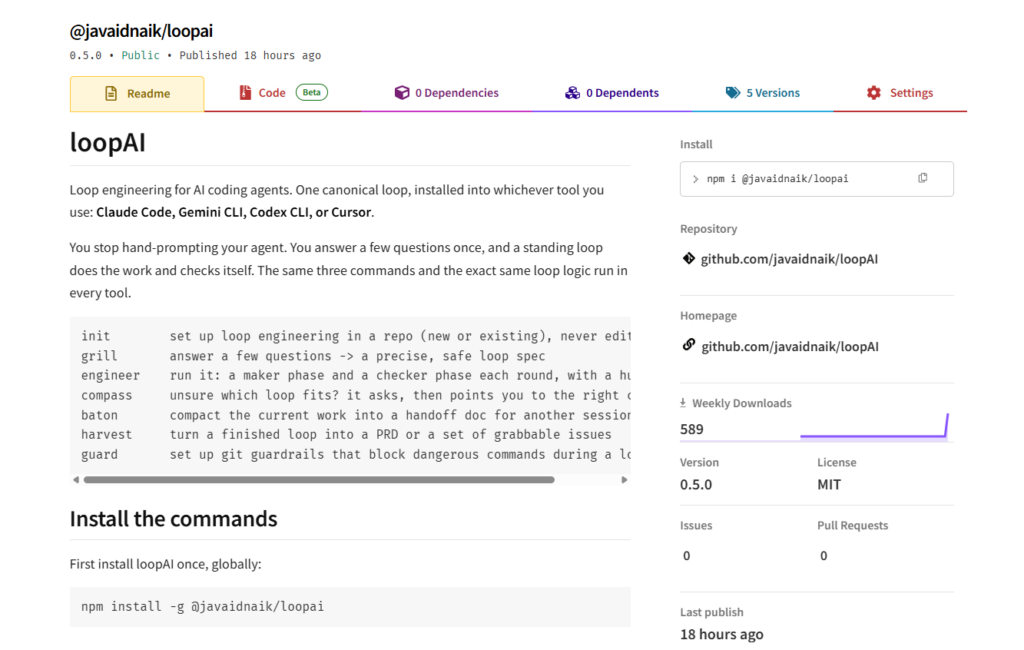
- loopAI ships seven commands you run inside your coding tool:
init,grill,engineer,compass,baton,harvest, andguard. - Five preset loops ship in the box. Drop one in and run it in under a minute, no interview required.
loopai runexecutes the maker, the checker, and the human gate straight from your terminal, no chat window needed.loopai statsandloopai doctorreplace “I think this loop is ready” with a pass rate you can actually check.loopai cronschedules a loop to run on its own and opens the report as a GitHub issue, locked to report-only because nobody is there to approve it.- loopAI runs the same loop logic across Claude Code, Gemini CLI, Codex, and Cursor, on your existing login, with no API key.
You have a capable AI coding agent. You write it a good prompt, it does the work, you review it.
Good. You are using the best tools available, and you are thinking about the right problem.
Now here is the harder question. How many times a day do you type roughly the same instructions? Fix this test. Now the next one. Now the same style note you gave it yesterday. Read the output, point out the mistake, ask again.
That is a loop. And you are standing inside it, running every lap by hand.
This post is about how to step out. It covers what loop engineering actually is, why a single agent checking its own work is not enough, how to run one loop across every major coding CLI without rebuilding it four times, and how to run it without a chat window at all.
You Are the Loop
Think about your real workflow, not the demo version.
You ask the agent for something. You read what it produced. You spot what is wrong. You explain the fix. You ask again. Then you do the whole thing over for the next task, and the next one after that.
Every one of those iterations runs through you. You are the part that notices, decides, and re-prompts. The agent is fast, but it only moves when you push it.
The person who led Claude Code at Anthropic described the shift plainly. He does not really prompt Claude by hand anymore. He writes loops that prompt Claude for him. His job became designing the loops.
That is the move. The value stopped being in one sharp prompt. It shifted to designing the system that runs many prompts over time and checks the results.
A loop has four beats. It discovers what needs doing. It plans. It executes. It verifies against rules you set. Then it repeats or hands back to you.
You design the beats once. After that, the loop carries the work.
The Maker Who Grades Its Own Homework
Here is where most people get loops wrong. They tell one agent to do the work and check its own output.
That agent will tell you it passed. Almost every time.
An agent grading its own homework has no reason to be strict with itself. It wrote the code, so it believes the code. You get confident output that quietly skips half the rules you set.
The fix is two roles, not one.
The maker does the work. It writes, edits, and revises toward the goal, and nothing else.
The checker only verifies. It reads the same rules, checks the maker’s output against every single one, runs the tests if the rules call for tests, and reports pass or fail with a specific list of fixes.
They never share a brain. The checker treats the maker’s work as a stranger’s, which is exactly what makes it strict. When the checker fails something, the maker fixes those exact items next round, and the loop runs again until it truly passes.
This one split is the difference between a loop you can trust and a loop that ships confident mistakes.
The Portability Tax
Say you buy into all of this and build yourself a loop. You wire it into Claude Code.
Then your team uses Gemini CLI. And a client is on Cursor. And you want to try Codex.
Now you are rebuilding the same loop four times, in four formats, and they drift apart the moment you change one rule.
Each tool speaks its own dialect. Claude Code wants markdown commands. Gemini CLI wants TOML. Codex wants plain prompt files in a specific folder. Cursor wants its own command files. The logic is identical. The packaging is not.
That is the portability tax, and it is why most people never move their loops past the one tool they started in.
The way out is to keep the loop logic in one place and generate each tool’s format from it. Write the rules once. Let an installer translate them. The behavior stays identical no matter where it runs, because it all comes from the same source.
That is the exact problem loopAI solves. One set of prompts, installed into whichever tool you use, with the same three commands everywhere: one to set up, one to interview you and write the spec, one to run the maker and checker loop.
Report-Only First
The fastest way to get burned by a loop is to let it edit your code on day one.
An agent that changes files while you are not watching can do real damage fast. So the safe pattern is a ladder, and you climb it slowly.
Level one is report-only. The maker proposes a change and writes it into a log. It never touches your files. You read what it would have done. This is where every new loop starts.
Level two is assisted. The maker edits files, but every change still waits for your approval before it is final.
Level three is unattended. The maker edits and, for low-risk proven loops only, moves forward without pausing.
The human gate stays on by default for a reason. Unattended loops make unattended mistakes. The whole point of starting in report-only is to watch a loop a few times before you trust it with anything that matters.
Give it rope after it has earned rope, not before. The next question is how you know it earned that rope. Not by feel. By the record.
Seven Commands, One Workflow
The maker and checker are the engine, but a real workflow needs more than a run button. loopAI ships seven commands, and they map to the actual moments in a day of engineering.
init: sets up loop engineering in a repo, new or existing. It reads your stack lightly, scaffolds a working folder, and never edits your code.grill: interviews you one sharp question at a time and writes a precise, safe spec. You answer an interview instead of writing a config.engineer: runs the loop. The maker does the work, the checker verifies it, round after round, with a human gate before anything final.compass: points you to the right command when you are not sure where to start. It asks what you are trying to do and sends you to the right place.baton: compacts your current work into a clean handoff doc so a fresh session, or a teammate, can pick it up without losing context.harvest: turns a finished loop into something a team can act on: a short PRD, or a set of issues each small enough to grab and ship on its own.guard: sets up guardrails that block dangerous git commands, like a force push or a hard reset, before a loop can run them by accident.
Three of these run the loop itself. The other four handle the work around it: routing, handoff, output, and safety. Together they turn a clever trick into a workflow you can live in.
That is what happens once you are inside your coding tool, chatting with the agent directly. Two more layers sit around that: one for skipping setup entirely, and one for running without a chat window at all.
You Do Not Have to Grill Every Time
grill is the right move the first time you build a loop that matters to your repo specifically. But most engineers do not need a custom interview for problems everyone already has.
loopAI ships five presets you can drop in and run immediately:
test-first: red-test-then-fix TDD loopsbug-hunt: reproduce, minimize, fixdep-bump: safe dependency upgradesreadme-sync: keeping docs honestpr-review: a strict review of your current branch against main
Run loopai spec pr-review and it writes a working spec into .loops/specs. Open it, tweak a rule if your repo needs something specific, and you are running a real maker and checker loop in the time it took to read this paragraph. No interview needed.
Run It Without Opening a Chat Window
Everything so far assumes you are sitting inside Claude Code or Gemini CLI, typing slash commands. Most days, that is exactly where you are. Some days you just want the loop to run while you get coffee.
loopai run <slug> does that. It drives the maker and checker itself, calling the Claude or Gemini CLI headlessly, no chat session required. You watch the rounds stream straight into your terminal. When the checker passes, you get a human gate right there, a single keypress to accept or send it back for another round. Every round, maker output and checker verdict, gets written to the same state file you would get from running it inside your tool.
Report-only specs still act report-only. The maker proposes changes and writes them into the log. It does not touch a file on your disk unless the spec says it can.
This is the same loop, the same rules, the same checker discipline. It just runs from wherever you already are, a terminal window, without asking you to open anything else first.
Let the Record Decide, Not Your Gut
Every loop you run gets written down. Not just the final verdict, every round: what the maker produced, what the checker flagged, whether you accepted it at the gate. That log lives in your repo at .loops/state, and every run also appends a line to .loops/history.jsonl.
loopai stats reads that history back to you. Pass rate. Average rounds to get there. The date of the last run. Three runs at a 100% pass rate is the line loopAI draws for you to start thinking about level two. Not a hunch. A number you can point to.
Before any of that, loopai doctor checks whether your setup can even produce a trustworthy record. Does .loops exist. Do your specs parse as valid JSON. Do you have a real test command the checker can run, not a stub that always exits clean. Is your state folder gitignored so round logs do not pollute your commits. It scores your repo and tells you exactly what to fix.
Between doctor and stats, the decision to trust a loop with more autonomy stops being a vibe you talk yourself into on a Friday afternoon. It is a number that either clears the bar or does not.
Loops That Run While You Are Not There
The whole point of a loop is that it should not need you standing over it. loopai cron takes that to its logical end.
Run:
loopai cron dep-bump --agent claude --schedule "0 6 * * 1"
and it writes a GitHub Action straight into .github/workflows. Every Monday at six, it checks out your repo, runs the loop headlessly, and opens the report as a GitHub issue waiting for you when you sit down.
There is one rule that never bends here. Scheduled runs are forced to report-only, no matter what the spec says. A human gate only works if a human is there to open it, and on a schedule, nobody is. The loop reports. You decide.
You still have to wire up your agent CLI’s headless auth on the runner before you flip this on. docs/HEADLESS.md in the repo walks through both Claude and Gemini, with a checklist so you are not guessing whether it will actually run at 6 a.m. on a Monday.
The Tools Crossed a Line
The tools crossed a line in the last year, and most engineers have not adjusted their habits to match.
Every major coding CLI now supports custom commands or extensions you can install and share. Claude Code has a plugin marketplace. Gemini CLI has installable extensions with a public gallery. Codex reads custom prompts. Cursor has project commands. The plumbing for portable, reusable loops is finally standard, not a hack.
The appetite is there too. When one engineer published his personal set of agent skills as an open-source repo, it went viral among working developers almost immediately. People are not looking for more vibe coding. They want engineering discipline they can reuse.
That combination, standard tooling plus real demand, is new. Two years ago you could not have shipped one loop that runs across four agents, headlessly, on a schedule, with the record to prove when it earned your trust. Today you can.
The engineers who adjust their habits now, from prompting to loop design, will compound that advantage every week. The window to build this into how you work is open, and it is open right now.
FAQs
Does loop engineering replace prompting completely?
No. You still write the rules and answer the setup questions, which is a form of prompting. What changes is that you stop retyping the same instructions on every iteration. You design the loop once and it handles the repetition.
Is it safe to let a loop edit my code?
It is, if you start in report-only mode where the loop proposes changes but never writes them. Move to assisted edits once loopai stats shows a real pass rate behind that loop, and keep the human gate on so nothing final ships without your approval.
Do I have to answer the grill interview every time I want a new loop?
No. loopAI ships five preset specs, test-first, bug-hunt, dep-bump, readme-sync, and pr-review, that you can drop into a repo and run with loopai spec <name>. Open the file afterward and adjust the rules to your project if you want to.
Can I run a loop without opening my coding tool?
Yes. loopai run <slug> drives the maker, the checker, and the human gate from your terminal, calling the Claude or Gemini CLI headlessly. No chat session needed.
Can a loop run on its own, without me around?
Yes, with loopai cron. It writes a GitHub Action that runs a spec on a schedule and opens the result as an issue. Scheduled runs are always forced to report-only, because a human gate needs a human, and nobody is watching a cron job at 6 a.m.
What can loopAI actually do?
Seven commands run inside your coding tool: init to set up, grill to write a spec, engineer to run the maker and checker, plus compass, baton, harvest, and guard for routing, handoff, output, and safety. Around those, the CLI itself adds loopai spec for instant presets, loopai doctor to check your repo is loop-ready, loopai run to execute a loop headlessly from your terminal, loopai stats to track pass rates over time, and loopai cron to schedule unattended runs.
Which tools does loopAI work with?
Claude Code, Gemini CLI, Codex CLI, and Cursor. The same three commands and the same loop logic run in all four, because they are all generated from one source.
Do I need an API key?
No. loopAI runs on the login you already have in your coding tool. There is no separate app to host and no key to manage.
Stop Prompting. Start Designing Loops.
The mistake is not that you are bad at prompting. The mistake is that prompting by hand is the wrong job to be good at.
Your agent is fast. You are the slow part, because every decision routes through you, one prompt at a time. Loop engineering takes you out of that seat. You design the loop, a maker does the work, a checker keeps it honest, and a human gate protects you until the loop earns your trust.
Do that once, in whatever tool you already use, and let it run. Drop in a preset if you do not want to design the first one from scratch, run it from your terminal without opening a chat, and check the stats before you hand it more rope.
Stop asking your agent to do one more thing. Start building the thing that asks for you.
loopAI is free, open source, and one command away:
npm install -g @javaidnaik/loopai
Repo and docs at github.com/javaidnaik/loopAI.

Comments are reviewed before they appear, so yours will not show up straight away. Your email is never published.