
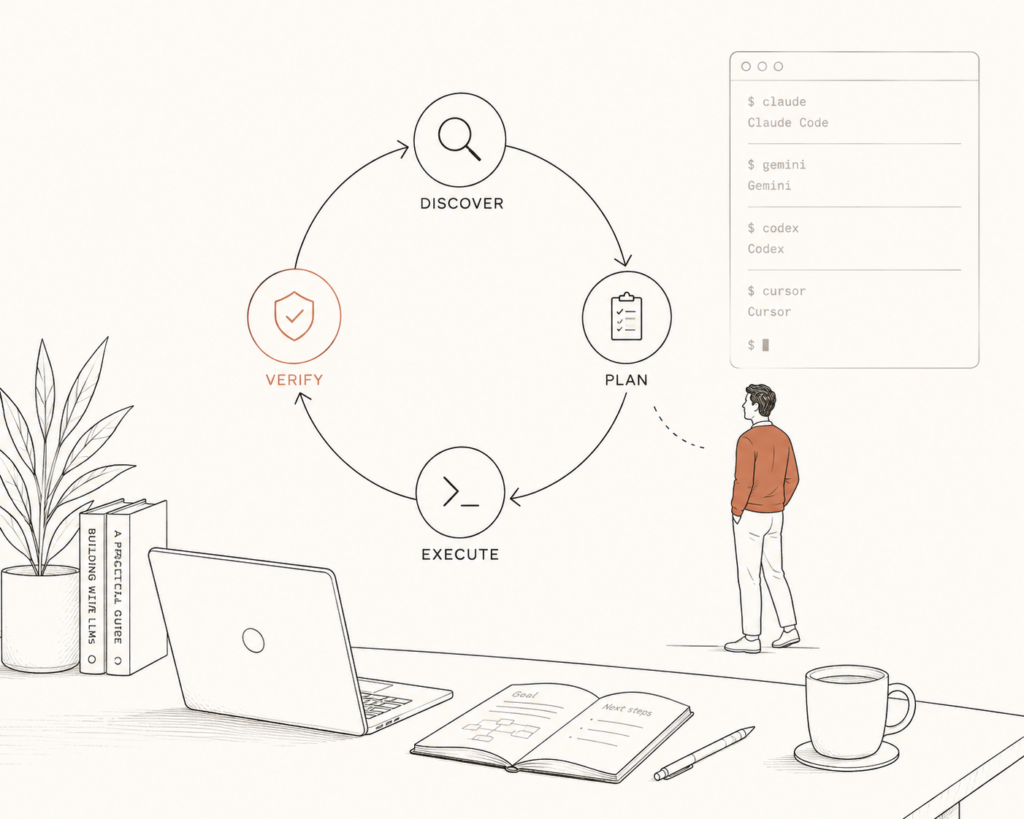
Here is the workflow most people have with an AI coding agent. You ask it to do something. You read what it gives back. You spot what is wrong. You explain the fix. You ask again. Then you do it all over for the next task, and the next.
That is a loop. And you are standing inside it, running every lap by hand.
loopAI is a small tool that takes you out of that loop. You answer a few questions once, and a standing loop does the work, checks itself, and only stops to ask you when something is risky. It runs the same way in Claude Code, Gemini CLI, Codex CLI, and Cursor, so you learn it once and use it everywhere.
It is open source, MIT licensed, and on npm: https://www.npmjs.com/package/@javaidnaik/loopai
What loop engineering actually means
The shift is simple to say and strange to do. Stop being the person who prompts the agent. Build the thing that prompts it for you.
The person who led Claude Code at Anthropic has said he does not really prompt Claude by hand anymore. He writes loops that do the prompting for him. The leverage moved from writing one clever prompt to designing the system that runs many prompts over time and verifies them.
Think about how much of your week is repetition. Triage the new issues. Watch the pull request. Fix the test that broke. Bump a dependency. Draft the changelog. None of that needs you to retype the same instructions every time. It needs a loop.
A loop has four beats. It discovers what needs doing. It plans. It executes. It verifies the result against rules you set. Then it repeats or hands back to you. You design the beats once. After that, the loop carries the work.
Why I built loopAI
There are good write-ups on loop engineering already. What I wanted was something I could run in under a minute, on any repo, in whatever tool I happened to be using that day, without setting up a separate app or pasting in an API key.
So loopAI installs three commands into your agent of choice. The loop logic lives in one place, and the installer wraps it in the format each tool expects. The behavior is identical no matter where you run it.
The commands are the same everywhere:
- init sets up loop engineering in a repo, new or existing, and never edits your code.
- grill interviews you and writes a precise, safe loop spec.
- engineer runs the loop: a maker phase does the work, a checker phase verifies it, with a human gate before anything final.
Install it
First install loopAI once, globally:
npm install -g @javaidnaik/loopaiThen, from the root of the project you want to add loops to, run one line:
loopai install --tool claude # or gemini, codex, cursor, or allHere is where the files land and how you call the commands in each tool:
| Tool | Files written | Invoke as |
|---|---|---|
| Claude Code | .claude/commands/loop/*.md | /loop:init /loop:grill /loop:engineer <slug> |
| Gemini CLI | .gemini/commands/loop/*.toml | /loop:init /loop:grill /loop:engineer <slug> |
| Codex CLI | ~/.codex/prompts/loop-*.md (global) | /loop-init /loop-grill /loop-engineer <slug> |
| Cursor | .cursor/commands/loop-*.md | /loop-init /loop-grill /loop-engineer <slug> |
Codex prompts install to your home directory, so for Codex you set it up once and it works in every project. The other three install per project.
How a run actually goes
Say you have a cart module with a broken test suite. Here is the whole flow.
You run the init command once. It reads your project lightly, with no edits, figures out your stack and your test command, and writes that into a small context file so the loop understands where it is working.
You run grill. It asks you one sharp question at a time. Which files may the agent touch? You say the cart source only, leave the tests alone. What counts as done? You say the whole suite passes and nothing else breaks. How much freedom? You allow edits but want to approve before commit. When it has enough, it writes a spec to a file. You did not write a config. You answered an interview, and the config wrote itself.
You run engineer with that spec. Round one, the maker phase edits only the cart source. The checker phase runs your real test command and reports the exact failures still standing. Round two, the maker addresses those. The checker runs the suite again. This continues until the suite is green, then the human gate asks you to accept before anything is final.
You wrote no prompts during any of that. You designed the loop, and the loop ran the laps.
The maker and checker split
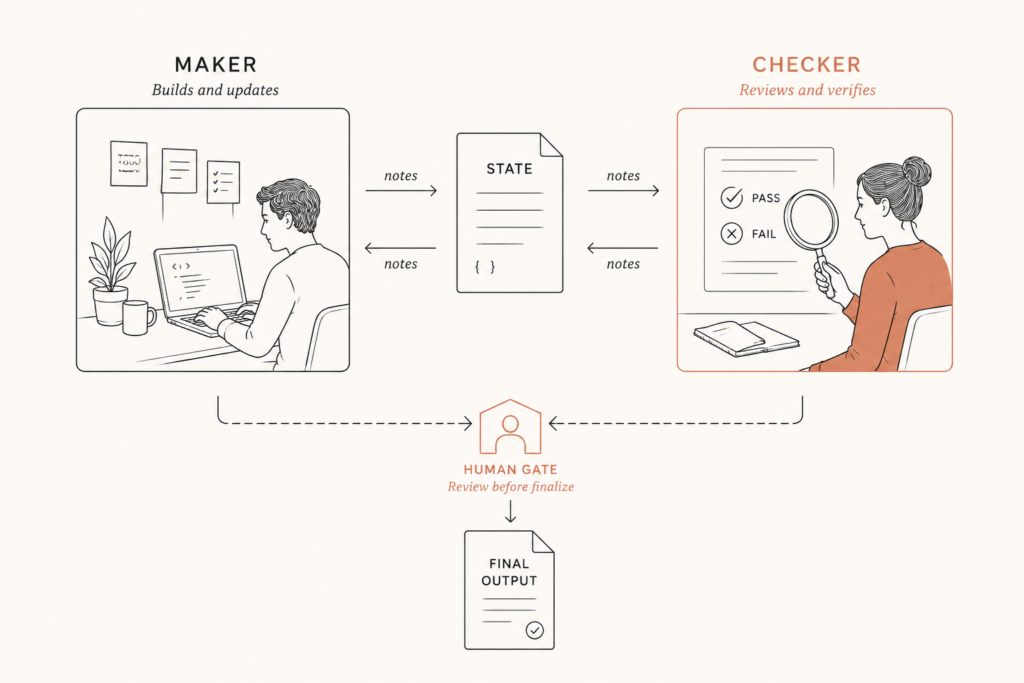
This is the part that makes loops trustworthy. One agent that grades its own homework will tell you it passed. So loopAI runs two phases each round.
The maker does the work. The checker becomes a strict, read-only verifier and checks the result against every rule you set, running your tests if the rules call for it. A rule that is mostly met is a fail. If it fails, the checker writes a short list of exactly what to fix, and the maker addresses those items next round.
They pass notes through a shared state file, so each round builds on the last. You can open that file afterward and read the full back and forth.
Start safe, then give it rope
loopAI uses three autonomy levels, and you should climb them slowly.
Start every new loop at L1, report only. The maker proposes a change and writes it into the log, but never edits your files. You read what it would have done. Once a loop earns your trust, move to L2, where the maker edits files but every change still needs your approval. Only for low risk, well proven loops should you reach L3, unattended.
The human gate defaults on for a reason. Unattended loops make unattended mistakes. The whole point of starting in report only is to watch a loop a few times before you let it touch anything.
The honest caveats
Loop engineering is not magic, and pretending it is would not help you.
A loop amplifies your judgment, good and bad. A sloppy rule produces sloppy work faster. Write rules that are specific and testable, the kind a checker can actually verify.
Verification is still your job at the start. Read what the loop ships before you trust it on its own.
And cost can climb. A loop with many rounds and two phases per round uses more tokens than a single prompt. Set a round cap, start small, and grow from there.
None of that is a reason to skip loops. It is a reason to build them like someone who plans to stay the engineer, not just the person who presses go.
Try it and contribute
loopAI is open source and built to grow with the people who use it. New examples, new loop patterns, and honest stories about loops that broke are all welcome, because that is how the tool gets sharper.
Install it, point it at something low risk like keeping your README in sync with your scripts, and watch it work. Then give it a little more.
You have been the slowest part of your own workflow long enough. Build the thing that prompts your agent, and go do the work only you can do.

Comments are reviewed before they appear, so yours will not show up straight away. Your email is never published.