
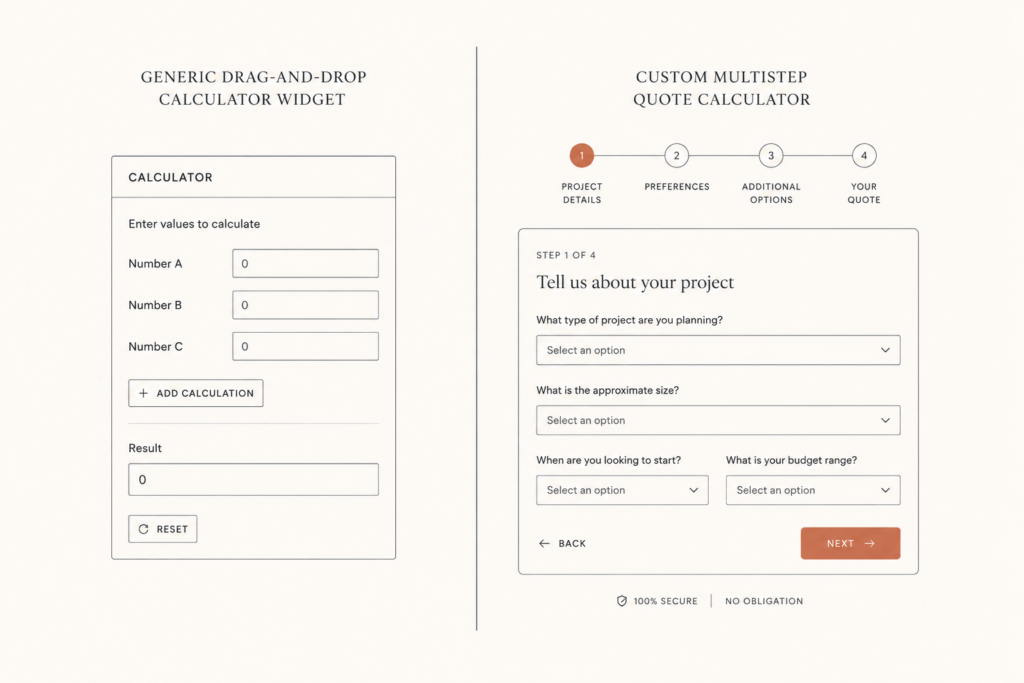
If your pricing depends on more than one or two inputs, a quote calculator on your site can turn a curious visitor into a priced lead while you sleep. The question most people get stuck on is whether to use a builder like Calconic or ConvertCalculator, or to have a custom one built. I have shipped a couple dozen of these, so here is the honest comparison, with real pricing and the trade-offs nobody puts on their sales page.
Short answer first. The builders are a fine place to start, especially if your pricing is simple. You outgrow them the moment your logic gets real or you care about clean data in your CRM. Let me show you where each one fits.
What Calconic is, and what it costs
Calconic is a drag-and-drop calculator builder with a clean, grid-based editor. You snap fields onto a canvas, set a formula, and embed the result on any site. There is a free plan, and paid plans run from about 6 to 55 dollars a month. The number of calculators you can publish is tied to your tier, with plans offering 5, 10, 20, or unlimited.
Where Calconic shines is simple math on a tidy layout. If your price is add up a few numbers and show a total, it does that well and you do not need a developer. Where it struggles is deep logic and brand control. The embedded widget is its layout, not yours, and complex conditional pricing gets awkward fast.
What ConvertCalculator is, and what it costs
ConvertCalculator aims higher. It builds calculators, product configurators, quizzes, and forms, and it supports more pricing models like one-time, subscription, and pay-per-use. Pricing starts around 15 dollars a month, and every plan includes unlimited calculators. It has features Calconic does not, like layered images and PDF quotes.
The trade-off is that more power means more setup. Users who have tried both tend to say the same thing: ConvertCalculator can do more, but it is harder to build, harder to customize, and it costs more over time. It is a capable tool, but it is still a tool you rent, and it is still its own platform sitting between you and your data.
Where both builders hit a wall
The builders all share the same ceiling. For a lot of service businesses, you hit it sooner than you expect.
- Brand match. The widget never quite looks like your site, and you cannot control the markup the way you can with your own code.
- Deep conditional logic. Once your pricing has real if-this-then-that rules, the visual builder gets fiddly or simply cannot express it.
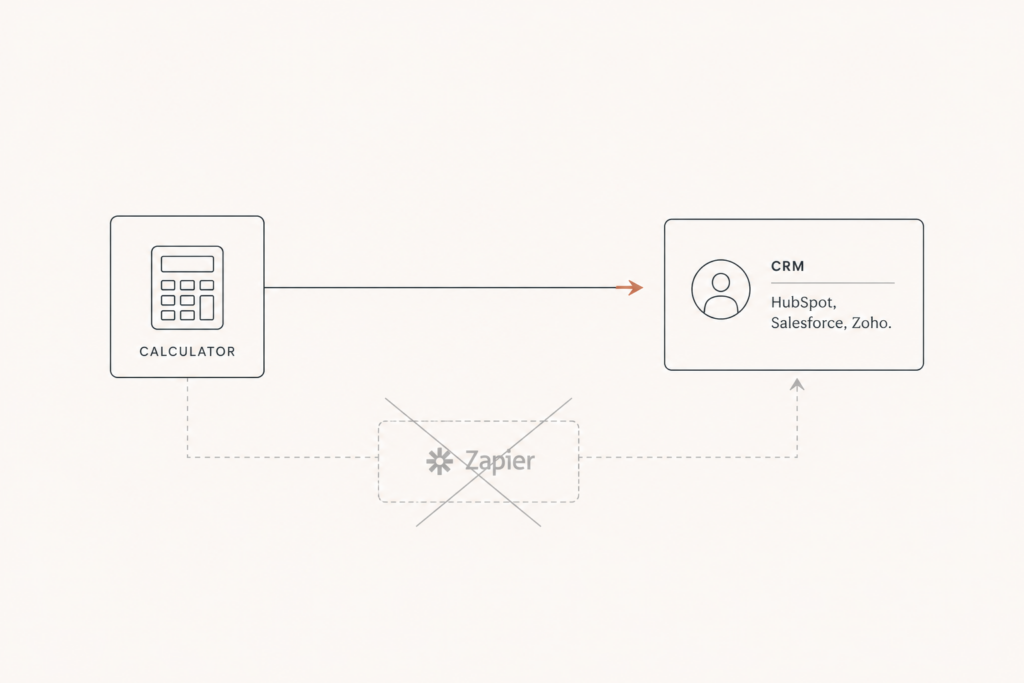
- CRM without glue. Getting clean lead data into HubSpot, Salesforce, or Zoho usually means a Zapier step in the middle, which adds cost and loses fidelity.
- Conversion tracking. Firing accurate events into GA4, Meta, and your ad platforms is limited by what the builder exposes.
- The fee never stops. The monthly cost runs forever, and your calculator, your formulas, and your leads live inside their platform.
None of these matter for a simple calculator. All of them matter once the calculator becomes a real part of how you sell.
What a custom build gives you
A custom calculator is your code, on your site, doing exactly what you describe. It matches your brand down to the pixel because it is built into your theme. It handles any pricing logic you can explain, no matter how many conditions. It writes leads straight into your CRM with every input captured as a field, no Zapier in the middle. And it fires clean tracking so you can actually see which inputs lead to closed deals.
Most important, you own it. There is no monthly rent and no platform lock-in. The calculator is an asset on your site, not a subscription you keep paying to keep the lights on.
The real cost math over three years
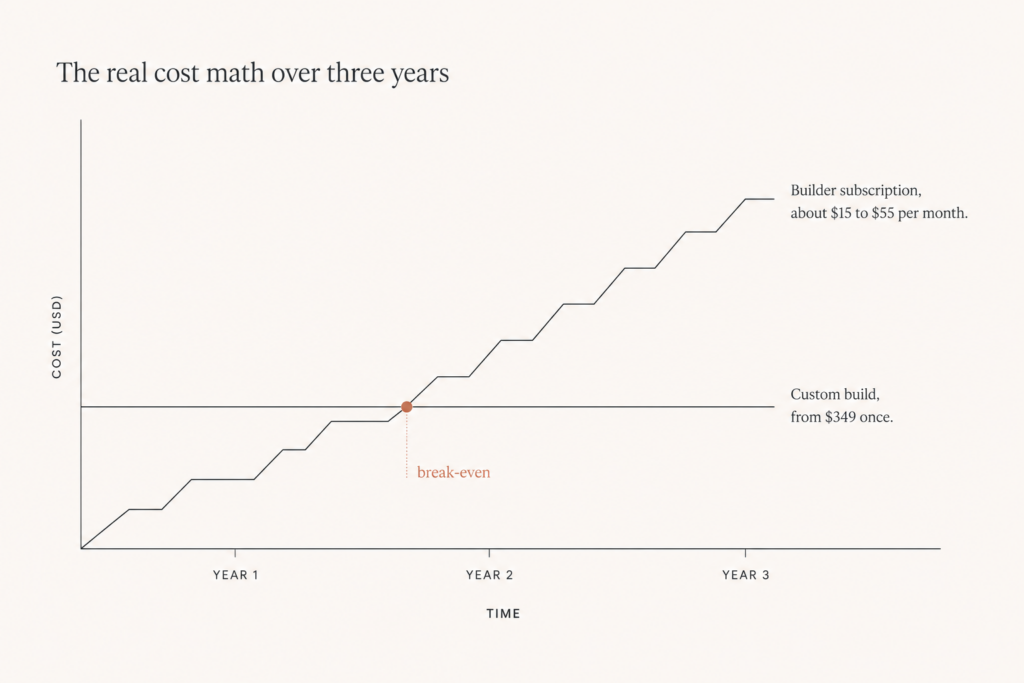
First-month price is the wrong way to choose. The three-year number is the honest one. A builder might cost you 15 to 55 dollars a month, which looks tiny next to a build. Stretch it across three years, add the cost of the workarounds you bolt on, the Zapier tasks, and the time spent fighting the layout, and the gap narrows fast. For a calculator that is central to your lead flow, a custom build often comes out cheaper by year two or three, and you are left owning the asset instead of renting it.
I walk through the full numbers in this plugin versus custom build breakdown, with figures pulled from real projects.
When to pick which
I am not going to tell you custom is always the answer. It is not. Here is the honest split.
- Pick a builder like Calconic or ConvertCalculator when your pricing is simple, your volume of leads is modest, and you want something live this week without a developer.
- Pick a custom build when your pricing has real logic, you want leads landing cleanly in your CRM, you care about brand and tracking, or the calculator is core to how you win business.
A good way to think about it: start with a builder to prove the idea, and move to custom once the calculator is earning its keep and the limits start costing you leads.
How I build a custom calculator
My builds are deliberately fast. A multistep cost calculator typically ships in 5 to 10 days, starting from 349 dollars depending on complexity. It is wired into your CRM, email, Slack, and analytics, so a finished quote is also a clean lead your sales team can act on. The UX follows the patterns that actually lift completion, like leading with the simplest input and never asking for an email on step one.
A real example
Take a fencing contractor. The price depends on linear feet, material, gate count, terrain, and removal of the old fence. On a simple builder, you can get the first three to work. The terrain and removal rules, which change the price the most, are where the visual builder starts to creak. You end up with a calculator that gives a rough number, then a human has to redo the quote anyway. A custom build handles all five inputs, applies the real pricing rules, and sends a quote the customer can act on, with the lead already in your CRM. Same idea, very different result.
Common mistakes with builder calculators
Most calculators underperform for the same handful of reasons, and they are easy to avoid once you know them.
- Asking for an email on step one. It kills completion. Capture contact details at the end, after the visitor has invested effort.
- Using your industry jargon in the questions. If the customer has to know your terms to answer, they leave.
- Showing a single scary number with no range or context. People want to understand how the price was built.
- Skipping tracking. A calculator with no analytics is a slot machine. You cannot improve what you cannot measure.
- Letting the widget look nothing like the site. Trust drops the moment it feels like a third-party bolt-on.
What good looks like

The calculators that convert share a pattern. They lead with the simplest question, usually a single choice anyone can answer without thinking. They show progress so the visitor knows how many steps are left. They reveal the price as it builds, so the number feels earned rather than dropped on them. And they end with a clear next step, whether that is booking a call, paying a deposit, or sending the quote by email. None of this requires a custom build, but a custom build lets you nail every piece without fighting a tool.
Where a deposit changes everything
The single highest-impact thing you can add to a quote flow is an optional deposit at the end. A small refundable deposit turns a lead into a committed prospect and filters out the tire-kickers. Builders rarely handle this well. A custom build can wire Stripe straight into the last step without making the whole thing feel like an ecommerce checkout.
Quick answers to common questions
Is a custom calculator worth it for a small business?
If pricing is central to how you win work, yes, even for a small business. The calculator pays for itself in time saved on manual quotes and leads you would have lost to slow replies. If you only get a handful of inquiries a month and your pricing is flat, a simple form or a cheap builder is enough.
Can you rebuild what I already have in Calconic or ConvertCalculator?
Yes. I often take an existing builder calculator, keep what works, and rebuild it as custom with the logic, branding, and CRM wiring the builder could not handle. You keep the proven flow and lose the limits.
What does it cost?
My custom calculators start at 349 dollars and scale with complexity. A simple one with a couple of inputs sits near the bottom of that range. A deep configurator with conditional logic, CRM writes, and payment sits higher. Either way, you own it once and stop paying monthly.
You can see the custom calculators I build, or read more about my custom WordPress development. When you are ready, get a fixed quote in 24 hours and I will tell you honestly whether a builder or a custom build fits your case.
If you would rather see the productized option before commissioning anything custom, the tiers are listed on calculator pricing.

2 comments
[…] If you are leaning toward a calculator, here is a custom build compared to Calconic and ConvertCalculator. […]
[…] Weighing a builder against custom? See how a custom quote calculator compares to Calconic and ConvertCalculator. […]
Comments are reviewed before they appear, so yours will not show up straight away. Your email is never published.