
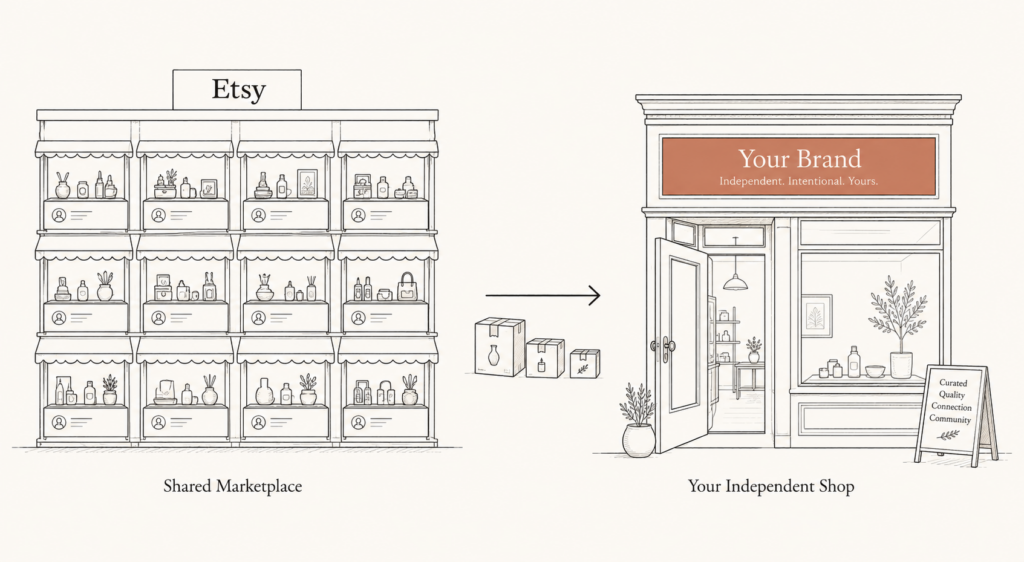
Picture this. You spent four years building an Etsy shop. Three thousand sales, a shelf of five-star reviews, a product that ranks on page one. Then the fee statement lands, and Etsy is quietly taking more than ten percent of every order before you have paid for materials, shipping, or your own time. You don’t own the customer email. You don’t own the listing URL. You’re renting a storefront on land you will never control.
That’s the real reason sellers start an Etsy to Shopify migration. Not because Etsy is broken. Because the math stops making sense once you have traction.
Here’s the honest part most guides skip. Moving is not a button. Some things transfer cleanly, some things Etsy simply keeps, and one SEO constraint makes this migration different from every other platform move. Get the sequence wrong and you lose sales in the gap. Get it right and you keep your revenue while you build something you own.
This article covers the full picture: when the switch actually pays off, what transfers and what does not, the step-by-step move, the SEO trap that catches most sellers, and how to run both stores so you never go dark.
When an Etsy to Shopify migration actually pays off
Start with the money, because that is what forces the decision.
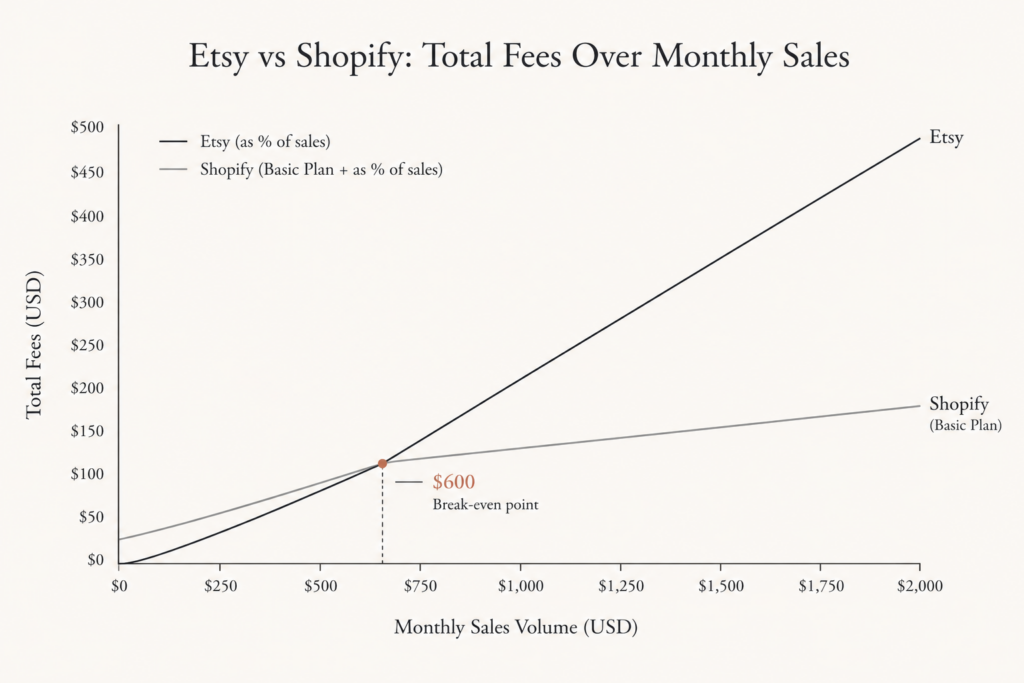
On a fifty dollar order, Etsy takes roughly five dollars in combined fees. That is the 6.5% transaction fee, plus payment processing of 3% and 25 cents, plus the 20 cent listing fee, as Etsy’s own fee structure lays out for 2026. The 6.5% rate is not old. Etsy raised it from 5% in April 2022, a thirty percent jump that triggered a week-long seller strike and never came back down.
Shopify charges differently. You pay a monthly plan fee, then roughly 2.9% and 30 cents per transaction on Shopify Payments. On that same fifty dollar order, that is about $1.75 in fees. The trade is simple: a fixed monthly cost in exchange for a much lower per-sale cut.
So the break-even is about volume. Industry fee comparisons for 2026 suggest Etsy stays cheaper below roughly 600 dollars a month in sales, and Shopify pulls ahead above that. Below the line, the marketplace is doing you a favor. Above it, you are subsidizing Etsy.
But the fee gap is only half the case. The other half is ownership. On Shopify you own the customer email, the checkout, the data, and the brand. That’s the asset that compounds. Etsy rents you traffic. Shopify lets you build equity.
The tell that you’re ready is boring and reliable: repeat buyers, a recognizable product, and sales consistent enough that the monthly fee is a rounding error. Still finding product-market fit? Stay on Etsy. Already found it? The migration is overdue.
What actually transfers, and what Etsy keeps
This is where expectations need managing. A migration is not a clone. It is a selective copy.
What moves cleanly: your product listings. Titles, descriptions, prices, tags, and images export through Etsy’s built-in CSV download and import into Shopify. Shopify’s own help center documents the Etsy import path, and the practical guides confirm the product core comes over intact.
What does not move: your reviews. Etsy owns them. There is no export, no API handoff, no clean transfer. Those five-star ratings that took years to earn stay on Etsy. Same story with your listing URLs, your Etsy shop rank, and in most cases your buyers’ contact details for marketing.
That gap matters because reviews are trust, and trust converts. You’re not losing the reviews so much as leaving them behind. The workaround is to start collecting Shopify reviews immediately, and to screenshot or manually recreate your strongest social proof as testimonials. It’s not a copy-paste. It’s a rebuild.
Here’s the thing: knowing this upfront changes how you plan. You don’t treat the migration as a one-day switch. You treat it as a launch, where you carry over the assets you can and reconstruct the ones you can’t.
The Etsy to Shopify migration, step by step
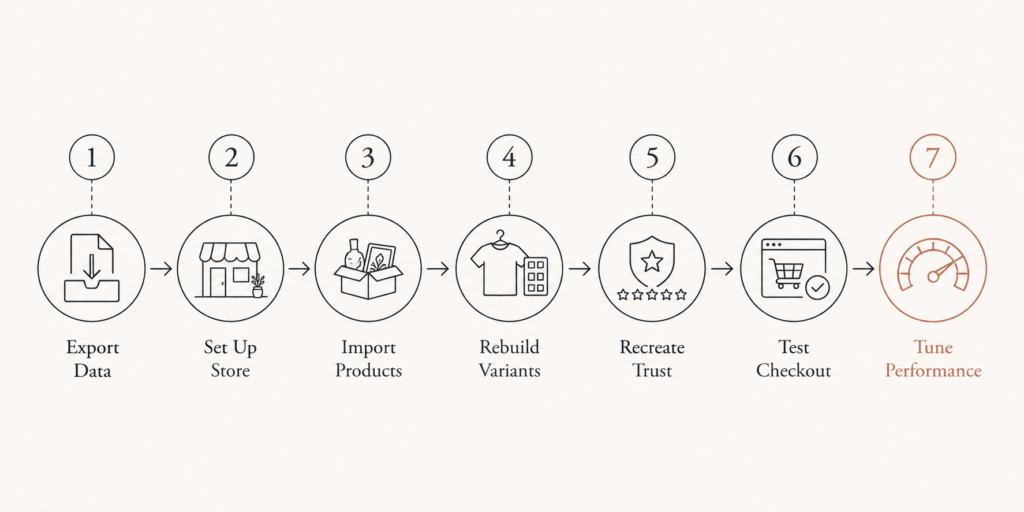
Once you accept it is a launch, the sequence is straightforward. Here is the working order I use when moving a marketplace seller onto their own store.
- Export your Etsy data. In your Etsy account, download your listings CSV and your orders CSV. The listings file carries titles, descriptions, prices, and tags. Save your product images separately, because image handling is the messiest part of any Etsy to Shopify migration.
- Set up the Shopify store first. Pick a theme, add your logo, configure Shopify Payments, taxes, and shipping zones. Do this before you import anything, so products land into a store that already works.
- Import products. For a small catalog, clean the Etsy CSV to match Shopify’s format and upload it. For a larger catalog, a URL-based importer app is faster and handles variants and images with fewer errors. A twenty-product shop is a thirty to sixty minute job by hand. A two-hundred-product shop can eat a full day on raw CSV, or twenty to thirty minutes with an automated tool.
- Rebuild variants and options. Etsy and Shopify model product options differently, so complex variations rarely map one to one. Expect to fix these by hand. This is the step people underestimate.
- Recreate trust. Add testimonials, set up a Shopify review app, and write an About page. This replaces the review equity you cannot export.
- Test checkout end to end. Place a real order, refund it, check the confirmation emails, confirm tax and shipping calculate correctly. Do not skip this.
- Tune performance before you drive traffic. A slow store converts worse regardless of how good the products are. Get the store fast from day one rather than patching it later, using a working Core Web Vitals checklist and a clear sub-3-second performance target.
None of these steps are hard in isolation. The failure mode is doing them in the wrong order, or driving traffic to a store that is not ready.
The SEO trap nobody warns you about
Every other migration on this site has one thing in common: you control the old URLs. When you move a Magento or WooCommerce store, you 301-redirect the old pages to the new ones, and Google carries most of your ranking across. That is the whole game, as the SEO redirects checklist spells out.
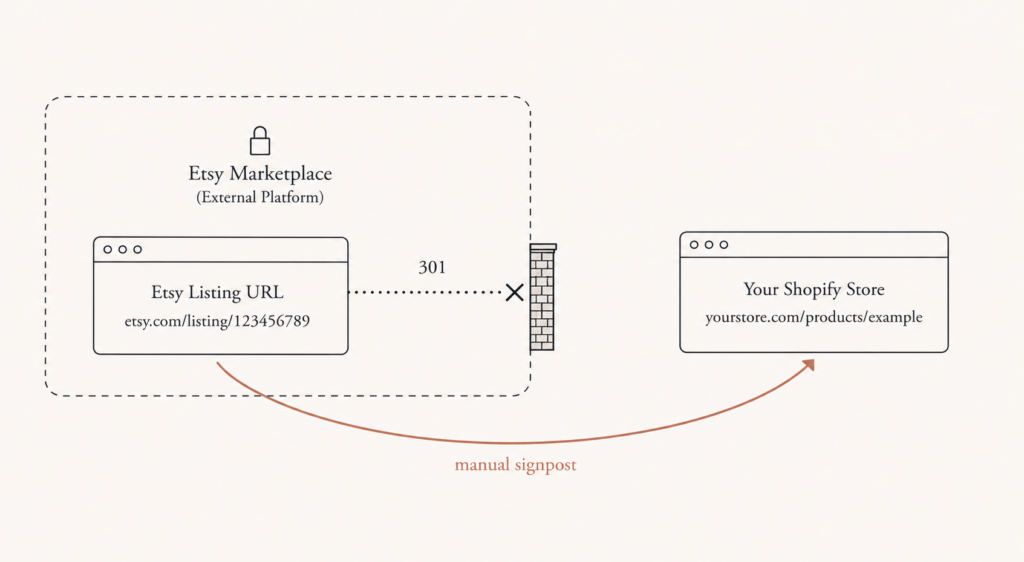
Etsy breaks that game. You cannot 301-redirect an Etsy listing URL, because Etsy owns it, not you. There is no redirect rule you can write. The ranking you built on Etsy stays on Etsy.
That is not a reason to panic. It is a reason to plan differently.
You are not migrating your Etsy SEO. You are starting fresh Shopify SEO. So treat launch day as the beginning of a new ranking effort, not a transfer of an old one. Build proper product URLs, write real metadata, add product schema, and expect to earn rankings over months. Shopify’s own migration SEO guidance reinforces the same point: the redirects you can control are the ones inside Shopify, from any legacy pages you do own.
The practical move is to guide your existing traffic manually. Update your Etsy shop announcement and your listing descriptions to point buyers toward your new store. That’s not a redirect. It’s a signpost. And for a loyal customer base, a signpost is often enough.
Do not close your Etsy shop on launch day
This is the mistake that costs real money. Sellers finish the Shopify build, feel the relief, and shut Etsy down the same week. Then the new store, with no rankings and no reviews, sells almost nothing for a month.
Do not do that. Run both.
Keep the Etsy shop open for at least thirty days after launch, and ideally run the two in parallel for sixty to ninety days. Etsy keeps producing sales from its own search while your Shopify store finds its feet. You use that overlap window to migrate customers gently, collect first Shopify reviews, and confirm your fulfillment works before you rely on it.
Think of Etsy during this period as a sales channel, not a competitor. Some sellers keep it open permanently for exactly that reason, letting Etsy handle discovery while Shopify handles the customers who already know them. The overlap isn’t indecision. It’s insurance.
One compliance note. Etsy updated its Fees and Payments Policy on February 13, 2026, clarifying how fees, taxes, and billing apply across transactions. If you’re running both channels, keep listings and tax settings consistent so nothing gets flagged mid-transition.
The bottom line on Etsy to Shopify migration
An Etsy to Shopify migration is not a copy. It is a launch with a head start. Your products move, your reviews and rankings do not, and the SEO you built on Etsy stays behind because Etsy owns the URLs. That sounds like a loss. It is actually the price of ownership.
So the guidance is simple. If your Etsy sales are still small and inconsistent, stay put and keep the low fixed cost. If you have real volume, repeat buyers, and a brand people recognize, move, but move as a launch: build the store first, import carefully, rebuild trust from scratch, and run both channels in parallel for sixty to ninety days so you never go dark.
If you want a straightforward read on whether your shop is ready and how much of your catalog will actually transfer cleanly, reach out to Javaid Ahmad for a plain conversation about your migration. No lengthy discovery calls, no vague proposals, just a clear answer on next steps at javaid.dev/contact.
FAQ
Q: How long does an Etsy to Shopify migration take? A: For product data alone, a small twenty-item shop takes thirty to sixty minutes by hand, and a two-hundred-item shop can take a full day on CSV or under half an hour with an automated importer. The full switch, including store setup, variant rebuilding, testing, and a parallel-run window, is realistically a two to four week project.
Q: Can I import my Etsy reviews to Shopify? A: No. Etsy owns your reviews and provides no export. You can screenshot your strongest ones to recreate as testimonials, and you should start collecting fresh Shopify reviews from your first orders, but the star ratings themselves do not transfer.
Q: Will I lose my Etsy search ranking when I move to Shopify? A: The ranking stays on Etsy, because you cannot 301-redirect Etsy listing URLs to your new store. Treat Shopify SEO as a fresh start with proper URLs, metadata, and product schema, and guide existing buyers over manually through your Etsy shop announcement.
Q: Should I close my Etsy shop after moving to Shopify? A: Not right away. Keep Etsy open for at least thirty days, and ideally run both for sixty to ninety days. Etsy keeps selling while your new store builds rankings and reviews, and many sellers keep it open permanently as a discovery channel.
Q: Is Shopify actually cheaper than Etsy? A: It depends on volume. Etsy tends to be cheaper below roughly 600 dollars a month in sales because there is no monthly fee, while Shopify wins above that thanks to a much lower per-sale cut. Above the break-even, the fixed monthly cost pays for itself and you also own the customer.
Q: What is the hardest part of the migration? A: Product variants and images. Etsy and Shopify model options differently, so complex variations rarely map one to one and usually need manual fixing, and image handling is where CSV imports most often break.

Comments are reviewed before they appear, so yours will not show up straight away. Your email is never published.