
Picture this: you’re fielding five quote requests a week, spending 30 minutes on each call, and only one of them converts. The friction isn’t your product. It’s the uncertainty. Buyers don’t know what things cost, so they ask. Then they compare. Then they ghost. A cost calculator on your website short-circuits this entire cycle before it starts.
One of the most common conversations at Javaid Ahmad® starts with a business owner saying, “I just need something that tells people a ballpark before they fill out a form.” That one shift in expectation changes everything about lead quality. The inquiries that come in after someone has already used a pricing estimator tend to be warmer, more specific, and much closer to a yes.
This article covers the full picture: which businesses get the most out of an interactive pricing tool, what makes a cost estimator actually drive conversions, when generic plugins break down and custom builds take over, and how to get one live on your site without the project stalling out.
Why your website needs a cost calculator, not a contact form
The hidden cost of “contact us for a quote”
When a site has no visible pricing or estimator, two things happen: the buyer either leaves or submits a form with zero commitment. From the business side, every inquiry looks the same on the surface, but most aren’t qualified. This creates a quoting treadmill where the sales team burns hours on leads who disappear the moment they hear a number.
A cost calculator changes the dynamic. The buyer self-qualifies before they ever reach out. They’ve already seen a range, accepted it mentally, and clicked “get a quote” because they’re ready, not just curious. This is the difference between a warm lead and a time sink, and it compounds over time.
What the data says about reducing quote friction
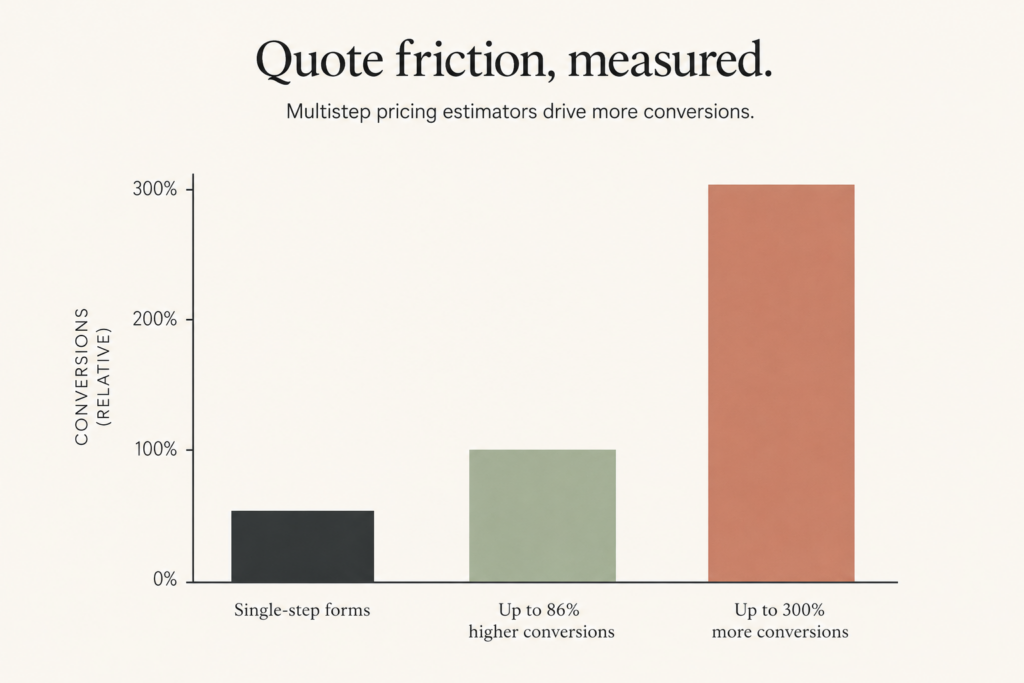
Multistep pricing estimators achieve conversion rates up to 86% higher than single-step contact forms, with some implementations driving 300% more conversions, based on documented performance data across interactive form platforms. The reason is straightforward: the conversation starts further down the decision funnel. When someone already has a figure in their head, the sales call becomes about logistics, not sticker shock. (multi-step form drop-off rates provide useful benchmarks for drop-off and recovery tactics.)
Progressive disclosure, showing basic results immediately and requiring contact information only for the detailed breakdown, is the strategy that converts best for high-ticket service businesses. Fully gated calculators, where you require an email before showing any result at all, create friction before delivering value. That friction kills the trust you were trying to build in the first place.
Which businesses get the most out of a pricing estimator
Service businesses with variable, project-based pricing
Home services, events, landscaping, cleaning, and entertainment companies all share the same problem: every job is different, so there’s no clean price list. A multistep cost calculator handles this by walking the visitor through a series of inputs, square footage, event size, number of guests, add-ons, and producing a realistic range at the end. The visitor feels informed. The business gets a pre-qualified contact instead of a curious tire-kicker.
The psychological mechanic behind this is the endowed progress effect. When users start a short, structured flow, they become invested in finishing it. A well-designed three-to-five step calculator feels like a short conversation, not a form. That’s a completely different emotional experience than staring at a blank “describe your project” text box.
Ecommerce stores that need a price calculator before checkout
For ecommerce, a cost calculator often lives at the product configuration stage. A custom furniture brand needs buyers to select dimensions, material, and finish before they can see a real price. A static price tag doesn’t work there. A unit price calculator embedded on the product page does. It reduces cart abandonment by setting expectations before the buyer reaches checkout, which is where unexpected costs cause the most damage.
B2B companies with tiered or volume-based pricing structures
B2B buyers almost never purchase without knowing the number first. A quote form asks them to wait. A cost calculator tool gives them an answer right now, based on volume, contract length, or seat count. That immediacy is a competitive edge, especially against companies that still require a sales call just to get a ballpark figure. The most common inputs in B2B pricing tools are team size, usage volume, and plan type. A net price estimator that surfaces a credible figure in under a minute keeps the buyer engaged far longer than a “we’ll be in touch” autoresponse.
What makes a cost calculator actually drive conversions
The inputs that matter and the ones that kill the experience
A pricing estimator with too many fields loses people before they finish. The goal is to ask only what’s necessary to produce a meaningful estimate. For most businesses, that’s three to five inputs at most. Use clear labels, logical sequencing, and short field sets per screen if the calculator is multistep. The experience should feel like a short conversation, not a tax return.
The output matters just as much as the inputs. Showing a specific number builds more trust than a vague range. If a range is unavoidable, keep it tight, a narrow spread gives buyers something to anchor on, while a spread of several thousand dollars leaves them no better informed than before they started. Pair the result with a clear next step, whether that’s a “get exact quote” button, a calendar link, or a form pre-populated with what they already entered. Don’t make someone re-enter information they just gave you.
Gated vs. ungated results: what the conversion tradeoff looks like
Some businesses show the estimate instantly and use it purely to increase engagement. Others require an email address before revealing the result, turning the calculator into a lead capture tool. Neither is universally right, but industry benchmarks suggest a clear direction. Interactive calculators using progressive disclosure, basic result shown immediately, detailed breakdown behind an email wall, can achieve lead conversion rates of 40 to 60% in high-ticket service contexts. For more on how gated content impacts lead generation, see the role of gated content for lead generation.
Ecommerce product calculators should almost always show the number immediately. Friction before purchase kills revenue. Service businesses with complex, high-ticket projects have more room to gate the detailed output, but only after delivering something of value first. Requiring an email before showing any result at all reads as a sales trap, and buyers with real budgets will simply leave.
When generic plugins stop working and custom calculators take over
Where off-the-shelf calculator tools fall short
Most plugin-based cost calculators are built for simple, linear math. You enter a number, multiply by a rate, and show a total. That works for basic unit pricing. It breaks down fast when pricing logic involves conditional rules, tiered rates, product dependencies, or anything that requires a real decision tree behind the scenes.
A jewelry retailer pricing a custom ring can’t use a generic form with two fields. A manufacturer quoting bulk orders with volume discounts can’t rely on a drag-and-drop widget. When your pricing model has real complexity, material options, geographic variables, or time-based rates, a generic plugin forces you to simplify your pricing just to fit the tool. That’s backwards. Your pricing logic should drive the tool, not the other way around. There are also industry-specific examples of sophisticated calculators, for instance, cloud cost calculators and the AWS Pricing Calculator demonstrate the kind of conditional, usage-based logic that generic plugins struggle to represent.
Custom-built calculators: where the investment makes business sense
Plugin-based solutions typically cost $0 to $150 for a lifetime license and can be deployed in hours. Custom development generally runs $1,000 to $5,000 or more depending on complexity, but that comparison only tells part of the story. The right question isn’t which is cheaper. It’s which one actually matches your pricing model and reflects your brand.
Javaid Ahmad® builds Custom Cost Estimation Calculator Builds for Shopify, WordPress, Webflow, and Wix, purpose-built for businesses with pricing structures too specific for any generic plugin to handle cleanly. Unlike off-the-shelf tools, these are designed around your actual pricing logic, can be integrated with your CRM or email platform, and built to look like a native part of your site rather than a bolted-on widget. For complex service businesses or B2B buyers, that’s not overhead. It’s a sales tool that works around the clock.
How to get your cost calculator built and live on your site
Mapping out your pricing logic before touching any tool
The most common reason a calculator project stalls is that the pricing logic hasn’t been fully defined before building starts. Start on paper. List every variable that affects your price. Group them into inputs the customer can provide and inputs you supply from the back end. Then map the decision tree: if input A is X, then show Y. This document becomes the blueprint, whether you use a plugin or go custom.
Be honest about edge cases during this step. What happens when someone selects an option combination you don’t actually offer? What’s the fallback when a quote requires manual review? Answering these questions before the build prevents expensive revisions after launch.
Platform considerations across Shopify, WordPress, Webflow, and Wix
Each platform has different constraints worth understanding before you commit to an approach. WordPress offers the most flexibility through custom plugin development, which allows for server-side logic, database storage, and Stripe integration for paid estimates. For practitioners looking specifically at WordPress options, check Cost Estimation Calculators for WordPress (2026) for a buyer-focused breakdown. Shopify is ideal for ecommerce-based calculators embedded at the product or collection level. Webflow and Wix work well for service businesses that need a clean, branded form experience without a full ecommerce stack.
On any platform, the most important step after launch is testing with real users, not internal QA testers, and tracking where people drop off in the flow. A progress bar helps reduce anxiety about form length. Simple, mobile-first field design reduces abandonment on smaller screens. These details are easy to overlook during the build and expensive to ignore after go-live.
The bottom line on building a cost calculator that converts
A cost calculator on your website isn’t a nice-to-have feature. It’s a lead filtering system that works while you sleep. The businesses that add one stop wasting time on unqualified inquiries and start having better conversations with buyers who already know what they’re getting into. The sales cycle can get shorter, the close rate often improves, and the calls stop feeling like cold starts.
If your pricing is simple, start with a plugin and test it. If your pricing is complex, or if you want the tool to actually reflect your brand instead of looking like a third-party widget bolted to the side of your site, build something purpose-made. That’s the version that compounds over time, the one that becomes a genuine asset instead of a workaround. For quick plugin options, consider a dedicated cost calculator plugin as a starting point.
If you know you need a cost calculator but aren’t sure where to start, reach out to Javaid Ahmad® for a straightforward conversation about what it would take to build something that fits your business. No lengthy discovery calls, no vague proposals, just a clear answer on next steps. You can also browse the Cost Calculator and Quote Tool Guides for additional examples and strategy notes.
Q: Why is a cost calculator better than a ‘contact us for a quote’ form?
A: A cost calculator lets buyers self-qualify by showing a realistic price range before they reach out, so inquiries are warmer and more specific. That reduces the quoting treadmill where sales teams spend hours on unqualified leads and get ghosted when numbers appear.
Q: Which businesses get the most value from an interactive pricing estimator?
A: Service businesses with variable, project-based pricing—like home services, events, landscaping, cleaning, and entertainment—benefit most because every job is different. Ecommerce brands that require product configuration (for example custom furniture with dimensions, material, and finish) also need calculators at the product stage to show real prices before checkout.
Q: How should I design a calculator to actually drive conversions?
A: Use a multistep flow (typically three-to-five steps) and progressive disclosure: show a basic result immediately and only ask for contact details if the visitor wants a detailed breakdown. Avoid fully gated calculators that require an email before showing any value, and design the flow to feel like a short conversation to leverage the endowed progress effect.
Q: Do pricing estimators really improve conversion rates?
A: Yes—documented performance across interactive form platforms shows multistep pricing estimators can achieve conversion rates up to 86% higher than single-step contact forms, with some implementations driving 300% more conversions. The uplift happens because conversations start further down the decision funnel when users already have a figure in mind.
Q: When should I use a plugin versus building a custom cost calculator?
A: Use an off-the-shelf plugin for simple, predictable pricing or basic product configurators where rules are straightforward. Choose a custom build when pricing is complex, highly variable, requires bespoke UI or advanced business rules, or when generic plugins repeatedly break down in real-world quoting scenarios.
Q: How many steps should my estimator have and why?
A: Aim for three-to-five steps—short, structured flows feel like a quick conversation and keep users invested through the endowed progress effect. That length balances data collection with low friction and maximizes completion and conversion rates.
Q: How do I get a cost calculator live on my site without the project stalling out?
A: Start with an MVP: a multistep estimator that returns a ballpark immediately and uses progressive disclosure for detailed quotes, then iterate based on user feedback. Scope the first release tightly, prioritize showing value before gating, and only add complexity once the basic flow proves it improves lead quality.

Comments are reviewed before they appear, so yours will not show up straight away. Your email is never published.