
You are paying for apps you do not need. I see it on almost every store I audit. A size-guide app here, a store-locator app there, a “rich product specs” app charging you $39 a month to do something Shopify now does for free. If your app bill has crept past $200 a month and your product pages still feel thin, this one is for you.
Here is the shift most merchants missed: Shopify metaobjects turned your store into a content platform. You can build your own mini-CMS inside Shopify, with no third-party apps, no monthly fees, and no external database. And in 2026, with native AI pulling structured data into search and chat results, the stores that use metaobjects well are the ones getting found.
I have used Shopify metaobjects to rebuild ring configurators, gemstone spec tables, and store directories that used to be three separate paid apps. So let me show you exactly how they work, where they save real money, and how to set them up without breaking your theme.
What Shopify metaobjects actually are
Let me clear up the confusion first, because metafields and metaobjects get mixed up constantly.
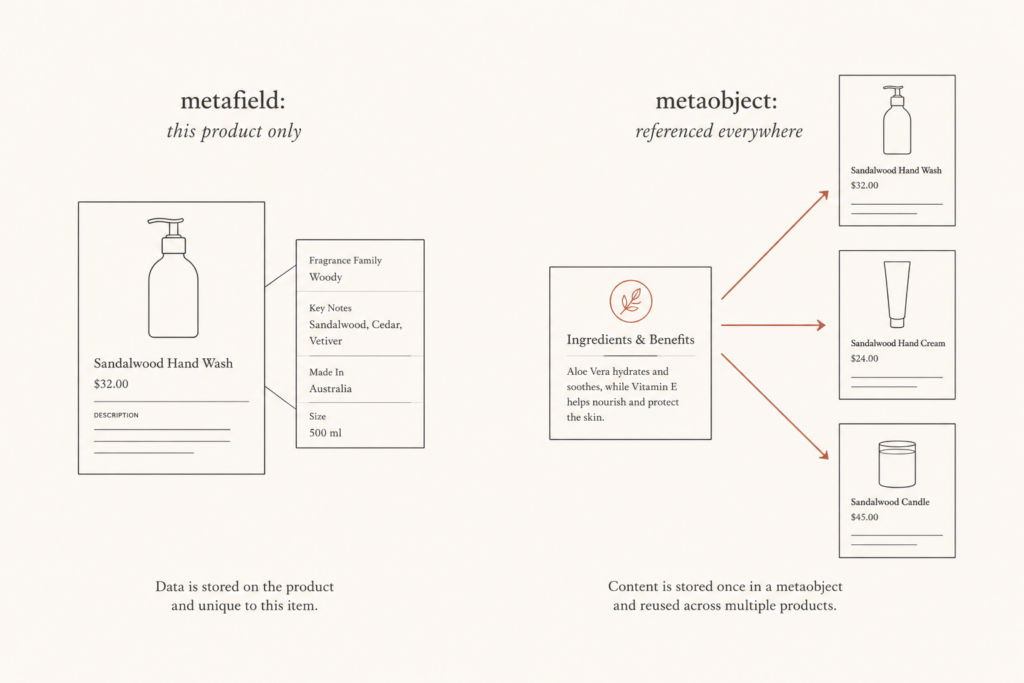
A metafield is a single custom data point attached to one resource. Think “carat weight” on one ring, or “care instructions” on one product. It lives on that product and nowhere else.
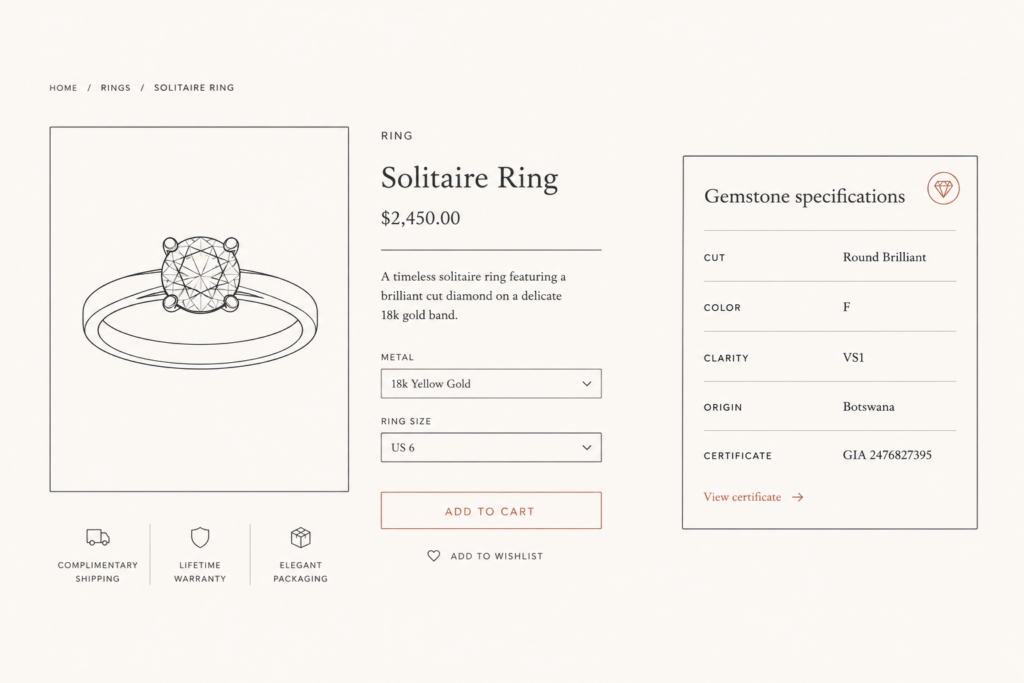
A metaobject is bigger. It lets you define an entirely new content type, with its own schema, its own entries, and its own relationships. You define the structure once (say a “Gemstone” type with fields for cut, color, clarity, origin, and certificate), then create as many entries as you want and reference them across the store.
The simple rule I give clients: if the data belongs to one resource, use a metafield. If you would write the same content into multiple products, define it once as a metaobject and reference it everywhere.
Both are native to Shopify. They work on every Online Store 2.0 theme without an app. You create definitions in Settings, Custom data, fill in the values, and connect them to your theme through dynamic sources in the theme editor. No code required for the basic version, though a developer unlocks the powerful stuff.
Why metaobjects matter more in 2026
Three things changed that make this worth your attention right now.
First, metaobjects ship on every plan. Since the 2023 Editions release there has been no plan-gated barrier, so a Basic Shopify store gets the same metaobject feature set as Shopify Plus. You are likely paying for capability you have never switched on.
Second, metaobjects can now render their own pages. With the renderable and online store capabilities, a metaobject entry can get its own URL, its own handle, and its own SEO title and meta description. That means a “Designer” metaobject can become a real, indexable landing page instead of a hidden data blob.
Third, AI answer engines reward structured data. Outputting metaobject content through your theme in Liquid gives Google and AI assistants cleaner data to interpret, which raises your odds of rich results and AI citations. If you sell jewelry, that structured spec data is exactly what gets your products surfaced. I went deep on that in my structured product data for jewelry guide.
Where metaobjects save you real money
This is the part that pays for the effort. Every metaobject use case below is something merchants routinely rent an app to do.
Here are the most common ones I rip out and rebuild natively:
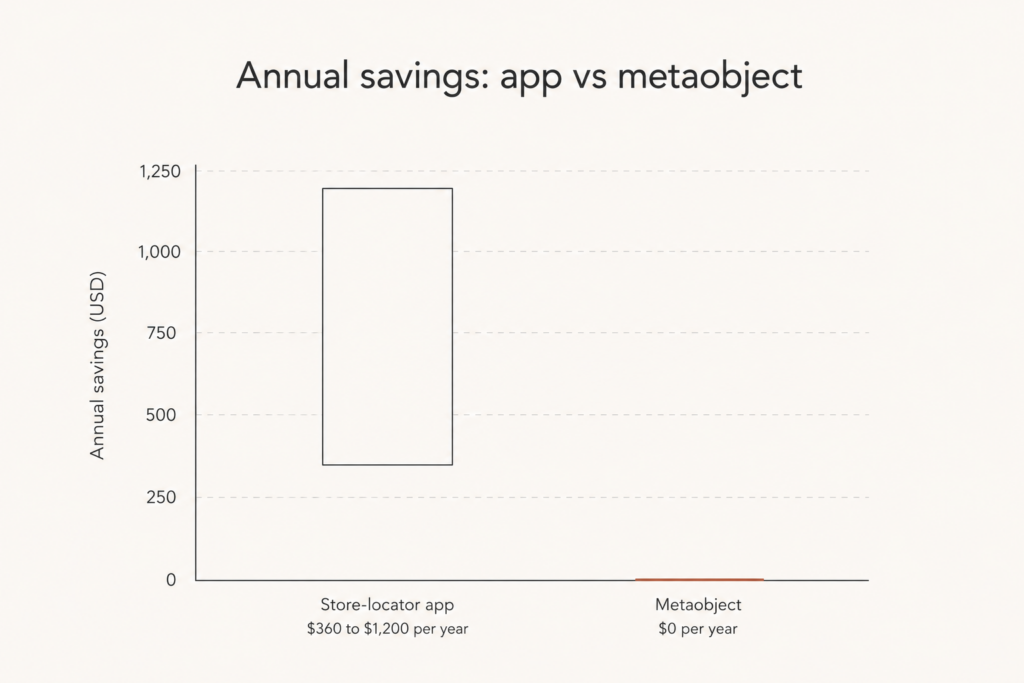
- Store locators and stockist directories. A retail brand with 50 locations can use a “Store Location” metaobject instead of a finder app costing $30 to $100 a month, saving roughly $360 to $1,200 a year.
- Size guides and care instructions. Define one “Size Guide” metaobject per category and reference it across hundreds of products. Update it once, and it changes everywhere.
- Product specification tables. Gemstone details, metal composition, dimensions, weight, and certifications, all structured and reusable.
- Team or designer pages, lookbooks, and ingredient or material databases. Classic CMS jobs that apps love to charge for.
- FAQ blocks and rich content sections that you reuse across collections.
The takeaway: if a metaobject replaces what an app was doing, you uninstall the app and stop paying for it. I have walked stores down from five paid apps to zero this way. The full method is in my post on replacing Shopify apps with native code, and a real audit lives in how we cut $480 a month in app spend.
How metaobjects help SEO and AI visibility
Saving money is nice. Earning traffic is better. And metaobjects quietly do both.
When you render structured data through your theme, you add indexable text to pages that used to be thin. A product page with 50 words of description plus 200 words of metaobject-powered specs simply has more for Google to chew on than a 50-word page. More relevant text, more ranking surface.
It compounds with schema markup too. Your Product schema can pull material, weight, GTIN, and other attributes straight from custom data, so your structured data stays accurate and complete instead of going stale. That is what drives the visually enhanced listings in search.
The numbers back this up. One machine-component distributor reported a 65% increase in organic search impressions after deploying advanced metafield and metaobject data mapped into their theme. That is the kind of lift you get when you stop hiding your best data inside a PDF or an app widget and start outputting it as real, crawlable content.
One catch worth knowing: pages generated by the renderable capability are not automatically added to your XML sitemap. You need to add those URLs manually or with a sitemap solution so search engines actually find and index them. Skip that step and your shiny new metaobject pages stay invisible.
There is a speed bonus too, and it is one people forget. Because metaobjects render through Shopify’s core framework, the data loads without the extra scripts a third-party app injects. Most content and spec apps drop their own JavaScript and CSS onto every page, which drags down your Largest Contentful Paint and your Interaction to Next Paint. Move that content to native metaobjects and you remove the script weight while keeping the content. Faster pages and cleaner data at the same time, which is rare. If performance is your sticking point, my Shopify Core Web Vitals checklist pairs neatly with this approach.
How to set up a Shopify metaobject (step by step)
Let me walk you through a real example: a reusable “Gemstone” content type for a jewelry store.
- Define the metaobject. Go to Settings, Custom data, Metaobjects, then Add definition. Name it “Gemstone”.
- Add fields. Give it the fields that matter: cut (single line text), color (single line text), clarity (single line text), origin (single line text), certificate (file), and an image. Each field has a name and a type you pick from a searchable list.
- Turn on capabilities if needed. If you want each gemstone to have its own page, enable the renderable and online store capabilities so it gets a URL, a template, and SEO fields.
- Create entries. Go to Content, Metaobjects, and add your actual gemstones. Each one is an entry you can reuse.
- Reference it from products. Add a metaobject reference field to your products so a ring can point to its gemstone entry.
- Connect it to the theme. In the theme editor, use dynamic sources to display the fields, or have a developer output them in Liquid for full control over markup and schema.
That is the whole loop. Define once, fill in entries, reference everywhere, and render in the theme. The first definition takes maybe twenty minutes to get right. Every entry after that takes seconds, and the structure pays you back for years. Update the gemstone entry a year later and every product using it updates instantly. That single-source-of-truth behavior is the real reason I reach for metaobjects on complex catalogs, the same logic that powered the engagement-ring configurator I built across four diamond suppliers.
When you should not use metaobjects
I am not going to pretend they solve everything. A few honest limits.
If the data truly belongs to one product and you will never reuse it, a plain metafield is simpler. Do not over-engineer a one-off into a metaobject.
If you need heavy front-end interactivity, real-time pricing, or supplier API calls, metaobjects store the data but they are not the app logic. You still need a developer to build the behavior on top. And if your team will not maintain the entries, a managed app with a polished admin might genuinely be worth the fee.
Use metaobjects when the data is reused, structured, and worth owning. Rent an app when the value is in the logic, not the data. That single distinction will save you from both overpaying and over-building.
Frequently asked questions
What is the difference between Shopify metafields and metaobjects?
A metafield is a single custom field attached to one resource, like one product. A metaobject is a reusable content type with its own fields and entries that you can reference from many products at once. Use metafields for one-off data and metaobjects for content you repeat.
Do Shopify metaobjects cost extra?
No. Metaobjects are included in your Shopify subscription on every plan, from Basic to Plus, with no extra fee. That is why they are such a strong replacement for paid content and data apps.
Can Shopify metaobjects have their own pages and SEO?
Yes. With the renderable and online store capabilities, a metaobject entry can get its own URL, template, page title, and meta description. Just remember to add those URLs to your sitemap manually, because they are not added automatically.
Can metaobjects replace Shopify apps?
Often, yes. Store locators, size guides, spec tables, FAQ blocks, and lookbooks are all jobs you can move to native metaobjects. If a metaobject covers what an app did, you can uninstall the app and stop paying the monthly fee.
Are metaobjects good for SEO in 2026?
They help. Rendering structured metaobject content adds indexable text and feeds accurate schema markup, which supports rich results and AI citations. One distributor saw a 65% lift in organic impressions after mapping custom data into their theme.
Conclusion
Shopify metaobjects are the most underused feature on most stores I touch. They let you build custom content like a CMS, retire paid apps you do not need, and feed the structured data that wins both Google and AI search in 2026. The cost is a little setup time. The payoff is lower app bills and richer, more rankable pages.
If your store is carrying app fees for things Shopify now does natively, I can find them. Book a call or grab a free app-spend audit at javaid.dev/contact, and I will show you what to cut and what to rebuild with metaobjects.

Comments are reviewed before they appear, so yours will not show up straight away. Your email is never published.